25 January 2010

Linux Network Printing from progeCAD using Samba

One common network configuration for business file storage and printing is the use of Linux file and print servers on low-cost PC hardware. The advantages of UNIX & Linux servers in an SMB office automation environment are:

  • Linux (also some UNIX, i.e. Solaris) is free to download
  • Linux is secure, fast and stable
  • Linux is scalable and highly configurable

Microsoft Windows, on the other hand, does work very well for supporting graphical end-user applications. progeCAD is a strongly graphical, end-user application for AutoCAD-compatible Computer Aided Design. To connect Windows PCs to a Linux back-office, we use Samba server. Samba is free Linux server software for sharing Windows folders or printers on a network:However, Samba will slow progeCAD's performance if not correctly configured. Samba is packaged for a wide variety of Linux types ("distributions") and installation is best carried out with free packages available for your version of Linux. Here are some more tips for setting up a network USB printer.
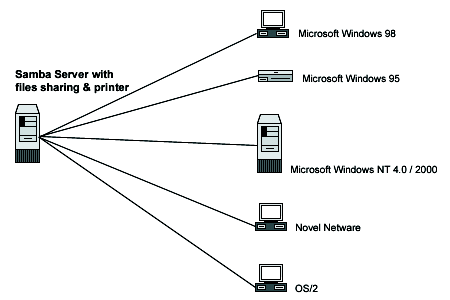
Once the USB printer is itself correctly configured by the local Linux printing subsystem (CUPS, LPRNG, UNIX LPR) the printer is then "shared" by its queue name onto the Windows SMB network in the Samba configuration (usually smb.conf, section shown here for Debian Linux - see Samba website for complete configuration details):

[printers]
comment = Sample Printers
path = /var/spool/samba
create mode = 0700
browseable = yes
writable = yes
guest ok = yes
public = yes
printable = yes
use client driver = no
printer admin = root

[My5500]
comment = Demo Example HP 5500 colour (change this with your own printer)
path = /var/spool/samba
browseable = yes
writable = no
guest ok = yes
printable = yes
default devmode = yes
use client driver = no
printer admin = root, administrator

Explanation: Driver configuration can either be client-side or server-side. We strongly recommend server-side drivers (default devmode = yes, use client driver = no) for speed and reliability. Only the Linux administrator is here given permission to "set up" the printer on the server side (printer admin = root). However this creates some challenges. The Windows driver will need to be "uploaded" to the Linux server. We will need to create an additional Samba configuration for allowing this:

[PRINT$]
path = /var/lib/samba/printers
guest ok = yes
browseable = yes
read only = yes
write list = root
admin users = root
create mask = 0644
directory mask = 0755

Once smb.conf is saved, Samba needs to be restarted. A quick network browse of our Linux machine from Windows (i.e. from Windows Explorer type '\\server-name') should list the shared printers and folders on that 'server-name'. NOTE: For security purposes we have only allowed "root" (and administrator) any kind of admin rights to the Samba printers. Our problem is that Windows doesn't have a UNIX user called "root". We get around this by initially connecting to our new shared printer from the DOS / Command prompt as follows:

runas /netonly /user:root "rundll32 printui.dll,PrintUIEntry /p /t3 /n \\server-name\printername" (i.e. \\pc123\My5510 in this example)

You should be prompted for the Linux password for "root", and then prompted whether you want to select a Windows driver at this time - click "No".

A spartan Properties Box for this printer should appear. Click on the "Advanced" tab along the top of the box and click the "New Driver.." button. Select a 'Generic -> Ms Publisher Color Printer' if you want to send Postscript to your Linux printer (this is a good idea, CUPS will automatically reformat Postscript files to something usable by the actual USB printer hardware if correctly configured). Windows should begin uploading the local driver from your PC to the Samba server. Now click the "Apply" button at the bottom of the properties box and you should see several more tabs appear in this dialogue box if everything goes as planned. You may now close this Properties Box.

Because "administrator" is also listed as an admin for our My5500 printer, Windows administrator can make centrally-stored changes to this Samba printer (like setting paper size from Letter to A4, or changing the Postscript mode). NOTE that we have thus far only highlighted steps to configure Samba printers on the server side. Now we can finally add this as a Windows printer by navigating to \\server-name in Windows Explorer, right-clicking the printer and clicking "connect" from the drop-down menu that appears.

This post does not completely cover Samba configuration, only those tips found best practice for printing. We have found the above approach to offer best performance and reliability for printing to Samba server on Linux in progeCAD IntelliCAD (as well as Microsoft Office applications) from Windows. However other procedures may work better for different plotters and we welcome your comments here.

13 January 2010

A Preview of Alibre CAM 2.0 CNC Software

The upcoming release of Alibre Design 12.1 (SP1) will include major enhancement to the basic CAM software included free with Alibre Design Expert, as well as the four- and five-axis options available for Alibre CAM Professional and Alibre CAM Expert. Improvement to the Alibre CAM Interface will make CNC programming inside Alibre Design much easier and enjoyable to do. Here is one comparison between the crowded old (left) tab interface and the new (right) cascading style:

But more than the lookand feel of Alibre CAM will change. A new entry method has been added to 2.5 axis profile milling operations allowing you to have more control over the entry angle.You can now create tabs/bridges for 2.5 axis profiling operations. You can specify the bridge height and length. You can also specify whether you want to use a particular number of bridges which will be equally distributed around the profiles or you can set an exact distance between bridges. Below is an example of the same cut-outs using 5 bridges and 10 bridges per profile.

The Tool Libraries will allow "drag and drop" of pre-defined tools into the active tool set. There will also be an option to immediately preview a tool upon creation.

Alibre CAM 2.0 will now support avoidance regions to specify where the tool should not cut, for example to avoid clamps holding the stock material down on your CNC machine. Flat faces can be directly selected as machining / avoidance regions instead of having to use sketches. You can also select the starting point for the engagement of the tool for Machining Operations defined by sketches.

Alibre CAM Standard will offer along-path-3D-entry for 3 axis horizontal finishing offers more control over surface finish for steep areas of parts. Specifying the engage angle and path height allows you to control the smoothness of the engage motion, helping to eliminate unwanted marks on the cut part that would otherwise need to be buffed out later. Alibre CAM Professional will also enjoy improvements to 4 axis milling.

Alibre CAM Expert will add a new 3D Offset profiling method, 3D Offset pocketing for making constant offset tool paths on the part surfaces, 3 axis pencil tracing now offers multiple passes & 3 axis valley re-machining allows split cuts, step over and cut control. Tool Holder Collision determines the minimum tool length required to avoid collision.

Alibre Design is sold in Australia by CADDIT. Download Alibre Design / Alibre CAM in Australia for a free 30 day "Professional" trial before software reverts back to free "Xpress" mode.

07 January 2010

CAD Training Course 28 January 2010 Near Sydney

A special one-day progeCAD CAD training course will be held Thursday, 28 January 2010 in Newcastle, NSW Australia. Special pricing for this event in Australia should especially appeal to small businesses on the Australian East Coast. All materials needed for participating in the class will be provided upon arrival. The class will be divided into four sessions on basic and advanced design. Lunch will be catered for.

progeCAD is a powerful tool for AutoCAD-compatible CAD drawing. progeCAD offers most of the same commands and DWG file format support, but at a much lower cost compared to AutoCAD or AutoCAD LT software. Recent years have also seen many customer-driven improvements in speed and flexibility. In 2009 progeCAD added in-place text editing, paper space sheet size display and 3D Google Earth model export. New buyers are now also enjoy a free upgrade to the 2010 version upon release. A 30 day trial version can be downloaded from CADDIT.

Newcastle Computer Training is centrally located on Wood Street, Newcastle NSW not far from major highways and public transportation. A wide choice of accommodation is also available. All software, hardware and needed training materials will be provided on site.

Specific questions about next class content material are being answered by CADDIT on (02) 8777 5588. Registration for progeCAD Training 2010 can be completed by phoning or by
registering online at HERE at CADDIT.

04 January 2010

Four Myths about PTC Pro/ENGINEER 3D CAD

1. Pro/ENGINEER seems harder to use
All
CAD software has some learning curve, and requires some training to use correctly. The more functionality software offers, the more that there is to learn about it (claims to the contrary usually have less to to with engineering design and more to do with clever marketing). Jeffrey Rowe, Editor at MCADCafe writes regarding the latest Pro/ENGINEER Wildfire release:

"Pro/ENGINEER Wildfire 5.0, is a refreshing continuation of 4.0 Instead of again just piling on an additional zillion new features and capabilities that relatively few designers use, PTC (like some of its competitors) chose to improve Pro/ENGINEER Wildfire 5.0 in other ways that matter to most customers, namely, software stability, better consistency across modeling functions, and promotion of more efficient work flows."

Three examples of this expressed in business are
PowerSki (USA), Hayter (UK), Haald Engineering (Australia) Pro/ENGINEER Wildfire 5 further updated its 2D detail drawing interface with a familiar "command ribbon", similar to many other Windows applications. Pro/ENGINEER also holds a tradition of delivering more control over the final design than competing systems. And, unlike many bloated CAD systems today, much of Pro/ENGINEER is still leanly coded using C language.

2. Pro/ENGINEER doesn't support surface modelling
False. Simply put, Pro/ENGINEER has supported
parametric surface modelling for years, with no additional license required to create parametric surface models. PTC tightly integrates surface machining with its manufacturing software.


3. I heard Pro/ENGINEER is really expensive
"For those still in the 2D realm and looking to switch, one thing worth considering is that Pro/Engineer is often perceived as an expensive option, particularly when you consider the price erosion in the mainstream market. This is not really the case anymore and the starting costs are comparable to its competition" - Al Dean, MCADonline.
In Australia, Pro Engineer is being offered at prices lower that its mainstream market competitors, CATIA and Unigraphics NX, perhaps Autodesk. In fact, a recent study in the Australian market found the total cost of ownership for Pro/Engineer to be lower than many mid-range products including Autodesk Inventor and SolidWorks.


4. Pro/ENGINEER can't collaborate
Nothing could be further from the truth. Pro/ENGINEER Wildfire was designed from the start to make use of web technology. Pro/ENGINEER was the first CAD solution to be enabled for social product development. Wildfire offers file import/export including both ACIS & Parasolid, as well as Autodesk Inventor import and more. Windchill, ProductLink, ProjectLink and PTC ProductPoint PDM for Microsoft Office Sharepoint server are all examples of Pro/ENGINEER design team support.
As of 2010, CADDIT will be joining PTC a Pro/ENGINEER Reseller in Australia. For more information, we can be contacted per phone, fax, email, etc as shown HERE.
Google.