Showing posts with label Adobe. Show all posts

24 July 2009

Free Fonts for CAD and Graphic Design

Wikipedia defines font (also fount) as "traditionally defined as a complete character set of a single size and style of a particular typeface". Good use of fonts can help accomplish goals like making ideas stand out tastefully, making content clear and easy to read or translating information in another language. There are three major font categories: bitmap, outline and stroked. TrueType fonts (originally developed by Apple) and Postscript Type 1 (developed earlier by Adobe) are examples of bézier vector outline type fonts.

Scalable vector outline and stroked fonts usually offer the best results in modern design. During the mid 90s fonts cost about $40 for a single face, but needed to be purchased in packages. Today there are many sources where usable fonts can be downloaded for free. Here is a list of some links for these...

Showfont.net is a site written in frames offering free TrueType fonts and previews, organized alphabetically and downloaded free after verifying the captcha image. Handy for some unusual themes and logos.

http://www.betterfonts.com/ offers many of the same fonts, presented differently with no captcha check. http://www.creamundo.com/en/ is similar but also offers web pages in Spanish.
http://www.searchfreefonts.com/ has a large collection including many varieties of standard typefaces like Swiss 721 and Arial.

Specific to CAD, there are several sites for downloading AutoCAD SHX fonts:
These are just a few of the resources available, we are sure there is more. Feel free to add you favorite site to the list in the comments below.

25 July 2008

Download Free Alternatives to Adobe Photoshop, Illustrator and Visio

Although not really CAD software programs, it is worth mentioning that there are several FREE graphic software programs which will allow you to edit photos and diagrams without the purchase of Microsoft Visio or Adobe Photoshop.

There are basically two types of 2D images: raster and vector. Raster images are "bitmap" pictures like JPEG and PNG without math definitions. Vector graphics are more mathematical depictions of geometry and formulas such as lines, arcs and conic splines. Some applications actually combine both of these two data sets in their native file format. My favorite application for raster image editing is free. It is GIMP.

Gimp is a large suite of free raster image editing tools (similar to Photoshop) which can edit, convert and enhance most popular raster image formats. Its functions include smooth image scaling and mode conversion, as well as path editing, selection tools, macros and the list just goes on and on. There are many books about GIMP. It runs on Linux and MAC OS X, as well.


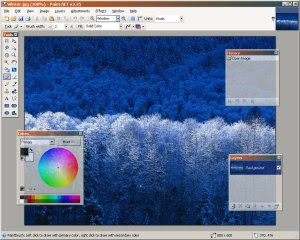
Another handy tool to download for free image editing like Photoshop is
Paint.NET. It downloads smaller than GIMP and doesn't depend on GTK but uses Microsoft .NET 2.0, so it only runs in Windows. It doesn't support near as many formats and tools as GIMP. Lighter weight and easy to use, however, some still prefer Paint.NET over GIMP so it's worth mentioning here.

A useful tool for free vector graphics and diagraming similar to Visio is Inkscape. Some confuse Visio and Inkscape to be CAD programs. It's an easy mistake to make. What they really are is vector graphics tools, mainly for diagram creation. But Inkscape can also edit combined raster and vector files such as Acrobat PDF (let's see Visio do that). It favors open standards like SVG but can also read DXF. If you don't have Inkscape yet and are reading this Blog, you should go download it. Simple as that.

Another new project similar to Adobe Illustrator is Creative Docs .NET. At this time, the project lacks data exchange with other software, but it is still worth having in a pinch and it's free.

Google.