Showing posts with label 3D. Show all posts

08 September 2021

progeCAD 2022 Coming Soon: Free Upgrade Offer Begins


Sydney, Australia 7 September - CADDIT announces the free upgrade to 2022 version for all progeCAD purchases on or after 01 September 2021. progeCAD is a powerful general-purpose 2D and 3D CAD solution very similar to AutoCAD, with additional tools and a lower cost. With progeCAD, designers have a professional yet affordable perpetual-license alternative to high-cost AutoCAD rental fees, with the ability to create, read, write and edit native AutoCAD DWG and DXF files fluently using and interface very similar to what AutoCAD already know. Based in Sydney, CADDIT has been supporting progeCAD users in Australia, New Zealand and surrounds for more than twelve years.


Much of what will come in 2022 is still confidential but we have several detail which we can pass on now. Significant effort has been invested in making progeCAD 2022 a truly cutting-edge release that is stable and reliable from initial release. Many improvements are still confidential during an internal testing period. What we can expect are new features for the AEC industry with further improvements to BIM and REVIT compatibility, as well.  Many features are expected to be completely re-worked or refactored, such as the MTEXT and TABLE elements. Pursuant to last year's improvements in hardware acceleration, this year progeCAD 2022 release is expected to offer many new improvements in 3D view handling, modelling and new 3D content specifically targeted to architects and structural engineers working in steel. GUI customization will also be improved with several new commands.


A detailed list of these new features will be released soon, but we are delighted to share what we know now and begin offering the free upgrade to all customers. progeCAD 2021 can be downloaded now as a free 30-day trial. As in previous years, all new licenses as well as upgrades for existing licenses, including single stand-alone, floating NLM network, USB and total office licenses, purchased on or after 1 September 2021 will be entitled to the same for progeCAD 2022 upon our announcement. Multiple purchases will qualify for multiple upgrades. progeCAD Upgrades will also qualify, again as in the past. As in past, eligible users with a USB upgrade will usually not be required to replace their hardware dongle for the next version. We are really excited about the upcoming new release and making those upgrade entitlements available well in advance. So watch this space over the next weeks as more details and images become available. Contact CADDIT Australia for more information about progeCAD or this upgrade offer.

21 November 2019

progeCAD 2020 Update Released on CADDIT.net

Sydney, Australia 09 November 2019 - progeCAD 2020 Professional 20.0.6 has been released on CADDIT.net, with free upgrade entitlement for all existing progeCAD 2020 users. progeCAD Professional is an affordable general-purpose CAD computer program having similar commands and workflow to AutoCAD, native DWG file read/write and extensive publishing/translation features. Advanced progeCAD features include full 3D modelling and rendering, extensive symbols library and Express Tools similar to those offered in AutoCAD. Using progeCAD, designers can seamlessly communicate with an AutoCAD environment. progeCAD 2020 was first released on CADDIT offering a heap of new features like 4K display support, drag-and-drop icon palettes, BIM IFC and RECAP .rcp/.rcs support, table formulas, 3D silhouette printing as well as new interfaces for PUBLISH and EXPORTPDF and new EXPRESS Tools.

BIM IFC files can now be fully imported as editable geometry. progeCAD now supports either import or export of at least 40 different major design formats (not including format versions), including 3D models, 2D drawings, mesh and point cloud models, vector and raster graphic images as well as embedding formats like PDF, offering a true swiss-army-knife like set of CAD functionality essential and affordable for any CAD designer.


3D BIM IFC Rendering progeCAD 2020
Direct BIM IFC import into progeCAD 2020 Professional with immediate 3D rendering in free Artisan rendering studio (Artisan for progeCAD included with purchase)


 The new progeCAD Professional 20.0.6 is a bugfix release offering users over 100 improvements over the previous 2020.0.4 version:
  • Improved support for functions like hatches placed in layout, nested BEDIT sessions, REFEDIT fade, embedded image PAN and ZOOM (when MTMODE = 3), Unicode support and 3D solid regen improvements.
  • Targeted fixes for existing commands like HATCH, BOX, HELIX, FILLET, SWEEP and dozens more..
  • Performance improvement for STEP import, 3D PDF, APPLOAD, COPYCLIP
  • API tweaks and small fixes to DCL, LISP and .NET
  • General improvements in interface and workflow

Users of previous progeCAD versions are strongly encouraged to consider upgrade to progeCAD Professional 2020, for better compatibility with AutoCAD as well as the ongoing updates for Microsoft Windows. A full price list for all upgrade options, including multiple stand-alone, USB and floating network licenses, can be found on the CADDIT website here (link). A fully enabled 30-day trial can also be downloaded. Additional questions about progeCAD features or upgrade options can be sent directly to CADDIT Australia via the Contact Us page.

08 May 2018

CAD File Translation Improvements in progeCAD 2019 Preview

Sydney, Australia  01 May 2017 - The CADDIT Team is happy to share an exciting announcement and first look at the upcoming major release of our progeCAD 2019 CAD Software. progeCAD is an affordable, robust general purpose CAD system used by designers, architects, builders, engineers, civil survey and government planning offices for over ten yeas in Australia and New Zealand. progeCAD requires little or no learning curve for AutoCAD users because of its compatible interface and command structure.

Now beginning with progeCAD 2019, users will have access to industry 3D CAD file support for STEP, IGES, and many other popular CAD file formats. Additional new tools include bi-direction (read and write) support for popular 3D modelling formats from Maya (.RTG), 3D Studio(.3DS), Alias(.OBJ), LightWave, STL and other formats. Along with existing native file support for over a dozen others like AutoCAD .DWG and .DXF, Adobe PDF, ACIS SAT, Microsation .DGN, LIDAR (.LAS and .XYZ), ESRI .SHP and more, progeCAD becomes a powerful CAD "swiss-army-knife" useful for almost any graphics professional. To put this another way, simply compare the import file format support from progeCAD 2019 with that of the previous release as shown below here:


Extended (DOUBLE) CAD formats supported in 2019.

Basic CAD file import offered in progeCAD 2018


progeCAD's new CAD import features now mean that architects can now directly insert mechanical parts into their design from programs like SolidWorks, Inventor and CATIA which have been saved in either a STEP or IGES neutral exchange format. This also means that graphic designers can insert mesh models from their favourite animation package like MAYA or 3D Studio. With progeCAD's powerful new 3D rendering feature, beautiful 3D graphics can then be generated combining files from all of these different formats, or converted into new formats for use by other 3D software..

In this "round-robin" CAD translation stress-test, a twenty-year old IGES file was imported into progeCAD 2019 as ACIS 3D surfaces and exported again as a neutral 3D STEP model which was read by another CAD system without any noticeable data loss.  


Another exciting CAD data feature coming in progeCAD 2019 is the new BIM IFC underlay support. This means progeCAD can now incorporate industry-standard IFC data as a visual underlay to your active drawing, as shown in the the image below..
 

IFC Underlay support in progeCAD 2019 from BIM

 
progeCAD 2019 will also add enhancements and new functionality in other areas, adding new value for CAD designers of all disciplines which we will discuss further. CADDIT is also happy to announce that starting 15 April 2018 all new and upgrade progeCAD 2018 orders from that day will be entitled to a free upgrade to 2019 upon its release on CADDIT.net. For a free 30-day trial of the current 2018 release of progeCAD or for more information about affordable CAD software, visit our website at www.caddit.net.


08 August 2017

Alibre Returns with New Licensing and Free Upgrade Promotion

Sydney, Australia  07 August 2017 - CADDIT and Alibre LLC together announce a new future for Alibre users. Alibre, LLC based in Houston Texas USA recently acquired all rights to any materials from 3D SYSTEMS related to Geomagic Design. Since then a new product and licensing has been in development, which we can now announce release for on the CADDIT.net website. Alibre Design will continue its focus on affordable 3D parametric mechanical design for the Windows platform. Alibre Design is an intuitive, easy-to-use mechanical design system offering advanced features like Keyshot 3D rendering and optional FEA analysis.


New licensing. Alibre will move away from Flexera to now use a similar online activation system from Nalpeiron, along with several updated license options. Alibre will not offer a USB dongle option. Geomagic Design users with a USB license from 3D Systems will be offered a Nalpeiron "offline" license instead (this license type uses an email activation, see http://docs.nalpeiron.com/display/NND/NSL+V10+-+Offline+Activation ) There will continue to be a floating network license option. At this time, Nalpeiron licensing is stored in local user profile, within C:\Users\\AppData\Local\Alibre Design. To reset the activation of Alibre Design, simply delete all file inside this directory. Otherwise, moving Alibre licenses will operate in a similar way as they did with Geomagic Design.

Free upgrade. Because Alibre's Nalpeiron-based licensing is not compatible with 3D System's Flexera system, everyone with a valid Geomagic Design license from October 2015 and later will be moved to Alibre 2017 without charge, see https://www.alibre.com/alibre-llc-faq/. Essentially this consitutes a free upgrade for everyone having a valid Geomagic Design license from October 2015 or later. Previous Geomagic Design users who were still on the original Alibre CRM licensing system (e.g. Alibre 2013) will not be upgraded for free. In such case a valid Alibre Design subscription will be required for the user to move to the new licensing system. More information will be following soon.

CADDIT is happy to continue offering Alibre Design as a cost-effective 3D mechanical design option and we look forward to the upcoming releases under new management of the software. We ask users to be patient during the transition period. Further questions can be directed to CADDIT via our CONTACT US page: https://www.caddit.net/store/index.php?main_page=contact_us

03 April 2017

CADDIT Launches Powerful Low-Cost 3D CAD Software ZW3D with Time Limited Discount Offer

Sydney, Australia 03 April 2017 - CADDIT announces an exciting new 3D CAD product line agreement with ZWSOFT to sell and support all ZW3D products Australia-wide. ZW3D offers mechanical designers, engineers, machinists and manufacturers a powerful suite of integrated CAD and CAM software for parametric 3D part and assembly design, hybrid freeform and direct editing, sheet metal nesting and weldment construction, 3D publishing and printing, prismatic and multi-axis machining, lathe turning and more. ZW3D also delivers powerful 3D CAD translation tools for importing SolidWorks, Solid Edge, Siemens NX, JT, PTC Creo, Autodesk Inventor, STEP, ACIS .sat and .sab, IGES and many more formats from even very recent versions of the software. ZW3D supplies thousands of businesses globally, including Yamaha Motor Co, Bridgestone, Johnson Controls, Baosteel and many others.

ZW3D uses specially written state-of-the-art modeling technology, originally developed by VX Corporation of Melbourne FL USA, with software R&D still located in Florida to this day. The user interface includes a modern ribbon-based UI with visual help cues and prompts. Traditional bottom-up assembly design is offered in every version of the software without limitation. Standard and higher versions also offer advanced assembly options, top-down down and animation. There are also two CAM-specialist versions for CNC machinists at reduced cost in CAD features. CADDIT also announces a special price release of ZW3D 2017 for the Australian small business user called "Workshop". ZW3D Workshop by CADDIT edition will include all features of ZW3D Premium minus the costly electrode and mould tooling libraries, to be made available at a much lower cost.


To help introduce this high-value 3D CAD and CAM software option to small business users in Australia, CADDIT has arranged for significantly reduced pricing on both software, support and one-year upgrade options. Level one support for ZW3D will be local. A series of free comprehensive one-day training events are planned around Australia, based on number of requests. The first event is planned in Parramatta NSW near our offices. Frequent news and updates will be posted over the next few weeks on  our websites. For immediate contact or general ZW3D inquiries, CADDIT.net will be the nation-wide software partner which can be contacted HERE.


16 May 2016

CADDIT Announces the Release of Geomagic Freeform 2016 in Australia

Sydney, Australia  16 May 2016 - CADDIT Australia announces the release of Geomagic Freeform and Freeform Plus 2016 version. Geomagic Freeform offers a cornerstone solution in the 3D "digital thread" of rapid manufacturing and reverse engineering suite from 3D SYSTEMS. Specifically, Geomagic Freeform is a comprehensive organic 3D engineering solution for digital sculpting, haptic-controlled VR modelling, surface design, 3D Scan processing, CAD interoperability and mould making. Geomagic Freeform offers the sensation of "virtual clay modelling" with physical model feedback to the designer - however Freeform models remain fully editable (as opposed to physical sculpting - try "undo" in real stone). Moreover, Geomagic Freeform works seamlessly with related 3D SYSTEMS technologies of 3D scanning and 3D printing.

Freeform 2016 introduces a number of new features and options, including:
Enhanced Sketching and Curve Tools
• Improved sketching tools to capture design intent
• Easily extract curve networks from a part in the object list
• Improved touchscreen support for curve drawing
StructureFX
• New tools for complex lightweight lattice structures
• Select existing patterns or create customs forms
• Quickly create clever and complex designs with CellFx,
LayeredFx, CageFx, and ShapeFX
Direct Geomagic Capture Scanning
• Directly capture physical objects in 3D with Geomagic® Capture™ scanner
• New Dynabar tools to support the scanning, alignment, and merging of scans
Wrap for Freeform Plus
• Freeform Plus includes cooperative application
• Use the high quality Geomagic surfacing tools to CAD surfaces
Clay File Viewer
• Stand-alone viewer for clay (.cly) files
• Visualize models with zoom, pan and rotate capabilities
• Analyze designs using measure and cutaway tools


CADDIT also announces the availability of Geomagic® Sculpt™ - a simple, fast yet sophisticated precision voxel 3D sculpting and modelling software solution. Create organic designs and edit and transform existing 3D data with sculpting, shaping and detailing tools not found in traditional CAD software. Get the sensation of clay modelling with the benefits of digital design. Available with Geomagic Sculpt is 3D SYSTEMS' new lower-cost 3D Touch haptic stylus device.


For more information, trial download (without haptic device) or even to arrange for a hands-on demonstration of digital sculpting using Geomagic Freeform in Australia, contact CADDIT in Parramatta.

19 January 2016

Alibre Upgrade No Longer Available after 30 April 2016

On 19 July, 2011 3D Systems first announced its acquisition of Alibre Inc. and its flagship 3D mechanical design software. The product was subsequently rebranded under the "Geomagic" portfolio as "Geomagic Design". This year will mark the fifth anniversary since this acquisition and new features which have subsequently been introduced. 3D Systems has thus far supported all versions of Alibre, including Alibre Design Standard, Professional and Expert with either ongoing maintenance subscriptions or upgrade opportunities. For several months a well-published opportunity for flat fee "update and upgrade" was made available in Australia through CADDIT.net. Many users took good advantage of this window of advantage to update Geomagic Design and Alibre versions that were three, four or even six years old and we wish to extend thanks to all who are participating. The flat fee promotion has now ended, as was announced, on 31 December 2015.

3D Systems business channel has made it known to CADDIT of the intention to drop all upgrade support for Alibre Design PE, Alibre Design Standard, Alibre Design Professional and all similar levels of Geomagic Design Standard and Professional. Going forward, there will only be one product level available to all Geomagic Design users, as demonstrated on the CADDIT webstore. Users of lower-version products will need to buy a completely new license if they wish to update their software. The date for this change is 30 April 2016, and only affects users of the old PE, Standard and Professional product levels -  Expert and Geomagic Design (full) are not affected, can continue to update their subscriptions per usual at this link. Also, any users under current active Geomagic Design maintenance are likely not affected as they will mostly likely already be migrated to the full product version.

Users in Australia at any level can still order maintenance at any product level and receive a free level upgrade to the full version of Geomagic Design at this link. All indications are that this is the final opportunity lower-level users in Australia will ever have to have their package updated. Without current support, CADDIT is unable to answer user requests for licensing help, account lookups etc. After 30 April all such requests will be referred directly to 3D Systems without assurance of a response due to the outdated support.

I renewed my Geomagic Design Subscription just last year. Am I affected?
No. You should continue your maintenance subscription per usual.

I have Alibre Design PE 2012 version. What happens if I don't upgrade?
You will have no support, and likely will not even be able to run the software on newer versions of Windows. You are encouraged to maintain your investment by renewing the maintenance subscription  HERE.

I have two licenses. One is Alibre Design Pro 2011 and the other is Alibre Design Expert 2010. Should I upgrade both and what does it cost?
A subscription will need to be purchased for each license that you wish to keep updated, using this link which shows the current AUD pricing including applicable lapse fees. It is strongly recommended not to mix versions of Alibre / Geomagic Design as this will lead to serious file compatibility problems between them. 

I have other questions.
CADDIT Australia can be contacted the usually way via these details:
https://www.caddit.net/store/index.php?main_page=contact_us

12 October 2015

progeCAD 3D Performance on Windows 10, 7 and 8

As of progeCAD 2016.0.8 progeCAD now supports native installation on Windows 10. Today we compared progeCAD 3D Orbit render performance on a selection of hardware and operating systems including Windows 7, Windows 8.1 and Windows 10 - with laptop hardware provided from Microsoft, Asus and HP to the following varied graphics specifications:

  • System 1 - Windows 7, Asus i3 2.3 GHz 4G RAM, Graphics ATI 7470M RADEON
  • System 2 - Windows 8.1, HP 2.2 GHz 16G RAM, NVIDIA GeForce GT 750M
  • System 3 - Windows 10 upgraded, Microsoft Surface Pro 3 i7 with Intel 5000 HD

progeCAD on various ATI, NVIDIA and INTEL HD graphics
Our Parramatta test focused on 3D shading and full rendering support. Although more focused on high performance 2D plan view design and detailing, progeCAD does offer several drawing and rendering tools for 3D presentation. One tool set is the full boolean direct solid modelling using the ACIS kernel compatible with AutoCAD. Another tool is the AutoCAD-compatible SHADEMODE command. Using SHADEMODE, we can change from 3D wireframe views of mesh and solid models to easy-shaded which we can "orbit" (or spin around) in real-time via the SHIFT+Middle-Mouse-Button combination. We used this mode for benchmarking our hardware FPS (frames per second) with the help of the FRAPS utility, as shown below:


First, our IIS model was loaded SHADEMODE was then set to REALISTIC. Next we started RTROT from the command line. This was because we needed to set a different centre or rotation (by first hitting the "S" key while within RTROT) or else our model quickly rotated right off of the screen (this was because of the coordinates used to produce the drawing).
 
The results were actually satisfactory for both the Microsoft Surface using INTEL 5000 graphics (very decent for on-board INTEL graphics) and the NVIDIA GPU running on the HP Envy Series. FPS ranged between 20-30 FPS (24 FPS is standard digital video speed) and our model rotated very naturally. We could not say the same for the ATI graphics on the i3 ASUS. Although still useable, the ISS model flashed between frames on our ASUS-ATI and FRAPS never reported an FPS exceeding 9 frames a second. Performance was noticeable lower than on the other two systems. Movement was "jerky" and poor quality using the ATI RADEON, despite the actually higher CPU clock speed of 2.3 GHz.
 
In conclusion, hardware does matter. We remind users that progeCAD uses OPENGL hardware acceleration when available. Either NVIDIA or better-quality INTEL graphics prove to supply this. Also i7 CPU seems to help, especially in file loading and other command response times. We were not surprised by these results, as the performance was similar with other OPENGL-based CAD software that we work with here. Should progeCAD users upgrade to Windows 10? ONLY IF THEY HAVE THE LATEST VERSION OF PROGECAD 2016. For more information about OS and hardware compatibility for this low cost AutoCAD alternative or upgrading, contact CADDIT Australia at this link.


22 September 2015

New Geomagic Design Features & How to Move a License

Geomagic Design offers the best of both worlds with robust feature-based parametric modelling side-by-side with direct editing tools for manipulating imported geometry from STEP, Parasolid, Inventor and other 3D CAD software, at a comparatively affordable price. With the release of Geomagic Design 2015.1 (17.1.0) will come several new features available to software subscribers as part of their product update. Updated MCAD file format support will help ensure ongoing model read/write interoperability with newer versions of 3rd party CAD systems like Solidworks and Siemens Solid Edge.

Two new features provided in the 2015.1 update will be associative assembly mirroring and "live linking" with KeyShot rendering software. Both features will save time for designers.

Assembly Mirror Component feature allows designers to create mirror-reverse instances of existing parts and subassemblies across a selected plane. This mirror feature can maintain associativity and reflect changes made to the parent instance, including motion etc. Live linking with KeyShot likewise saves design time by allowing designers to update scenes with new geometry from the Geomagic Design model while keeping all existing scene settings, material bitmaps and light positions. Below is a video released by 3D Systems demonstrating an early version of this functionality:


For users of previous versions of Alibre or Geomagic Design, these new features add to the value of the excellent flat-rate upgrade-and-update amnesty offer on CADDIT.net. Questions about Geomagic Design CAD Software can be submitted to CADDIT here.

Speaking of questions, several users have been asking about how it is possible to "move" a license using the new Flexnet license management for Geomagic Design. Simply stated, the software is deactivated from the "License Key Status" on one PC and activated on another. Without a license activation, Geomagic Design will ask for one each time it is started. If the license code is already activated on another PC, this license can be made free again using these steps as shown below: 1) Make sure the current system is connected to the internet. From the Home Window of Geomagic Design click "Help" -> "About Geomagic Design". 2) Click the "License Key Status" button. 3) Select "Virtual Dongle":


4) Click "Deactivation" from the Virtual Dongle functions. Select your license and click the grey arrow (lower right of box) to proceed. Once the license is deactivated online, it can be activated on the new target PC/Laptop/etc:

Geomagic Design users wishing to move their license offline, without use of an internet connection, may consider purchase of a hardware USB dongle available from CADDIT here.

15 December 2014

Mesh to Solid in Geomagic Design, New Update

CADDIT announces the availability of a new update for Geomagic Design with enhanced mesh to solid functionality and other enhancements. Geomagic Design is a complete but affordable 2D/3D CAD system for mechanical design similar to SolidWorks and Inventor, and  available through the CADDIT.net website in Australia since 2009. Version 16 recently added milestone mesh import and conversion functionality to the already large set of design tools including parametric and direct solid modelling, assembly and sheet metal design, BOM and 2D drafting along with a large collection of third party applications for motion simulation, rendering and CNC machining.

When Geomagic Design 16.0 was first announced, milestone features allowing users to convert mesh triangle models (such as from 3D scanners and printers) into useable CAD models was introduced. This means that we can read a file of discrete triangles such as in STL, OBJ or 3DS and convert these into true NURBS based solids for export as IGES, STEP or SolidWorks CAD models using a proprietary "auto-surfacing" technology. Geomagic Design 16.0.2, recently released, adds Boolean to Mesh, trim solid to 3D mesh, and the ability to "snap" to mesh edges in Sketch mode. This provides the mechanical CAD designer with a true hybrid modelling environment unique to Geomagic Design. The following table summarizes these powerful new capabilities.

Scan to CAD - scan directly into Geomagci Design using Sense Scanner
Scan to CAD - users can now attach a low-cost Sense scanner directly into Geomagic Design and begin importing 3D scan data without any need for conversion. Simply click "Launch Sense Scanner" from the main menu. The resulting 3D scanner information will be added to the parametric model history tree as "Mesh" type entities.

Convert to Solid - Mesh entities do not need to remain mesh entities anymore. Reverse engineering time is now greatly reduced with the ability to change a mesh into a solid model with just a few mouse clicks. This functionality was originally discussed in the v16 announcement here: http://cadcam3d.blogspot.com.au/2014/06/geomagic-design-3d-cad.html

This works for both mechanical or organic type mesh models. The results of this conversion process for a sample freeform surface model are shown here to the right.

Boolean to Mesh - Solid model Boolean operations are among the oldest in the direct modelling toolbox of CAD software. Shapes are changed by "adding" or "subtracting" the volume or one solid to another. Geomagic Design extends this functionality by allowing users to specify a mesh as the Boolean tool. Solids may also now be trimmed or cut against an imported or scanned mesh entity as shown below.


Version 16.0.2 also introduced the ability to "snap" to a point on a mesh while in the part sketch mode. The To-Next termination condition type for the Extrude Boss and Extrude Cut operations also now supports the selection of a surface or a mesh. Imported meshes can also now be precisely re-located and oriented against the existing model space using the new Locate Mesh function.

Geomagic Design 16.0.2 reveals the forward vision of Geomagic Design as a true parametric hybrid, capable of using both NURBS solids and triangle mesh models together in the mechanical design process. For a free trial of the new version of Geomagic Design visit the CADDIT website at this link:
http://www.caddit.net/3d-cad-software/download-alibre.php

28 October 2014

Geomagic Freeform Released on CADDIT.net; New 2014 Version Offers Mouse Input, More..

Sydney, Australia 28 October 2014 - After several years of successful partnership with 3D Systems in Australia and users of their affordable Geomagic Design mechanical design software, CADDIT Australia has released Geomagic FREEFORM - a highly advanced organic CAD modelling and digital sculpting solution. Sensable Freeform was acquired by 3D Systems in April 2012 and is now a key component of the Geomagic software platform. Geomagic Freeform offers several unique features useful for artistic / organic computer aided design and digital sculpting:
  • 21st century cutting-edge, virtual-reality artist's studio software
  • Direct, natural carving and shaping technique like that used in traditional clay sculpting.
  • Virtual "clay" using relative-placement point cloud datasets of 3D pixels (called "voxels").
  • Human interaction with the computer model using "haptic" articulating arm device providing physical tactile "touch" sensation with the computer model.
  • Edit / clean / analyse / export CAD mesh datasets such as STL or OBJ.
  • Unique Bi-direction NURBS-mesh and mesh-NURBS conversion
  • Open C++ toolkit for development of custom haptic applications.
Geomagic Freeform is not a mechanical design software in the traditional sense. Aptly named, Freeform is mainly an artistic tool for digital sculpting, reverse engineering and content creation. Examples of uses for Geomagic Freeform are in the areas of fine art, toys and merchandise design, jewellery, footwear and apparel design, aftermarket product customizations, 3D printing, movie entertainment and animation content and model development, historical and restoration work, dental, medical and rehabilitation organic fittings and frames... virtually any application where design needs to fit natural freeform shapes as opposed to a more rigid mechanical specification.


The new version of Geomagic Freeform was first shown in June 2014 with 3D Systems and CADDIT at NMW in Sydney, with successive demonstrations held at various industry events. CADDIT is now happy to announce the availability of free brief demonstration bookings, by appointment, for this new haptic technology locally at their new Parramatta office location. Freeform can also be downloaded for a free trial from CADDIT and the software will now work with just a mouse (although having the haptic device is still strongly advised).

03 June 2014

Review of New Features and Licensing for Geomagic Design V16 (2015)

Sydney, Australia 30 May 2014 - CADDIT is happy to announce the first steps of integration to the new licensing for Geomagic Design and other 3D Systems software products including Geomagic Freeform. Geomagic Design is the de facto low cost 3D CAD solution for parametric mechanical CAD design. A few weeks earlier, a significant update was released to Geomagic Design support subscribers which made several significant adjustments in the product:

Operating Systems - Geomagic Design continues to support 32 and 64-bit operating systems:
  • Windows Vista
  • Windows 7
  • Windows 8
  • Requires Graphics Card with DirectX 9.0c or above and 32 bit true color
  • Windows XP is now unsupported by Microsoft and officially unsupported by 3D Systems. CADDIT can therefore provide general information on software usage as long as the question is not XP-specific.
Import wireframe mesh as CAD solid (new):
  • Geomagic Design, Geomagic Freeform and Geomagic Studio include proprietary "autosurfacing" libraries which can convert mesh models to solids. This revolutionary, one-of a kind technology has been simplified for inclusion into the low-cost Geomagic Design software.
  • There are two options in the Geomagic Design wizard-driven version: import as "organic shape" or import as "mechanical shape". These options use different algorithms to compute NURBS curves to represent the imported mesh, one with stricter planar/arc based "feature" recognition and one suited for non-parametric freeform topologies. Import as "organic shape" will also allow the user to merge the imported shape with an opened CAD part file.
wireframe mesh STL OBJ to NURBS solid model conversion
 
 
TeamPlatorm integration:
  • Designers may now sign in directly to 3D Systems cloud storage from within Geomagic Design and share models and designs electronically.
Geomagic Design Viewer Mode:
  • A new Geomagic CAD viewer has been implemented. The CAD viewer allows users to open and view native Geomagic Design and Elements files as well as DWG and DXF files. In addition, users will be able to take measurements, obtain physical properties of a design and use the Redline tools for markups. Files can then be saved or uploaded/downloaded from TeamPlatform.
Flexnet Licensing:
  • Perhaps most importantly, Geomagic Design has incorporated a new licensing tool which will allow users to directly manage the activation and deactivation of software licenses. Geomagic Design no longer connects to Alibre CRM for license updates and can be moved ad-hoc by the user themselves. There are several licensing options now available including live floating network, virtual USB and physical USB dongles. These licenses options can be reviewed by opening the Geomagic "GSLicenseUtil.exe" directly or calling it from the main menu -> Help -> About Geomagic Design -> "License Key Status" button:
 
 
This new license system incorporates the use of serial codes issued from 3D Systems. Please note that we are finishing our migration to this system license deliveries may experience a short delay. CADDIT staff are very excited about these new features in Geomagic Design as they reflect a great deal of investment from 3D Systems to unify their software product portfolio and add value for the end-user.
 
Geomagic Design is available in Australia through CADDIT, and we invite users to test drive the new version. Download and test drive Geomagic Design V16 HERE (note you may need to rename the downloaded adding an .exe extension to run it). Even if users have tried a previous version they can still download and trial the new V16 version without any extension requests to us (unlike before). Form more information about Geomagic Design in Australia contact CADDIT.


20 February 2014

progeCAD 2014 Released on CADDIT.net - Update Information and More.

Sydney, Australia 18 February 2014 - CADDIT announces the completed initial release of progeCAD 2014 to Australia and New Zealand customers. progeCAD is the region's de facto choice for low-cost AutoCAD-compatible design software, and progeCAD 2014 is definitely the most advanced release ever. With the initial milestone of complete rewriting and refactoring finished in 2013, progeCAD 2014 was free to explore important features long requested by our users:
  • AutoCAD table entity creation and support for DWG files with data tables
  • Massive improvements in 3D - including functional ACIS sweep command and a full range of 3D architectural design tools.
  • 3D PDF Publishing included free for sharing 3D designs.
  • Initial support for Dynamic Blocks. progeCAD now attempts to present dynamic block data from AutoCAD DWG files using the grips interface. This support is still under development.
  • progeCAD now offers a full interface for creating new multi-line styles.
  • Improved support for various graphic cards.
  • Command line auto-completion mode (DYNMODE).
  • Hundreds of other improvements and enhancements.


CADDIT will begin processing iCARE and promotional upgrade entitlements this week. Users will be notified via email of their new progeCAD 2014 (English version) serial code. Please note that a 2013 serial code will not work with progeCAD 2014. Please also note that the progeCAD Standard product is no longer available. Other users who wish to upgrade from a previous progeCAD version may do so here.

A completely new 30-day trial of progeCAD 2014 can now be immediately downloaded from www.caddit.net. CADDIT is the major supplier of progeCAD to Australia, New Zealand and Asia-Pacific region since 2007. We are proud of our now very large community of users in ANZ and hope that this new release demonstrates our desire to help deliver the features requested by these users. CADDIT was directly involved with some of the new features in version 2014 and can be contacted via the website details as usual, http://www.caddit.net/store/index.php?main_page=contact_us .

26 November 2013

progeCAD 2014 Free Upgrade Offer Starts 26 November

Sydney, Australia 25 November 2013 - CADDIT announces a global free upgrade offer for all new and upgrade purchases of progeCAD Professional 2013 from CADDIT.net. Buy a new license of progeCAD 2013 now and receive an equivalent progeCAD 2014 product upgrade free, after the general release. progeCAD 2014 is currently scheduled for release in the next few months. progeCAD 2014 will follow up the successful 2013 DRX/IRX based code re-write with features requested by our users:


AutoCAD Tables - creation and editing of text & entity tables introduced
Dynamic Blocks - basic support introduced
3D Architecture tools
3D Sweep solid modelling command enabled
Create New Multiline Styles enabled
Many more features, small and large not mentioned here ...


progeCAD has long been a favourite low-cost CAD alternative for creating and editing .DWG CAD files from Autodesk. Features have long included PDF import and printing, 3D modelling and rendering, USB and network license support and more.

The progeCAD 2014 free upgrade promotion begins 26 November 2013 AEST (Australia Sydney Time) for all new full and upgrade orders placed for progeCAD Professional 2013 version (current) ENGLISH LANGUAGE ONLY - including progeCAD Pro, progeCAD USB, progeCAD Network NLM and OFFICE licenses. It does not apply to orders placed before this date.

For more information please contact CADDIT directly using this link:http://www.caddit.net/store/index.php?main_page=contact_us

17 July 2013

Geomagic Design 2014 Released on CADDIT.net with new Motion and FEA Options

Sydney Australia - Geomagic Design 2014 has been released on CADDIT Australia. One central aspect to this update is name change for all of the package levels as follows:

Geomagic Design Personal Edition is now Cubify Design
Geomagic Design Professional is now Geomagic Design ELEMENTS
Geomagic Design Expert is now Geomagic Design

This will take a little getting used to for some of us, so CADDIT continues to maintain the comparison chart on their website regarding the differences between these package levels. Also released with Geomagic Design 2014 is an extra, optional upgrade to Motion 2.0 called Alibre Dynamics and an FEA option called Simulate. The Dynamics package has been released at a very affordable cost for existing and new full Geomagic Design users under active subscription. Cubify and Design ELEMENTS users will have to upgrade to the top level Geomagic Design first before qualifying for the discounted Dynamics package.

Geomagic Design Dynamics - fantastic motion studies at low cost for Geomagic Design users on active subscription. Cubify and ELEMENT user will need to upgrade to Geomagic Design first.

Also announced was a new FEA (Finite Element Analysis) option called Simulate which extends the motion dynamics package with full 3D FEA in a unified interface for both motion simulation and finite element analysis studies. Study types include stress/strain, vibrational, thermal, etc. Use of powerful combined dynamics/FEA simulation allows for joint forces from the motion to be converted to distributed loads, inertial information is transferred into the FEA model and stress, and strain which can be re-calculated at every step of the simulation. Both packages include full comprehensive help and tutorials and can open ACIS solid models directly. Both packages are very user-friendly.


Geomagic Design 2014 also includes dozens of small fixes and enhancements in the base product of the software so any user under active subscription will benefit - but for the simulation software users will need to be using the latest version of Geomagic Design (not Cubify or ELEMENT) and pay the option fee(s). All prices for these options are listed in AUD on CADDIT.net HERE.
 
For more information about Geomagic Design 2014 or for a trial, visit us at: http://www.caddit.net/cad-cam-software/geomagic.php

04 June 2013

3D CAD Sheetmetal using Excel in Geomagic Design

Geomagic Design 3D CAD (formerly Alibre Design) software from 3D Systems supports the use of Microsoft Excel files to drive design in all low-cost versions: Design Personal, Design Professional and Design Expert. Spreadsheet-driven parameters allow for company staff to specify design criteria without the use of any CAD software - only the final update need be applied using Geomagic. Microsoft Excel 2003, 2007 and 2010 are all supported in the software help documentation of Geomagic Design 2013. This article follows a simplified demonstration of setting up, linking to and executing Excel files for a sheet metal part.

To begin with, download Geomagic Design HERE (link). No special settings are required at this point during the installation. Note that Geomagic Design does not support integration with Open Office. By way of overview, our example team will generate example spreadsheets which we will use to update a 3D design, which will be saved and used to update a DXF file for CNC.
 
 
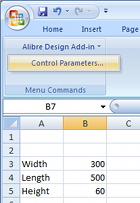
Every Geomagic Design installation includes an installation template which must be added to the Excel add-on list while running Excel once with administrator rights. Instructions as to how to do this with any supported version of Microsoft Office are available in the F1-help of Geomagic Design. Once properly installed, "Alibre Design Add-in" should be available from the Tools menu or Add-ins ribbon tab. Any numerical value cell may be selected to correspond to a Geomagic Design parameter, units specified and applied to a selected Geomagic Design file. For example we whip up something simple in Excel (shown right). Such a file can be created in Excel by anyone anywhere anytime (or it can be an imported CSV file etc)...

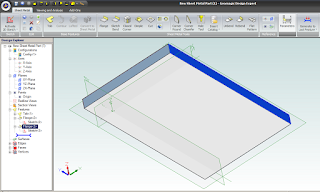
To update model parameters with the values listed in our spreadsheet, we need to start Geomagic Design and load the file in question. In our example we load the following basic Sheet Metal part, with overall parameters for "SM_length", "SM_width" and "SM_height":

 
Switching back over to our open spreadsheet, we select the Albre Design Add-in Control Parametrs (see above image of Excel). This opens a table in which cells are matched with parameter names:
 

To link spreadsheet values with model parameters, select an Active Session (model name currently open in Geomagic Design). All of the selected session's parameters will be listed by name. Now select the name of the desired model parameter from this list - and then the small "_" button down under Cell Reference and pick the workbook cell that you wish to link it to. Click the "Modify" button to finally change the parameter value to the one in the spreadsheet. Changes are shown immediately in Geomagic's active session model. Multiple changes can be made and applied at once by multi-selecting through the parameter list. If the spreadsheet is saved, the parameter links are saved with it.

To generate a DXF file of the final sheet metal design, a Geomagic drawing is used. Create a new Standard View. In the open Standard View Creation window, click the button "More Options". Check the option "Project as Flat Pattern" which will use the flattened version of the Sheet metal design for the projection view. Check that the projection scale is 1:1 and create the view. Once the flattened view is created, export the version of DXF which you require for CNC.

Geomagic Design is Australia's de facto low-cost 3D CAD alternative to SolidWorks and Autodesk Inventor. For more information about Geomagic Design or a free download, visit our website at http://www.caddit.net/cad-cam-software/geomagic.php

Google.