Showing posts with label announcement. Show all posts

11 December 2017

progeCAD 2018 Update Free for Existing Users

progeCAD 8.0.8.26 has been released on CADDIT.net, with free upgrade entitlement for all existing progeCAD 2018 users. progeCAD is an affordable general-purpose CAD drawing package with similar commands and workflow to AutoCAD, native DWG file read/write and extensive publishing/translation features. Advanced progeCAD features include full 3D rendering, extensive symbols library and Express Tools similar to those offered in AutoCAD. Using progeCAD, designers can seamlessly communicate with an AutoCAD environment. progeCAD updates 8.0.6 and  8.0.8 improves performance and addresses a number of reported issues. These improvements include several significant improvement for users with high-DPI displays:

  • Official support for Windows 10 FALL CREATORS update
  • Improved quality for icon transparency
  • Better UI experience for custom control with high DPI
  • Added DPI Aware settings in options dialog
  • Improved drag of blocks on x86 version with DRAGDETAIL > 0 
  • Added check to avoid crash while closing, when IRX applications uses point monitoring
  • Added Layer support in PUBLISH PDF (batch printing)
  • Added detection and correction of possible PDF/JPG printers activation issues after OS update
  • Fixed crash when TABLE command is called multiple times 
  • Changed the file name of the ones saved during emergency save when crash occurred
  • Added opening of .SV$ files during drawing recovery
  • Fixed height of command list items in 4k high DPI monitor
  • Fixed height of items in layer toolbar combo box in 4k high DPI monitor
  • Fixed height of items in toolbar combo box in 4k high DPI monitor
  • Improved stability when using grips on dynamic blocks
progeCAD 2018 release is now quite well tested for supporting a variety of environments, and is still available for free trial download in either 32-bit or 64-bit versions. progeCAD's flexibility makes it practical as a low-cost design solution for a variety of Australian and overseas industries including architecture, landscaping, land survey and GIS, mining, advertizing and signage design, fabrication, spa and pool design, kitchen and bath, cabinetry and many others.


Users of previous progeCAD versions are strongly encouraged to consider upgrade to 2018, for better compatibility with AutoCAD as well as the ongoing updates for Microsoft Windows. A full price list for all upgrade options, including multiple stand-alone, USB and floating network licenses, can be found on the CADDIT website here (link). A fully enabled 30-day trial can also be downloaded. Additional questions about progeCAD features or upgrade options can be sent directly to CADDIT Australia via the Contact Us page. 

19 February 2015

Geomagic Design 2015 (v17) Released, 32 Bit Support by Special Request

Sydney, Australia 19 February 2015 - CADDIT Announces the immediate availability of Geomagic Design 2015 V17 Release. This is somewhat a stability / bugfix release but with several new and important features requested by users in Australia and around the world. 3D Systems demonstrates its commitment to making Geomagic Design an improved tool for 3D mechanical design and drafting with this release. The most significant (and perhaps most understated) enhancement is the long-awaited Global Parameters feature. What are "global parameters"? Basically, a global parameter is a design value or equation which is shared across multiple parts and/or assemblies. The concept is very similar to SolidWorks global variables. Global variable data is stored independently in a newly released format called an ".AD_GLP" file. Any part or assembly can be associated to the values stored in an AD_GLP file.

A new set of Global Parameters can be created in Geomagic Design from the file menu -> "New" -> "Global Parameters" as shown in the Home window screenshot below:

Selecting this file type opens the new Editor interface for Global Parameters as shown. Create new parameters and save the final data as a new AD_GLP:
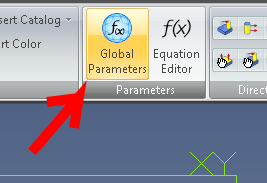

Your new Global Parameter file can thereafter be selected from any part or assembly and be used in that design by clicking the new "Global Parameters" supplied in both the Part and Assembly menu ribbons. Click "Select File" and choose your newly created AD_GLP file from the folder where it was saved to.


Other new features include: The Isolate command has been added to design instances in the Drawing Explorer. It is used to isolate a design instance in a drawing view, especially ones that are affected by an assembly feature. Standard fundamental deviations and International Tolerance (IT) grades can be selected to create Fit Tolerances on a hole and shaft, which will determine the type of fit. The dialog boxes for creating Reference Geometry have been updated to more intuitively show how reference geometry is created and to visually assist users on the various creation methods that can be used in different reference geometry creation situations. A new "Summary BOM" can now be created from an assembly. It can be used to override the Treat as part in BOM when used as a subassembly option. This is useful for quickly creating a BOM that shows all parts in subassemblies if multiple subassemblies have been set to be treated as a part.

A 32-bit version of Geomagic Design 2015 is still available but only by special request. Users should contact CADDIT for link and availability. Legacy users of Alibre Design Pro and Expert are strongly urged to renew their software maintenance subscription if they wish to take advantage or these new features and the remaining 32-bit -platform support. Subscriptions can be renewed online using this webpage: https://www.caddit.net/store/index.php?main_page=product_info&products_id=74&language=en

17 July 2013

Geomagic Design 2014 Released on CADDIT.net with new Motion and FEA Options

Sydney Australia - Geomagic Design 2014 has been released on CADDIT Australia. One central aspect to this update is name change for all of the package levels as follows:

Geomagic Design Personal Edition is now Cubify Design
Geomagic Design Professional is now Geomagic Design ELEMENTS
Geomagic Design Expert is now Geomagic Design

This will take a little getting used to for some of us, so CADDIT continues to maintain the comparison chart on their website regarding the differences between these package levels. Also released with Geomagic Design 2014 is an extra, optional upgrade to Motion 2.0 called Alibre Dynamics and an FEA option called Simulate. The Dynamics package has been released at a very affordable cost for existing and new full Geomagic Design users under active subscription. Cubify and Design ELEMENTS users will have to upgrade to the top level Geomagic Design first before qualifying for the discounted Dynamics package.

Geomagic Design Dynamics - fantastic motion studies at low cost for Geomagic Design users on active subscription. Cubify and ELEMENT user will need to upgrade to Geomagic Design first.

Also announced was a new FEA (Finite Element Analysis) option called Simulate which extends the motion dynamics package with full 3D FEA in a unified interface for both motion simulation and finite element analysis studies. Study types include stress/strain, vibrational, thermal, etc. Use of powerful combined dynamics/FEA simulation allows for joint forces from the motion to be converted to distributed loads, inertial information is transferred into the FEA model and stress, and strain which can be re-calculated at every step of the simulation. Both packages include full comprehensive help and tutorials and can open ACIS solid models directly. Both packages are very user-friendly.


Geomagic Design 2014 also includes dozens of small fixes and enhancements in the base product of the software so any user under active subscription will benefit - but for the simulation software users will need to be using the latest version of Geomagic Design (not Cubify or ELEMENT) and pay the option fee(s). All prices for these options are listed in AUD on CADDIT.net HERE.
 
For more information about Geomagic Design 2014 or for a trial, visit us at: http://www.caddit.net/cad-cam-software/geomagic.php

12 August 2009

$99 Alibre Announced, Special Promotion in Australia

PRESS RELEASE (Modified for Australia)
Richardson, TX (August 11, 2009) - Alibre, Inc. (http://www.alibre.com/) today announced the boldest marketing initiative in the history of 3D CAD - making professional grade 3D CAD software, including parts, assemblies, and 2D drafting, available to anyone for under $100. In Australia the promotional price will be AUD $149.00, sold through CADDIT.net.

For a limited time, anyone can get Alibre Design for $99 (regularly $999). Alibre Design is the core CAD component of Alibre's product offering, providing a complete parametric toolset for unlimited 3D part and assembly design and 2D drafting. Capable of creating complex mechanical designs with thousands of components, full assembly motion, automatic 2D drawing updates, and many other benefits, Alibre Design is similar to products such as SolidWorks, Inventor, and Pro/E. Tens of thousands of Alibre Design users in 50 countries and 15 languages use the software to design, verify, and virtually test their products.

With today's announcement consumers have the option of spending $99 for Alibre Design or a minimum of around $5000 for competitors' software. Paul Grayson, Chairman and CEO of Alibre, Inc., says, "Alibre has the unique ability to offer its professional engineering products at a fraction of the cost of the competition. But by lowering the price to $99, the offer is irrefutably the best in the history of 3D CAD. It's absolutely unheard of given the tools we're offering, without restrictions of any kind, and we expect a lot of people and businesses to take advantage. It's really that simple. We also know that our competition can't begin to come close to this, not even within a few thousand dollars."

Alibre is ideal mid range 3D CAD for Australia, offering the best of both worlds in design function, interoperability with other systems like CATIA and Pro/Engineer via Alibre Translate, and - most of all - value. Alibre Design Standard includes the basic 2D/3D design tools as well as Tutorial access, IGES & STEP import/export and Excel spreadsheet driven design. In Australia see CADDIT.net for more information, other countries can see Alibre.com for their nearest representative.
Google.