Showing posts with label 3d-design. Show all posts

19 February 2015

Geomagic Design 2015 (v17) Released, 32 Bit Support by Special Request

Sydney, Australia 19 February 2015 - CADDIT Announces the immediate availability of Geomagic Design 2015 V17 Release. This is somewhat a stability / bugfix release but with several new and important features requested by users in Australia and around the world. 3D Systems demonstrates its commitment to making Geomagic Design an improved tool for 3D mechanical design and drafting with this release. The most significant (and perhaps most understated) enhancement is the long-awaited Global Parameters feature. What are "global parameters"? Basically, a global parameter is a design value or equation which is shared across multiple parts and/or assemblies. The concept is very similar to SolidWorks global variables. Global variable data is stored independently in a newly released format called an ".AD_GLP" file. Any part or assembly can be associated to the values stored in an AD_GLP file.

A new set of Global Parameters can be created in Geomagic Design from the file menu -> "New" -> "Global Parameters" as shown in the Home window screenshot below:

Selecting this file type opens the new Editor interface for Global Parameters as shown. Create new parameters and save the final data as a new AD_GLP:

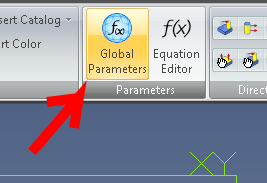
Your new Global Parameter file can thereafter be selected from any part or assembly and be used in that design by clicking the new "Global Parameters" supplied in both the Part and Assembly menu ribbons. Click "Select File" and choose your newly created AD_GLP file from the folder where it was saved to.


Other new features include: The Isolate command has been added to design instances in the Drawing Explorer. It is used to isolate a design instance in a drawing view, especially ones that are affected by an assembly feature. Standard fundamental deviations and International Tolerance (IT) grades can be selected to create Fit Tolerances on a hole and shaft, which will determine the type of fit. The dialog boxes for creating Reference Geometry have been updated to more intuitively show how reference geometry is created and to visually assist users on the various creation methods that can be used in different reference geometry creation situations. A new "Summary BOM" can now be created from an assembly. It can be used to override the Treat as part in BOM when used as a subassembly option. This is useful for quickly creating a BOM that shows all parts in subassemblies if multiple subassemblies have been set to be treated as a part.

A 32-bit version of Geomagic Design 2015 is still available but only by special request. Users should contact CADDIT for link and availability. Legacy users of Alibre Design Pro and Expert are strongly urged to renew their software maintenance subscription if they wish to take advantage or these new features and the remaining 32-bit -platform support. Subscriptions can be renewed online using this webpage: https://www.caddit.net/store/index.php?main_page=product_info&products_id=74&language=en

15 June 2010

"Alibre Design Personal" Replaces Standard & Xpress versions; New Alibre Products

Alibre is a powerful but easy-to-use 3D mechanical CAD package which is distributed and supported in Australia through CADDIT.net. Beginning in mid-May, Alibre no longer offered a "Standard" version of their CAD software. Alibre Design "Standard" has been replaced with the Alibre Design "Personal" version, mainly for hobby use. Also, the free version referred to as "Alibre Design Xpress" will no longer be available to new users. Current users of these products, however, should be able to continue using them as-is without any change to their software. A note to those who purchased Alibre Design from us during our last promotion, well done - you have a package worth about $1000 for under $200. Alibre Design Personal now has some new limitations in comparison to its predecessor, Alibre Design Standard:
  • Single install license (no take-home license, multiple keys etc)
  • Advanced Import / Export features are deactivated
  • Import DWG / DXF is still enabled
  • Export .STL is still enabled for 3D printers
  • Publish 3D PDF (for models only) is still available
  • No STEP, IGES, SAT, Rhino, image files
  • Files are not enumerated unless you select All files (*.*)
  • Turn-off Advanced Detail Drawing (see further..)
  • No Bill of Materials
  • No Detail, Section, Partial, or Broken views
  • No views for Centers, Cosmetic Threads, External Threads, or No Hole Call-outs
CAD users looking for competent 3D mechanical CAD software are really encouraged to at least go with Alibre Design Professional now. Algor DesignCheck FEA is now called "Simulation Express" from Autodesk and will continue to be available as before. Alibre also has a new partner for delivering photo-realistic rendering to all Alibre Design Professional and Alibre Design Expert users. Luxion's KeyShot For CAD is now included in both versions and is available in Australia from CADDIT. Other Luxion users include PTC, Cadkey, SpaceClaim and Rhino. NOTE Alibre expects to also have new KeyShot BIP file export enabled within Alibre Design by the end of June.

KeyShot For CAD allows Alibre Pro and Expert users to create full photo-realistic images for their model within minutes. And - much like Alibre itself - Keyshot is easy to use. Drag-and-drop materials, preset lighting, and real-time updates give you the final result all the time. KeyShot is the first and only rendering application that offers real-time ray-tracing. This means that your model is constantly being rendered as you zoom, pan, rotate, and apply materials and lighting presets. For more information about Alibre Design 3D CAD in Australia feel free to CONTACT CADDIT.net. A free 30-day PROFESSIONAL trial of Alibre Design can be downloaded HERE.
Google.