Showing posts with label Australia. Show all posts

26 June 2025

progeCAD 2026 Offers Improved Performance

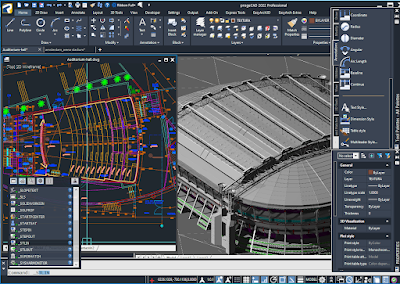
 Sydney, Australia 19 June - CADDIT announces the release of progeCAD 2026 Professional. progeCAD Professional is advanced general-purpose 2D and 3D CAD software with similar commands to AutoCAD but with perpetual license and lower price. CADDIT has been supporting progeCAD users in the Australia/New Zealand region for over fifteen years.  Now, after months of thorough testing, the our team can announce this official release. progeCAD Professional 2026 delivers completely new architectural AEC CAD features and libraries, as well as hundreds of other new capabilities and improvements. 

progeCAD 2026 Professional is built on improved framework which delivers multiple speed optimizations compared with previous progeCAD versions:

  • Drawing update - up to 2x faster
  • File open with ACIS Solids -  up to 10x faster
  • REGEN up to 1.5x faster
  • Faster HATCH and boundary recognition
  • Faster entity generation from IcARX API
  • Improved speed for PAN, drag and BEDIT preview
  • Numerous other interface speed improvements 

 A new "high performance" power settings dialog has been introduced to encourage users to consider Windows "High Performance" power setting for progeCAD, which further improves performance in exchange for system resources.  Other new commands in progeCAD 2026 include MKSHAPE, MKLTYPE, SURFNETWORK, SURFOFFSET and new "Reset Advanced Block" command.

progeCAD 2026 additionally offers improved Microstation DGN file compatibility with Data Extraction support, improved 3D sheet surface modelling support for surface-to-surface fillet, trim and extend. The Extract Data command is completely refactored to improve performance, including the ability to report on the properties of drawings (such as file size, path, etc.), system variables stored in drawings, and the number of entities in drawings (such as total circles). Presentation is improved with column sorting. organization and filtering.

progeCAD 2026 is now available on CADDIT.net for a free thirty-day trial. Questions about latest version of progeCAD can be directed to our Sydney office. 


27 September 2022

progeCAD 22.0.14 Free Update Released

 Sydney, Australia 26 September - CADDIT announces the immediate availability of the 2022.0.14 patch update for all progeCAD 2022 license types. This update is free for all up-to-date users of progeCAD Professional 2022 Single License (stand-alone), Portable Travel-USB and Network License types. It may be downloaded either through the progeCAD software update, or directly as a complete installation package from the CADDIT website. progeCAD is a general purpose AutoCAD-compatible 2D and 3D technical drawing software used by thousands of Australian businesses and government agencies.

This progeCAD update offers minor improvements in multiple functional areas, including Superhatch and Hatch island detection, Tables and Table Styles, ease of use and appearance issues. These include:

•    Fixed crash selecting specific hatch
•    Fixed zoom on entity in FIND command without "zoom after replace" option
•    Margins set in Table Style are now loaded correctly in table creation menu
•    Fixed EATTEDIT prompt messages
•    Fixed open of drawing with bad constraints
•    Fixed behavior of prompt boxes. Added new variable PROMPTBOXES to enable/disable prompt boxes. Right click menu is now regulated only by the variable SHORTCUTMENU
•    Now creating a new table style copies the base one successfully
•    Fixed Table Styles preview
•    Added "Match Cell" and "Field" buttons to Table Cell context ribbon
•    Fixed prompt menu when command is not active
•    Added "Alignement" button to the Table toolbar for the Classic workspaces
•    Fixed crash using table with block in cell
•    Fixed freeze searching closed boundary in a drawing
•    Fixed SUPERHATCH with circle island in area
•    Fixed SUPERHATCH with rectangular "hole" in area
•    Added double click to edit block in table cell
•    Fixed crash on edit table cell with block. Using "Format Locking" option
•    Added "Block" button to "Insert" panel of "Table Cell" contextual ribbon
•    Added TBB and TINSERT aliases of TABLEINSERTBLK command
•    Fixed ARC command from Lisp
•    Fixed contextual menu on mouse button down
•    Removed display of options list when DYNMODE < 0
•    Changed ZOOM level on FIND command, Implemented FINDZOOMSCALE variable to set scale zoom level (default 5.0)
•    Improved drawing templates dropdown menu in Start Page. Now it will display a vertical scrollbar if the list of the templates is too long

Question about this update for progeCAD 2022 can be submitted through the CADDIT website.

03 January 2022

progeCAD 2022 Milestone AutoCAD Alternative Released on CADDIT.net

 Sydney, Australia 3 January - CADDIT Announces the release of progeCAD 2022 on CADDIT.net for Australia and New Zealand. progeCAD is an advanced general-purpose 2D and 3D CAD package with similar commands to AutoCAD but with perpetual license and lower price. CADDIT has been supporting progeCAD users in the Australia/New Zealand region for almost fifteen years.  Now, after months of thorough testing, the CADDIT team is happy to announce their official release of this milestone product version.

progeCAD 2022 from CADDIT Australia

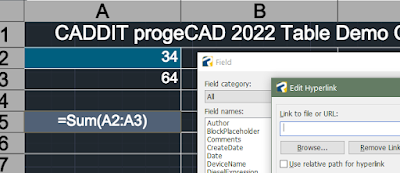
progeCAD 2022 from CADDIT Australia offers a dramatic feature update over previous versions. 2D Drafting now includes a fully-implemented and hugely improved interface for drawing text and data TABLES, including improved cell support and a full list of FIELD types. Data cell selection now seamlessly brings up a full text editor. DIESEL fields are now properly implemented and real-time spell checking has been added for text. MTEXT likewise has new support for clear and strike-through formatting, as well as better symbol- sub- and super-script support. progeCAD 2022 now offers the much-anticipated SHEET SET MANAGER displays, publishes and manages sheet sets, a named collection of drawing sheets. Each sheet in a Sheet Set is a layout in a drawing (DWG) file.

A new geometry solver improves reliability for almost all drawing commands like Trim, Chamfer, Fillet, Hatch etc. General performance improvements have also been made to FILE open speeds, REGEN, SAVE, AUTOSAVE as well as the end user's experience in OSNAP, LAYOUT and many other commands. General interface improvements have been made to the program's START page, VIEW MANAGER, SETTINGS window, CUI customization dialog and the ARRAY command. Feature GROUP handling is now offered in progeCAD via the new GROUPEDIT command, complete with visualization grips. Several new tools will save estimators time in progeCAD, such as the new TOTALAREA command which gives the sum total of multiple selected closed entities, the new ATTSYNC command which updates attributes for all block instances (useful for updating material lists) or IMPOINT which automates the creation of new points, polylines or splines from coordinates in a text file. TPNAVIGATE has also been added for palette navigation, which can be helpful for users who create or use multiple tool palettes.

progeCAD 2022 new TABLE and FIELD support
New TABLE and FIELD interface for progeCAD 2022

progeCAD 2022 now supports all new Spacemouse and CADmouse models from 3DConnexion. This can be an absolute boon for end users doing a lot of 3D design in progeCAD. 3D Solids now fully support the use of GRIPS for direct editing. a new 3D STEEL library for quick 3D weldment design in progeCAD has also been added.

A free no-obligation thirty-day trial of progeCAD 2022 can be downloaded directly from CADDIT Australia here, even if you have downloaded progeCAD before. Due to the significant improvements made to this software for this version, we need to repeat our usual call for existing users to strongly consider a low cost upgrade to progeCAD 2022 stand-alone, USB or Network licenses. We plan to publish several more in-depth reviews of the important new features in progeCAD 2022. Please contact CADDIT at their Sydney office with any questions.

08 September 2021

progeCAD 2022 Coming Soon: Free Upgrade Offer Begins


Sydney, Australia 7 September - CADDIT announces the free upgrade to 2022 version for all progeCAD purchases on or after 01 September 2021. progeCAD is a powerful general-purpose 2D and 3D CAD solution very similar to AutoCAD, with additional tools and a lower cost. With progeCAD, designers have a professional yet affordable perpetual-license alternative to high-cost AutoCAD rental fees, with the ability to create, read, write and edit native AutoCAD DWG and DXF files fluently using and interface very similar to what AutoCAD already know. Based in Sydney, CADDIT has been supporting progeCAD users in Australia, New Zealand and surrounds for more than twelve years.


Much of what will come in 2022 is still confidential but we have several detail which we can pass on now. Significant effort has been invested in making progeCAD 2022 a truly cutting-edge release that is stable and reliable from initial release. Many improvements are still confidential during an internal testing period. What we can expect are new features for the AEC industry with further improvements to BIM and REVIT compatibility, as well.  Many features are expected to be completely re-worked or refactored, such as the MTEXT and TABLE elements. Pursuant to last year's improvements in hardware acceleration, this year progeCAD 2022 release is expected to offer many new improvements in 3D view handling, modelling and new 3D content specifically targeted to architects and structural engineers working in steel. GUI customization will also be improved with several new commands.


A detailed list of these new features will be released soon, but we are delighted to share what we know now and begin offering the free upgrade to all customers. progeCAD 2021 can be downloaded now as a free 30-day trial. As in previous years, all new licenses as well as upgrades for existing licenses, including single stand-alone, floating NLM network, USB and total office licenses, purchased on or after 1 September 2021 will be entitled to the same for progeCAD 2022 upon our announcement. Multiple purchases will qualify for multiple upgrades. progeCAD Upgrades will also qualify, again as in the past. As in past, eligible users with a USB upgrade will usually not be required to replace their hardware dongle for the next version. We are really excited about the upcoming new release and making those upgrade entitlements available well in advance. So watch this space over the next weeks as more details and images become available. Contact CADDIT Australia for more information about progeCAD or this upgrade offer.

28 October 2020

progeCAD 2021 Release with Improved GPU Graphics

 Sydney, Australia 20 October - CADDIT Announces the release of progeCAD 2021 on CADDIT.net for Australia and New Zealand. Based in Sydney, CADDIT has been supporting progeCAD users in Australia, New Zealand and surrounds for more than twelve years. progeCAD is a powerful general-purpose 2D and 3D CAD package which offers very similar work environment as AutoCAD, with additional tools and  lower price. progeCAD 2021 offers multiple improvements in areas of graphics performance, interface handling and file format support. After several months of per-release field testing, CADDIT is pleased to follow our global partners with the release of this version.

progeCAD, like most CAD systems, offers both simple software CPU-driven graphics and much faster hardware GPU-driven graphics. The hardware graphics offered in progeCAD uses the common OPENGL graphics language, supported at least in part by most modern graphics cards. OPENGL compatible graphics are offered by a variety of NVIDIA and Intel GPU like NVIDIA QUADRO, NVIDIA GTX and even on-board "business graphics" offered by Intel. There are different versions of OpenGL and most modern requirements call for at least OpenGL version 4 supported by Intel HD (since Haswell, excluding older Intel "Ivy Bridge" drivers which only supported OpenGL 3). "Software" graphics on the other hand, do not use any GPU, but emulate 3D graphics instructions to the main CPU. This is an even slower than Intel HD "on board" graphics, but also a bit cheaper (although most modern PCs/laptops at least offer Intel Graphics). Which graphics are most suitable depends on job size and user situation.

Details of the updated "Graphics Performance Panel"
Details of the updated "Graphics Performance Panel" with (1) Option to use hardware or software graphics (2) Optimization options new in progeCAD 2021  (3) Installed GPU list


Two new GPU optimization options are shown in 2021 Performance Options panel:

Hide small entity in block: This saves GPU bandwidth by masking the most insignificant features of block instances, hiding them as invisible. NOTE this does not affect printing, block printing is still in full detail. The job of this option is strictly to increase display efficiency.

Use Frame buffer object display system: Also new in progeCAD 2021 - this introduces dedicated memory for GPU temporary display storage as another method of optimization, commonly known as a frame buffer. As most NVIDIA cards include their own graphics memory, this option is mainly for lower-cost Intel on-board graphics which actually use system RAM for frame buffering. This will be especially useful option to enable on lower-cost laptops, Microsoft Surface Pro, etc without NVIDIA graphics but having something like the Intel UHD 5000 GPU.

progeCAD 2021 also has included a number of other new graphics optimizations for cropped and large size XREFS handling, improved realtime CONCEPTUAL and REALISTIC rendering performance, better ISOLINE display as well as optimizations for drawings with active shading. Note that a number of third party hardware options have been specifically discussed in this article to assist users with the general principles to make the best decision for their own choice of CAD hardware. A final note especially about Intel on-board "business" graphics: we have found significant performance improvement simply by updating to the latest driver version for the GPU.

progeCAD 2021 is now available for free download on CADDIT.net. CADDIT re-affirms their commitment to perpetual non-rental licensing for all progeCAD license types including simple single stand-alone PC licenses, portable USB licenses and floating network NLM licenses. We encourage users to consider the new options discussed in this article to help them in their choice to use progeCAD. Contact CADDIT Australia for more information about progeCAD or new features offered in progeCAD 2021.


03 August 2020

Free Upgrade begins for progeCAD 2021

Sydney, Australia 03 August - CADDIT announces the free upgrade to 2021 version for all progeCAD purchases on or after 01 August 2020. progeCAD is a powerful general-purpose 2D and 3D CAD package which offers very similar work environment as AutoCAD, with additional tools and  lower price. With progeCAD, designers have a professional yet affordable perpetual-license alternative to high-cost AutoCAD rental fees, with the ability to create, read, write and edit native AutoCAD DWG and DXF files fluently using and interface very similar to what AutoCAD already know. Based in Sydney, CADDIT has been supporting progeCAD users in Australia, New Zealand and surrounds for more than twelve years.

Along with new features, progeCAD 2021 will deliver a significant modernization of progeCAD's overall drawing environment. progeCAD's Start page has a fresh new look, and new Ribbons have been prepared for different types of users. progeCAD 2021 will offer a new "full-screen" mode and users can now "query" through overlapping entities with selection cycling. SELFILTER opens an updated Filter panel for quick re-use of selection sets, and UNDO operations can now be selected from an UNDO list. progeCAD 2021 updates the Tool Palettes with palette grouping and the ability to share existing palettes and build new palettes almost instantly. progeCAD 2021 now enables to change layer visualizations per-viewport with its new VPLAYER command. MTEXT, POLYGON, AREA and ARRAY commands have been significantly improved with new associativity options. Specific ARRAYPOLAR, ARRAYRECT and ARRAYEDIT commands have been added to accelerate array definition and modification.

progeCAD Professional 2021
CAD software users can now qualify for their free progeCAD 2021 Upgrade, with any new or upgrade progeCAD license purchase after 01 August 2020.

progeCAD 2021 will also follow through in its ongoing commitment to offering the most powerful set of data translation tools, so that users can share and receive information with a broader range of other designers, customers and partners. progeCAD 2021 will now read SolidWorks files directly - both individual SLDPRT part files as well as collective SLDASM assembly files. Other users may be happy to know that progeCAD 2021 will begin supporting the in-drawing use of QR codes. progeCAD will also save users potentially hundreds of hours with new PDF batch import functionality in the 2021 release - as well as save countless hours with the new AUTOPUBLISH command, which automatically creates export files (.dwf/.pdf) from the current drawing and saves to a specified location on saving or closing the DWG file. Three new commands will be introduced which will could completely change the way designers draw in 3D: CONVTOSURFACE, CONVTOSOLID and CONVTOMESH. These new key commands will allow designers to convert geometry between 3D solids, surfaces and meshes. RCS and RCP POINTCLOUD import now includes bounding box and size calculation. progeCAD DATAEXTRACTION has been enhanced to auto-populate tables and schedules from block attributes and drawing properties. Even copy-paste will offer in-command alignment rotation.

If you work with very large CAD files, progeCAD 2021 will also improve graphics performance for on-board graphics, offering a new “Use Frame buffer object display system” GPU option. “Hide small entity in block” will offer further speed by masking small details from inserted blocks for faster regen and display time. PRINT PREVIEW has been updated with better speed and viewing flexibility. ISOLINES, Conceptual and Realistic 3D rendering have all been improved for progeCAD 2021 as well.

The current progeCAD 2020 release is now quite well tested for supporting a variety of environments, and is still available for free trial download in either 32-bit or 64-bit versions. progeCAD's flexibility makes it practical as a low-cost design solution for a variety of Australian and overseas industries including architecture, landscaping, land survey and GIS, mining, advertising and signage design, fabrication, spa and pool design, kitchen and bath, cabinetry and many others. To qualify for this free upgrade offer, simply order any quantity progeCAD 2020 (English) new or upgrade licenses from CADDIT.net on or after 01 August 2020. Multiple purchases will qualify for multiple upgrades. progeCAD 2020 Upgrades from older versions also qualify under this promotion, including all new progeCAD USB and Network license upgrades. Note that eligible users with a USB upgrade will not be required to replace their hardware dongle for the next version. Within a few weeks after the 2021 release announcement, eligible users will have eligible progeCAD 2020 license keys automatically upgraded to run either version of their preference - progeCAD 2020 or 2021. Promotion does not apply to OEM repackaging or to languages other than English. This promotion will run until progeCAD 2021 release is announced on this website. Contact CADDIT Australia for more information about progeCAD or this upgrade offer.

10 May 2018

Civil Survey DTM Features Introduced in progeCAD 2019

Sydney, Australia  09 May 2017 - CADDIT Software announces the second major class of new features to ship with their upcoming progeCAD 2019 release. progeCAD is an affordable, robust general purpose CAD system used by designers, architects, builders, engineers, civil survey and government planning offices for over ten yeas in Australia and New Zealand. progeCAD requires little or no learning curve for AutoCAD users because of its compatible interface and command structure.

Along with thousands of general-purpose CAD drafting features such as AutoCAD-similar drawing commands, full native DWG format read-write, PDF import and export, direct 3D modelling and realtime and advanced rendering, extensive block libraries, 3D architecture, tables and data extraction, new 3D model translation from STEP IGES and STL-mesh models as well as countless other tools, progeCAD 2019 will introduce a new suite of civil survey functions.


This new suite of DTM functions offer civil engineers, landscapers, environmentalists, builders and other land-development professionals an easy-to-use set of basic land survey tools for generating terrain profiles and slope lines. Some of the new civil survey commands include:

AUTOSECTION - generate full section detail views with full annotation from drawing contours
SECTIONLINE - create a profile path to be used by AUTOSECTION
CONVERTLCURVES - convert SPLINEs into 3DPOLY usable by AUTOSECTION
SLOPEBLOCK - generate normal or "slope" lines along a single polyline
SLOPEAREA - generate normal or "slope" lines between two polylines

To gererate a new civil section view simply create a new SECTIONLINE through your drawing like so and then select it using AUTOSECTION:
progeCAD 2019 can create DTM section views directly from LINE, 3DPOLY and 3DFACE. SPLINE need to be converted into 3D polylines first, using the "convert level curves" tool (CONVERTLCURVES)
 AUTOSECTION begins with a comprehensive dialog which allows you to customize your new DTM section view or click OK to accept prior defaults. After clicking OK your terrain section view will be generated like so:


 CADDIT is pleased to announce that starting 15 April 2018 all new and upgrade progeCAD 2018 orders from that day will be entitled to a free upgrade to 2019 upon its release on CADDIT.net. For a free 30-day trial of the current 2018 release of progeCAD or for more information about affordable CAD software, visit our website at www.caddit.net.

08 August 2017

Alibre Returns with New Licensing and Free Upgrade Promotion

Sydney, Australia  07 August 2017 - CADDIT and Alibre LLC together announce a new future for Alibre users. Alibre, LLC based in Houston Texas USA recently acquired all rights to any materials from 3D SYSTEMS related to Geomagic Design. Since then a new product and licensing has been in development, which we can now announce release for on the CADDIT.net website. Alibre Design will continue its focus on affordable 3D parametric mechanical design for the Windows platform. Alibre Design is an intuitive, easy-to-use mechanical design system offering advanced features like Keyshot 3D rendering and optional FEA analysis.


New licensing. Alibre will move away from Flexera to now use a similar online activation system from Nalpeiron, along with several updated license options. Alibre will not offer a USB dongle option. Geomagic Design users with a USB license from 3D Systems will be offered a Nalpeiron "offline" license instead (this license type uses an email activation, see http://docs.nalpeiron.com/display/NND/NSL+V10+-+Offline+Activation ) There will continue to be a floating network license option. At this time, Nalpeiron licensing is stored in local user profile, within C:\Users\\AppData\Local\Alibre Design. To reset the activation of Alibre Design, simply delete all file inside this directory. Otherwise, moving Alibre licenses will operate in a similar way as they did with Geomagic Design.

Free upgrade. Because Alibre's Nalpeiron-based licensing is not compatible with 3D System's Flexera system, everyone with a valid Geomagic Design license from October 2015 and later will be moved to Alibre 2017 without charge, see https://www.alibre.com/alibre-llc-faq/. Essentially this consitutes a free upgrade for everyone having a valid Geomagic Design license from October 2015 or later. Previous Geomagic Design users who were still on the original Alibre CRM licensing system (e.g. Alibre 2013) will not be upgraded for free. In such case a valid Alibre Design subscription will be required for the user to move to the new licensing system. More information will be following soon.

CADDIT is happy to continue offering Alibre Design as a cost-effective 3D mechanical design option and we look forward to the upcoming releases under new management of the software. We ask users to be patient during the transition period. Further questions can be directed to CADDIT via our CONTACT US page: https://www.caddit.net/store/index.php?main_page=contact_us

22 May 2017

progeCAD 2018 Released on CADDIT.net with New Artisan Render

Sydney, Australia  22 May 2017 - CADDIT announces the release of progeCAD 2018 Professional on the website for immediate download. progeCAD is a flexible general-purpose CAD drawing program that is used in many industries, including architectural design, fabrication shops, landscaping, strata and property management, mechanical design and many more. progeCAD is the long-standing low cost alternative for AutoCAD® and AutoCAD LT® software in Australia. progeCAD 2018 continues to offer perpetual license options (no rental or annual subscription required) and is tested for compatibility on Windows 7 through to Windows 10, both 64-bit and 32-bit versions. All progeCAD 2018 licenses now include Artisan for progeCAD - a new 3D rendering tool for creating business presentation-quality 3D graphics from progeCAD models and drawings.

New presentation-quality 3D rendering with free rendering add-on


progeCAD 2018 refines the native 64-bit performance first introduced last year with improved general performance and reliability. Major improvement in progeCAD Microstation V8 file interoperability now offers users complete ability to open, save, create, and edit .dgn files in native Microstation V8 DGN format. progeCAD further now supports the Microstation .dgnlib,.rdl,.cel formats. Users now also may use geometry from PDF and DGN underlays as an ESNAP reference. This example demonstrates the close read/write compatibility that progeCAD also offers for users with files from Bentley Microstation now:


    Microstation imported to progeCAD and saved again
          
progeCAD .DGN read back into Microstation V8i           
       
Development has also completed on a number of other new features. The progeCAD PDF printer now supports PDF printing with layers. Point cloud import now supports LIDAR scan data .las and .laz (compressed) formats. Land planning and civil engeering teams will also greatly benefit from the new support of ESRI Shape import. The shapefile format is a popular geospatial vector data format for geographic information system (GIS) software. It is developed and regulated by ESRI as a (mostly) open specification for data interoperability among ESRI and other GIS software products.

progeCAD 2018 offers a completely new in-place MTEXT editor. Extensive implementation of Fade controls for XREFerences and locked layers ships as well. progeCAD 2018 also delivers additional support for AutoCAD VPMIN and VPMAX for maximizing and minimizing viewports, as well as implementing the Superhatch command accessible through the Express Tools menu has been introduced to create amazing hatches out of images, blocks, external references and wipeout objects. progeCAD 2018 further delivers:
Contextual Ribbons
Toolbars locking
Clickable Command Prompt Options (string options on command line can be selected with mouse)
New Advanced Rename interface
New Array Interface
Support for variable DIMLAYER
Support for variable HPLAYER and HPTRASPARENCY (Default layer for Hatch and level of Hatch transparency)
3D Sub Entity selection (selection of Faces and Edges on 3D objects)
TEXTFRONT Command (bring all texts to front)
CACHEFILES variable (control the external cache layout data to enhance layout switching performance and memory usage)
PathWatcher (control of a folder for automatic DWG opening)


Current iCARE subscribers and those participating in our recent free upgrade promotion will begin to receive their progeCAD 2018 upgrade notices in the next several days. Users of previous versions of progeCAD can order the appropriate upgrade for them from the CADDIT progeCAD upgrade price list. There is much more to be said about the new progeCAD 2018 release, including dozens of other new commands, variables and improved functions (such as the 3D rendering) which can be explored by downloading the software for a free 30 day trial from CADDIT. We are very excited about this release and hope that many users will benefit form the hard work invested in this version of progeCAD. Any questions about general features of progeCAD can be directed to CADDIT via the CONTACT US page HERE.


03 April 2017

CADDIT Launches Powerful Low-Cost 3D CAD Software ZW3D with Time Limited Discount Offer

Sydney, Australia 03 April 2017 - CADDIT announces an exciting new 3D CAD product line agreement with ZWSOFT to sell and support all ZW3D products Australia-wide. ZW3D offers mechanical designers, engineers, machinists and manufacturers a powerful suite of integrated CAD and CAM software for parametric 3D part and assembly design, hybrid freeform and direct editing, sheet metal nesting and weldment construction, 3D publishing and printing, prismatic and multi-axis machining, lathe turning and more. ZW3D also delivers powerful 3D CAD translation tools for importing SolidWorks, Solid Edge, Siemens NX, JT, PTC Creo, Autodesk Inventor, STEP, ACIS .sat and .sab, IGES and many more formats from even very recent versions of the software. ZW3D supplies thousands of businesses globally, including Yamaha Motor Co, Bridgestone, Johnson Controls, Baosteel and many others.

ZW3D uses specially written state-of-the-art modeling technology, originally developed by VX Corporation of Melbourne FL USA, with software R&D still located in Florida to this day. The user interface includes a modern ribbon-based UI with visual help cues and prompts. Traditional bottom-up assembly design is offered in every version of the software without limitation. Standard and higher versions also offer advanced assembly options, top-down down and animation. There are also two CAM-specialist versions for CNC machinists at reduced cost in CAD features. CADDIT also announces a special price release of ZW3D 2017 for the Australian small business user called "Workshop". ZW3D Workshop by CADDIT edition will include all features of ZW3D Premium minus the costly electrode and mould tooling libraries, to be made available at a much lower cost.


To help introduce this high-value 3D CAD and CAM software option to small business users in Australia, CADDIT has arranged for significantly reduced pricing on both software, support and one-year upgrade options. Level one support for ZW3D will be local. A series of free comprehensive one-day training events are planned around Australia, based on number of requests. The first event is planned in Parramatta NSW near our offices. Frequent news and updates will be posted over the next few weeks on  our websites. For immediate contact or general ZW3D inquiries, CADDIT.net will be the nation-wide software partner which can be contacted HERE.


16 March 2017

progeCAD 2018 Preview and Free Upgrade Offer

Sydney, Australia 15 March 2017 - CADDIT announces the free upgrade to 2018 version for all progeCAD purchases on or after 15 March 2017. Selected users have already started second-stage internal testing with the new version with very positive results. progeCAD is a general-purpose 2D and 3D CAD package which offers very similar work environment as AutoCAD, at a much lower price. With progeCAD, designers have a professional yet affordable perpetual-license alternative to high-cost AutoCAD rental fees, with the ability to create, read, write and edit native AutoCAD DWG and DXF files fluently using and interface very similar to what AutoCAD already know. Based in Sydney, CADDIT has been supporting progeCAD users in Australia, New Zealand and surrounds for more than ten years.

progeCAD 2018 will deliver major refinements for many progeCAD features. Currently these improvements introduce a brand new 3D rendering system from Artisan, completely re-written MTEXT, REFEDIT, RENAME and ARRAY command interfaces. 3D scan data will now be directly accepted from several more formats including .ply and vanilla .xyz files. Existing functionality will also be greatly expanded in a number of key areas, such as Workspace management, fading controls for XREF, REFEDIT and LAYERS. New commands VPMAX, VPMIN, TEXTFRONT and more. progeCAD 2018 will also add support for many new system variables like DIMLAYER, HPLAYER, CACHEFILES and HPTRASPARENCY usage. progeCAD will now support reading many more file formats from Microstation (.dgnlib,.rdl,.cel) and can snap to UNDERLAY entities. progeCAD 2017 was the first version to offer the new RIBBON interface. The progeCAD 2018 interface will add controls for Toolbar locking, Contextual Ribbons and a PathWatcher for control of a folder for automatic dwg opening. As usual, this is only a cross-sampling of the numerous new features and optimizations coming in our 2018 version.

To qualify for this free upgrade offer, simply order any quantity progeCAD 2017 (English) new or upgrade licenses from CADDIT.net on or after 15 March 2017. Multiple purchases will qualify for multiple upgrades. progeCAD 2017 Upgrades from older versions also qualify under this promotion, including all new progeCAD USB and Network license upgrades, essentially resulting in two version upgrades for the price of one. Note that eligible users with a USB upgrade will not be required to replace their hardware dongle for the next version. Within a few weeks after the 2018 release announcement, eligible users will be issued upgrades with a progeCAD 2018 serial key and an updated download link for the software, similar to how has been done in past years. Promotion does not apply to OEM repackaging or to languages other than English. This promotion will last until the day that progeCAD 2018 release is announced on this website.

To try progeCAD free for a month, progeCAD 2017 can be downloaded HERE. For questions about this free 2018 promotion please contact CADDIT here.

09 March 2017

Mathcad Prime 4.0 Released on CADDIT

Sydney, Australia 08 March 2017 - CADDIT announces the immediate availability of Mathcad Prime 4.0 on the CADDIT.net website. Mathcad is computational software which solves equations written in conventional textbook format, as opposed to obscure expression languages used in spreadsheets. Mathcad is the application of choice for many math-critical industries, such as mining, aerospace, chemical and laboratory research environments. Mathcad updates solutions in real time, and can also be used to visualize datasets in both 2D and 3D plots. Mathcad Prime 4.0 adds several important usability features requested by our users.

PTC Mathcad Prime 4.0 extends access control features to individual worksheet areas. Using the new Area Protection and Locking functionality in PTC Mathcad Prime 4.0, users may select specific areas of a document for password protection, making them unavailable or just read-only for other users while leaving remaining areas fully editable. This feature further protects the integrity of corporate calculations, preventing protected values from unwanted alteration.

PTC Mathcad Prime 4.0 improves document readability with enhanced equation wrapping. Equation wrapping works much like word wrapping does for a text editor. Users can now both insert a wrapped addition, subtraction, multiplication or inline division operator while typing an equation (in other words, they can wrap as they go) or they can go back to existing math and toggle the wrapping on those operators too. Wrapping does not break logic linkage to the next line, and can also be inserted as the equation is typed. Improved support for Microsoft Object Embedding is included. Linked objects can be displayed within the worksheet, and opened for real time editing in the necessary application.

Users with large worksheets will notice several overall performance improvements in Mathcad Prime 4.0. In particular, the Mathcad region display has been re-designed with far greater efficiency, with very noticeable results especially when handling extensive worksheets spanning dozens of pages. Additional improvements have been made for smoother graph editing and other optimizations.

Mathcad 4.0 is available for immediate trial download on the CADDIT website HERE. Current maintenance subscribers should already have access to the new version via their PTC web account. Additional questions about the latest Mathcad 4.0 release can be directed to CADDIT via the Contact Us information HERE.


05 October 2016

progeCAD 2017 Graphics and GPU Review

Sydney, Australia 05 October 2016 - With the recently available progeCAD 17.0.8 service pack, the CADDIT team has revisited last year's review of CAD hardware. As stated in the update announcement on CADDIT.net, progeCAD is a low-cost general-purpose 2D/3D CAD system with very tight compatibility to recent versions of AutoCAD. Since the landmark progeCAD 2013 release several years ago, our development team has been spending considerable effort to improve our use of OpenGL hardware acceleration commonly employed by CAD software  like AutoCAD and Geomagic. OpenGL is essentially a machine language for sending commands like draw and shade directly (in a process sometimes called "direct rendering") to an OpenGL-speaking graphics card for display on the screen. These commands are often wrapped inside other languages like C++ for callable use by developers to tie into their software - like CAD, games, many video players and other highly-demanding graphics applications.

https://en.wikipedia.org/wiki/OpenGL
The inner workings of OpenGL per diagram from Wikipedia

This year we began introducing two significant hardware assets for graphics testing in our labs: Dell XPS Laptops (15 inch series) with Nvidia GTX 960M series GPU, now with a "game-ready" driver update version 372.90 (free update from NVidia.com).  I really like the XPS and have taken one for use myself. Other legacy systems tested are an HP Pavilion running Windows 7 on a Intel Core 2 Quad Q6600 2,4GHZ processor with Nvidia Quadro K1200 GPU and a new Asus with Intel i7-3770 @ 3.40 GHz Windows 10 PRO x64 / Nvidia GeForce GTX 550 Ti (working at 1680x1050) - both with updated Nvidia v372 driver updates as well.

This year we again employed the FRAPS graphics utility for our performance analysis. Combined with results from the previous year, average speed on all systems all measured between 20 and 30 refresh frames per second (FPS) with the shaded ISS 3D test drawing, with the Dell XPS and HP Pavilion with the Quadro having slightly higher (smoother) graphics performance than the others. Results were similar when loaded with mid-sized 2D drawings roughly 12 - 14 megabytes in size, with the new progeCAD 2017 64 bit handling of larger files somewhat better than last year's version.

Early year observations of regular crashing on systems using Nvidia Quadro graphics seem to all but completely disappear with updated Quadro drivers from nvidia.com and installing the latest progeCAD update from caddit.net. We also notice the same improvement when updating the Intel business graphics drivers on systems like the Surface Pro 3. Unfortunately we were unable to make similar comparisons with legacy systems equipped with ATI 7470M Radeon graphics because the new ATI driver sent an incompatible signal voltage to the LED backlighting of the screen.  Based on last year's problems and comparatively poor performance of the ATI card, we really didn't feel like buying another one. We have heard remarks that OpenGL support on the ATI FireGL series is somewhat better, however.

In conclusion, we repeat last year's recommendation of intel CPU / NVidia graphics for progeCAD when possible. Using the latest progeCAD service pack (currently 17.0.8) and recent Nvidia device drivers is highly recommended for best results, although users should double check any possible incompatibility that newer drivers might have with their own hardware.

19 September 2016

Alibre and progeCAD 2013 End of Support

Sydney, Australia 19 September 2016 - CADDIT Announces end of all legacy support for the following outdated products:

"Alibre Design" - All Versions (not including Geomagic Design). Users wishing to maintain a support relationship with CADDIT Australia should now be using Geomagic Design (full version) instead.

progeCAD - 2013 and earlier versions only. Up-to-date subscription and new license users are not affected. Other users can upgrade here (link).

Why is installation support removed from very outdated product versions? First, we want to express our appreciation for all of the engineers, architects, builders, designers and manufacturers who have selected our products from among many in the past. Our products have advanced significantly. Frankly, we have little choice in this matter of very old version support. With Operating System support removed from Windows XP and Vista by Microsoft, supporting older software not only becomes unviable, but also unsafe as these systems are no longer provided with critical Functionality and Security patches. Windows 7 EOL (End Of Life) was announced by Microsoft (see table here http://windows.microsoft.com/en-us/windows/lifecycle ).

As with previous EOL announcement, end of support means any help from our local office in re-installing, moving, lost keys or passwords, registering, unregistering or otherwise assisting a user of a deprecated product. progeCAD users from any version will, however, still have the option to buy a license lookup (link) should they misplace their installers or serial codes. Users of progeCAD versions newer than 2013 continue to be entitled to one free lookup for each active license.


I have progeCAD 2010 and I lost my license. What can I do?
You will need to buy a license lookup service for each license in question, here:
https://www.caddit.net/store/index.php?main_page=product_info&products_id=91


I have progeCAD 2014 and I lost my license for the first time. What can I do?
Contact us here for your free one-time lookup:
https://www.caddit.net/store/index.php?main_page=contact_us


I have Alibre Design 2012 Standard / PE and I need help to activate on Windows 10.
Not supported. There are several issues with this, which prevent our staff from assisting in any way. First, Alibre 2012 is categorically not supported on Windows 10 in any fashion. Second, Alibre Design Standard / PE is completely discontinued. Alibre users were invited several times to upgrade free of charge to supported versions, as long as they only paid the subscription fee. Users who have repeatedly declined our offers have now indicated that they will keep their existing installations. Third, all 2012 releases of our products are completely outdated.

Alibre users still have login access to their online account HERE and are welcome to continue supporting themselves as best as possible. There is an Alibre password reset function HERE. Alibre users are also welcome to try to contact Geomagic Support at 3D Systems directly, however we cannot guarantee a response for unsupported legacy users. General questions about CADDIT support policies can be submitted to us via our website at any time HERE. Once again, we repeat, updated and new license users are not affected by this announcement.

16 May 2016

CADDIT Announces the Release of Geomagic Freeform 2016 in Australia

Sydney, Australia  16 May 2016 - CADDIT Australia announces the release of Geomagic Freeform and Freeform Plus 2016 version. Geomagic Freeform offers a cornerstone solution in the 3D "digital thread" of rapid manufacturing and reverse engineering suite from 3D SYSTEMS. Specifically, Geomagic Freeform is a comprehensive organic 3D engineering solution for digital sculpting, haptic-controlled VR modelling, surface design, 3D Scan processing, CAD interoperability and mould making. Geomagic Freeform offers the sensation of "virtual clay modelling" with physical model feedback to the designer - however Freeform models remain fully editable (as opposed to physical sculpting - try "undo" in real stone). Moreover, Geomagic Freeform works seamlessly with related 3D SYSTEMS technologies of 3D scanning and 3D printing.

Freeform 2016 introduces a number of new features and options, including:
Enhanced Sketching and Curve Tools
• Improved sketching tools to capture design intent
• Easily extract curve networks from a part in the object list
• Improved touchscreen support for curve drawing
StructureFX
• New tools for complex lightweight lattice structures
• Select existing patterns or create customs forms
• Quickly create clever and complex designs with CellFx,
LayeredFx, CageFx, and ShapeFX
Direct Geomagic Capture Scanning
• Directly capture physical objects in 3D with Geomagic® Capture™ scanner
• New Dynabar tools to support the scanning, alignment, and merging of scans
Wrap for Freeform Plus
• Freeform Plus includes cooperative application
• Use the high quality Geomagic surfacing tools to CAD surfaces
Clay File Viewer
• Stand-alone viewer for clay (.cly) files
• Visualize models with zoom, pan and rotate capabilities
• Analyze designs using measure and cutaway tools


CADDIT also announces the availability of Geomagic® Sculpt™ - a simple, fast yet sophisticated precision voxel 3D sculpting and modelling software solution. Create organic designs and edit and transform existing 3D data with sculpting, shaping and detailing tools not found in traditional CAD software. Get the sensation of clay modelling with the benefits of digital design. Available with Geomagic Sculpt is 3D SYSTEMS' new lower-cost 3D Touch haptic stylus device.


For more information, trial download (without haptic device) or even to arrange for a hands-on demonstration of digital sculpting using Geomagic Freeform in Australia, contact CADDIT in Parramatta.

19 January 2016

Alibre Upgrade No Longer Available after 30 April 2016

On 19 July, 2011 3D Systems first announced its acquisition of Alibre Inc. and its flagship 3D mechanical design software. The product was subsequently rebranded under the "Geomagic" portfolio as "Geomagic Design". This year will mark the fifth anniversary since this acquisition and new features which have subsequently been introduced. 3D Systems has thus far supported all versions of Alibre, including Alibre Design Standard, Professional and Expert with either ongoing maintenance subscriptions or upgrade opportunities. For several months a well-published opportunity for flat fee "update and upgrade" was made available in Australia through CADDIT.net. Many users took good advantage of this window of advantage to update Geomagic Design and Alibre versions that were three, four or even six years old and we wish to extend thanks to all who are participating. The flat fee promotion has now ended, as was announced, on 31 December 2015.

3D Systems business channel has made it known to CADDIT of the intention to drop all upgrade support for Alibre Design PE, Alibre Design Standard, Alibre Design Professional and all similar levels of Geomagic Design Standard and Professional. Going forward, there will only be one product level available to all Geomagic Design users, as demonstrated on the CADDIT webstore. Users of lower-version products will need to buy a completely new license if they wish to update their software. The date for this change is 30 April 2016, and only affects users of the old PE, Standard and Professional product levels -  Expert and Geomagic Design (full) are not affected, can continue to update their subscriptions per usual at this link. Also, any users under current active Geomagic Design maintenance are likely not affected as they will mostly likely already be migrated to the full product version.

Users in Australia at any level can still order maintenance at any product level and receive a free level upgrade to the full version of Geomagic Design at this link. All indications are that this is the final opportunity lower-level users in Australia will ever have to have their package updated. Without current support, CADDIT is unable to answer user requests for licensing help, account lookups etc. After 30 April all such requests will be referred directly to 3D Systems without assurance of a response due to the outdated support.

I renewed my Geomagic Design Subscription just last year. Am I affected?
No. You should continue your maintenance subscription per usual.

I have Alibre Design PE 2012 version. What happens if I don't upgrade?
You will have no support, and likely will not even be able to run the software on newer versions of Windows. You are encouraged to maintain your investment by renewing the maintenance subscription  HERE.

I have two licenses. One is Alibre Design Pro 2011 and the other is Alibre Design Expert 2010. Should I upgrade both and what does it cost?
A subscription will need to be purchased for each license that you wish to keep updated, using this link which shows the current AUD pricing including applicable lapse fees. It is strongly recommended not to mix versions of Alibre / Geomagic Design as this will lead to serious file compatibility problems between them. 

I have other questions.
CADDIT Australia can be contacted the usually way via these details:
https://www.caddit.net/store/index.php?main_page=contact_us

24 August 2015

Upgrade Alibre or Geomagic Design Any Version to V17, Special Offer

CADDIT announces a limited, one-time maintenance fee which will allow CAD users to upgrade to the most current version of Geomagic Design from any previous version of either Alibre- or Geomagic Design. Any customer in Australia who bought Alibre Personal, Alibre Professional, Alibre Design Expert and Geomagic Design Elements, and who are not on current maintenance can subscribe now for one flat fee on the CADDIT.net website until December 31, 2015. Maintenance subscribers receive all updates and support from 3D Systems for a one-year period after booking, so for outdated / lapsed users this represents an excellent return on the original investment and an opportunity to migrate over to the new license system. Note that the exact AUD price is subject to change. Offer applies only to each seat of purchased software. Multiple installed seats on one license will be charged separately. Dongle and network fees may apply seperately.  This offer does not apply to the AlibreCAM, Mfiles/Vault or Dynamics add-ons.

For one flat fee, any user of previous versions of Alibre or Geomagic Design can now update - includes hobby users.
As previously announced, newer versions of Geomagic Design now use a new serial-key based floating license which requires occasional connection to the internet for verification purposes. Users with problematic internet, or having no internet, may wish to take advantage of the new Geomagic Design USB license dongle instead. The USB dongle can be ordered on the same page as CADDIT Geomagic Subscription Renewals.

These offers are only valid for online purchases placed using the following web link:
https://www.caddit.net/store/index.php?main_page=product_info&products_id=74&language=en

At a highly affordable price point, Geomagic Design delivers top-end tools at lower cost, including comprehensive assembly, parametric and direct editing tools, 2D documentation, sheet metal design, motion analysis and integrated CAD data sharing tools. For more information about 3D Systems Australia, Geomagic Design or this promotion, contact CADDIT HERE.

24 April 2015

Important Free Update for All progeCAD 2016 Users

Sydney, Australia 24 April 2015 - An important update has been released free for all English version progeCAD 2016 Professional Single, USB and Network installations. progeCAD 2016 is a general-purpose 2D/3D DWG/DXF-native CAD, the optimum cost-effective alternative to AutoCAD® and AutoCAD LT®. progeCAD 2016 Professional reads and writes AutoCAD® DWG versions 2.5 - 2016. progeCAD 16.0.6 has been released as both an automatic update and as a fully downloadable package on the CADDIT website. The following is a non-exhaustive list of important improvements have been delivered in progeCAD 2016.0.6.6:
  • Fixed COPYCLIP between progeCAD and other software products
  • Fixed EXTRUDE of not closed polylines but with equal end and start points
  • Dynamic Input: Fixed SPACEBAR to change grip function
  • Layer Manager: Fixed creation of layer group filters
  • Removed wrong ortho glyph used with ETRACK on NWUCS
  • Dynamic Input: Fixed not allowed chars
  • Annotative Dimension: Added regeneration of annotative dimensions to avoid disappearance
  • Fixed BOX command starting from not 0 Z
  • Fixed update of angle with rotation in Z axis in VIEWCTL dialog
  • Fixed ROTATE3D X/Y/Z options in NWUCS
  • Fixed CONE/CYILINDER specify radius with Z point
  • Fixed creation of BOX by length in NWUCS
  • Fixed command WEDGE length option
  • Dynamic UCS: Fixed exception in some cases
  • Disabled OSMODE for command LOFT
  • Annotative blocks: Fixed assign of annotative scale after SAVE and re-OPEN
  • Annotative blocks: Added BLOCKSCACHE variable to disable cache of blocks
  • Annotative blocks: Fixed BLOCKSCACHE change removing automatic reload of current drawing to avoid hang
  • Annotative blocks: Added check to annotative blocks changing active annotative scale, if found pcad asks the user to disable blocks cache and reload drawing
  • Added check to avoid useless and slow set of pdf printer margin
  • Fixed JPEG printer
  • Fixed LOFT command. Now it accepts parameters from LISP
  • Fixed crash/exception saving (also autosave) drawing with thumbnail
  • Fixed save of last used path to allow to set it by external IRX
  • Fixed lisp PRINT and PRIN1 with "\\"
  • Fixed FILLET command of a closed polyline
  • Fixed FLATSHOT and implemented dragging of created blocks
  • Fixed error when autosaving a 2013 drawing
  • Dynamic Input: Fixed CONE, SPHERE, CYLINDER commands typing diameter instead of radius
  • Added new contextual menu items for viewports. "Viewport Clip", "Display Viewport Objects" and "Display Locked".
  • Command VPORTS : Fixed ON/OFF for option Lock
  • Fixed ESNAP on ACIS with NWUCS
  • Dynamic UCS: Added dynamic UCS to CONE command and direction of extrusion
  • Dynamic UCS: Added Dynamic Ucs to WEDGE command
  • Dynamic Input: Fixed NNx and NNxp annotation in ZOOM command
  • Fixed extrude command with mouse direction and esnap
  • Fixed a wrong option in the ucs menu
  • TBSIZE variable set to readonly
  • QLEADER position error (with modified ucs)
  • Fixed specify of height of CILYNDER depending from mouse direction, ESNAP or ORTHO 3d
  • Fixed specify of height of BOX depending from mouse direction, ESNAP or ORTHO 3d
  • Dynamic UCS: Fixed Cylinder command with dynamic UCS
  • Changed the saving version parameter for command line
  • Fixed freeze with files with OLE objects
  • Removed colon at the end of EasyArch object's attributes in the edit object mask
  • Cloud: Fixed save to cloud without fonts
  • Fixed INSERT command setting angle with keyboard and POLAR
  • Fixed Missing Arc Aligned Text label in QSelect
  • Fixed ROTATE command setting angle with keyboard and POLAR
  • Added some check to avoid exception in NCOPY
  • Fixed DWGPREFIX and DWGNAME variable for files in 2013 format
  • Dynamic Input: Fixed dimension pointed lines scale in imperial/metrics drawing
  • Dynamic Input: Fixed height of text in dynamic dimension in drawing if current text style has fixed height
  • Dynamic Input: Fixed FLATTEN prompt for options
  • Dynamic Input: Moved dynamic controls away from cursor position
  • Dynamic Input: Fixed prompt text of command TEXTMASK and MOCORO and various messages in express
  • Dynamic Input: Fixed display of unselected text in dynamic control
  • Dynamic Input: Fixed draw of caret in active edit control
  • Fixed Hatch of dynamic blocks
  • Fixed BREAKLINE command in NWUCS
  • Dynamic Input: Fixed PAN and ZOOM during selection in localized version
  • Dynamic Input: Fixed cursor on mandatory option list after select (PEDIT, IMAGECLIP,...)
  • Removed grips from solid face perpendicular to view direction
  • Fixed position of tooltip of ESNAP/ETRACK/POLAR
  • Dynamic Input: Fixed RAY and XLINE input
  • Dynamic Input: Fixed reset of value in GetString mode
  • Dynamic UCS: Fixed dynamic UCS during RTPAN/RTZOOM
  • Fixed the "File" menu when closed all documents
  • Dynamic Input: Fixed display of dynamic input controls after RTPAN in REVCLOUD command
  • Dynamic Input: Fixed display of selection set coordinate controls after RTPAN
  • Dynamic Input: Fixed options in RASTER commands
  • Dynamic Input: Fixed update of controls and dimensions using only keyboard
     
Google.