Showing posts with label Autodesk. Show all posts

19 April 2024

progeCAD 2025 First Look and Free Upgrades

  Sydney, Australia 18 April - CADDIT announces their testing of the upcoming progeCAD 2025 Professional software product. We also announce that any order placed on or after 15 April 2025 will be entitled to have that order upgraded to a 2025 version after the release announcement on CADDIT.net. progeCAD is an advanced general-purpose 2D and 3D CAD package with similar commands to AutoCAD but with perpetual license and lower price. CADDIT has been supporting progeCAD users in the Australia/New Zealand region for almost twenty years.

Additional to existing features of both powerful 2D and 3D design, CAD file conversion and rendering, progeCAD 2025 will add new domain-specific functionality requested by many users.


A brand new AEC module replaces progeCAD EasyArch, supporting AutoCAD®AEC Compatible 3D architectural elements with a two-dimensional view in plan and takes advantage of a whole series of new Architecture style commands. progeCAD 2025 still offers an installation option for EasyArch if needed.

progeCAD 2025 AutoCAD 2025 AEC compatible

progeCAD 2025 will offer a new parametric block authoring tool called Advanced Blocks. This will offer similar functionality offered by AutoCAD's "Dyanmic Blocks" and will have the ability to import Dynamic Blocks for editing. More details to this tool will come in a future post. There will be many other new features, like drawing translation and "Rubber Sheeting" added, as well as significant performance fixes and improvements.


A free equivalent upgrade to progeCAD 2025 is now offered to all new and upgrade orders. For example, if a user upgrades five progeCAD NLM network licenses from 2022 to 2024 now, all five progeCAD 2024 Network Licenses will also be upgraded to progeCAD 2025 Network entitlement without additional charge after the official progeCAD 2025 release announcement is posted on CADDIT.net. Similar upgrades will be issued for progeCAD USB and stand-alone licenses. This free upgrade offer applies to all progeCAD 2024 new and upgrade orders placed with CADDIT after 15 April 2024.

We believe that the new and improved abilities in progeCAD 2025 will represent an incredible value leap for progeCAD user investment. Additionally, a new series of live training events are being planned in key locations across Australia in 2024 and 2025. If your business is interested in CAD training for multiple users please contact us.

We are pleased about what we are seeing in our progeCAD 2025 early release testing and will be following up with additional details soon. Please contact our Parramatta office for press kit information or general questions about this new progeCAD Upgrade offer. 


24 April 2015

Important Free Update for All progeCAD 2016 Users

Sydney, Australia 24 April 2015 - An important update has been released free for all English version progeCAD 2016 Professional Single, USB and Network installations. progeCAD 2016 is a general-purpose 2D/3D DWG/DXF-native CAD, the optimum cost-effective alternative to AutoCAD® and AutoCAD LT®. progeCAD 2016 Professional reads and writes AutoCAD® DWG versions 2.5 - 2016. progeCAD 16.0.6 has been released as both an automatic update and as a fully downloadable package on the CADDIT website. The following is a non-exhaustive list of important improvements have been delivered in progeCAD 2016.0.6.6:
  • Fixed COPYCLIP between progeCAD and other software products
  • Fixed EXTRUDE of not closed polylines but with equal end and start points
  • Dynamic Input: Fixed SPACEBAR to change grip function
  • Layer Manager: Fixed creation of layer group filters
  • Removed wrong ortho glyph used with ETRACK on NWUCS
  • Dynamic Input: Fixed not allowed chars
  • Annotative Dimension: Added regeneration of annotative dimensions to avoid disappearance
  • Fixed BOX command starting from not 0 Z
  • Fixed update of angle with rotation in Z axis in VIEWCTL dialog
  • Fixed ROTATE3D X/Y/Z options in NWUCS
  • Fixed CONE/CYILINDER specify radius with Z point
  • Fixed creation of BOX by length in NWUCS
  • Fixed command WEDGE length option
  • Dynamic UCS: Fixed exception in some cases
  • Disabled OSMODE for command LOFT
  • Annotative blocks: Fixed assign of annotative scale after SAVE and re-OPEN
  • Annotative blocks: Added BLOCKSCACHE variable to disable cache of blocks
  • Annotative blocks: Fixed BLOCKSCACHE change removing automatic reload of current drawing to avoid hang
  • Annotative blocks: Added check to annotative blocks changing active annotative scale, if found pcad asks the user to disable blocks cache and reload drawing
  • Added check to avoid useless and slow set of pdf printer margin
  • Fixed JPEG printer
  • Fixed LOFT command. Now it accepts parameters from LISP
  • Fixed crash/exception saving (also autosave) drawing with thumbnail
  • Fixed save of last used path to allow to set it by external IRX
  • Fixed lisp PRINT and PRIN1 with "\\"
  • Fixed FILLET command of a closed polyline
  • Fixed FLATSHOT and implemented dragging of created blocks
  • Fixed error when autosaving a 2013 drawing
  • Dynamic Input: Fixed CONE, SPHERE, CYLINDER commands typing diameter instead of radius
  • Added new contextual menu items for viewports. "Viewport Clip", "Display Viewport Objects" and "Display Locked".
  • Command VPORTS : Fixed ON/OFF for option Lock
  • Fixed ESNAP on ACIS with NWUCS
  • Dynamic UCS: Added dynamic UCS to CONE command and direction of extrusion
  • Dynamic UCS: Added Dynamic Ucs to WEDGE command
  • Dynamic Input: Fixed NNx and NNxp annotation in ZOOM command
  • Fixed extrude command with mouse direction and esnap
  • Fixed a wrong option in the ucs menu
  • TBSIZE variable set to readonly
  • QLEADER position error (with modified ucs)
  • Fixed specify of height of CILYNDER depending from mouse direction, ESNAP or ORTHO 3d
  • Fixed specify of height of BOX depending from mouse direction, ESNAP or ORTHO 3d
  • Dynamic UCS: Fixed Cylinder command with dynamic UCS
  • Changed the saving version parameter for command line
  • Fixed freeze with files with OLE objects
  • Removed colon at the end of EasyArch object's attributes in the edit object mask
  • Cloud: Fixed save to cloud without fonts
  • Fixed INSERT command setting angle with keyboard and POLAR
  • Fixed Missing Arc Aligned Text label in QSelect
  • Fixed ROTATE command setting angle with keyboard and POLAR
  • Added some check to avoid exception in NCOPY
  • Fixed DWGPREFIX and DWGNAME variable for files in 2013 format
  • Dynamic Input: Fixed dimension pointed lines scale in imperial/metrics drawing
  • Dynamic Input: Fixed height of text in dynamic dimension in drawing if current text style has fixed height
  • Dynamic Input: Fixed FLATTEN prompt for options
  • Dynamic Input: Moved dynamic controls away from cursor position
  • Dynamic Input: Fixed prompt text of command TEXTMASK and MOCORO and various messages in express
  • Dynamic Input: Fixed display of unselected text in dynamic control
  • Dynamic Input: Fixed draw of caret in active edit control
  • Fixed Hatch of dynamic blocks
  • Fixed BREAKLINE command in NWUCS
  • Dynamic Input: Fixed PAN and ZOOM during selection in localized version
  • Dynamic Input: Fixed cursor on mandatory option list after select (PEDIT, IMAGECLIP,...)
  • Removed grips from solid face perpendicular to view direction
  • Fixed position of tooltip of ESNAP/ETRACK/POLAR
  • Dynamic Input: Fixed RAY and XLINE input
  • Dynamic Input: Fixed reset of value in GetString mode
  • Dynamic UCS: Fixed dynamic UCS during RTPAN/RTZOOM
  • Fixed the "File" menu when closed all documents
  • Dynamic Input: Fixed display of dynamic input controls after RTPAN in REVCLOUD command
  • Dynamic Input: Fixed display of selection set coordinate controls after RTPAN
  • Dynamic Input: Fixed options in RASTER commands
  • Dynamic Input: Fixed update of controls and dimensions using only keyboard
     

24 February 2015

progeCAD 2016 Released with New "Dynamic" Features

Sydney, Australia 24 February 2015 - CADDIT Announces the release of progeCAD 2016 Professional CAD software. Since 2007 progeCAD has delivered the leading low-cost AutoCAD-alternative product for Australia and many other regions. progeCAD offers an affordable way to read and write AutoCAD files, using similar commands and toolbars as used in previous releases of AutoCAD itself. Many choose progeCAD over AutoCAD LT because of it's low cost (currently a little over AUD $500) and features like 3D modelling and AutoLISP which are blocked in AutoCAD LT. progeCAD is commonly used in a wide variety of industry domains, including building design, electrical and plumbing, telecommunications and fibre-optic diagrams, civil land survey, engineering, fabrication, joinery and much more. With progeCAD Professional 2016, a CAD drafter can create very large complex drawings and save directly to AutoCAD or AutoCAD LT without data loss or conversion, as shown:

DWG 2015 Test TrueView
  Left, AutoCAD 2015 DWG, Right same file read in new progeCAD 2016

Existing users who upgrade to progeCAD 2016 version will enjoy a host of new features, including dynamic input at the screen cursor, dynamic UCS for selecting 2D drawing planes on-the-fly, solid grips for editing 3D solids dynamically and support for annotative objects.

progeCAD Dynamic Input
Dynamic input allows the user to enter options and values for drawing commands via context-sensitive "tooltip" boxes and menus which appear near the graphics cursor. progeCAD dynamic input works with geometry, text and dimensions. For some users, this graphical input system seems more "user-friendly" than the traditional command prompt and use of relative polar notation.

Dynamic UCS allow users to choose a 2D planar coordinate system (UCS) merely by starting a drawing command like LINE and "hovering" over supported entities which will temporarily appear 'dashed' indicating a temporary UCS is selected. Both Dynamic Input and Dynamic UCS can be switched off at any time via their buttons on the bottom status bar.

progeCAD Annotative Detailing and Notation
Annotative Objects were introduced in AutoCAD 2008. Using Annotative Objects in progeCAD allows the user to create dimensions, text and even hatches which scale automatically scale according to the viewport or plot scale they are presented with. With more flexible detailing, drafters will not need to create as many text and dimension styles. Those which are created can be more flexible. In progeCAD, to make any supported detailing style or hatch "annotative" simply by clicking the new "Annotative" option provided.

progeCAD 2016 also offers a new ARCTEXT command with a very similar interface to the one provided by AutoCAD Express Tools. You can define text justified to an arc (not a full circle) with options on spacing, height etc. as shown here.
text along arc in progeCAD

New commands also include support for saving drawings and configurations to and from supported Cloud Storage accounts including Dropbox, Google Drive and Microsoft OneDrive. Since we now live in a time where cloud storage is more common, this new feature may prove very convenient for some users. Other new features include a new BREAKLINE command, updated icons and a larger selection of interface skins to choose from.

progeCAD 2016 Professional is available for immediate download form CADDIT. The new version will run for 30 days with all features enabled, thereafter a license must be purchased. Existing users can purchase an upgrade to progeCAD 2016 Professional from their current version. Any other questions about the new progeCAD 2016 release can be submitted on the CADDIT Contact Page.

18 November 2014

AutoCAD Tables in progeCAD 2014 - Create and Edit

A new feature in progeCAD 2014 is comprehensive support for the AutoCAD data "table" entity set which was first introduced in AutoCAD 2005 version but improved in 2008. The data table is supported in both the full version of AutoCAD and AutoCAD LT, although the LT version does not support entity data extraction feature. It was also discussed for earlier versions of progeCAD, but had to wait for the milestone 2013 DRX-based release before it could be implemented. In a further step in AutoCAD compatibility, progeCAD 2014 can now both create new data tables and edit existing data tables from AutoCAD DWG files.

To create a new, empty data table in progeCAD, simply click either the Table icon in the Draw toolbar
, OR select "Draw" -> "Table" form the progeCAD menu. The following familiar dialogue box will appear:

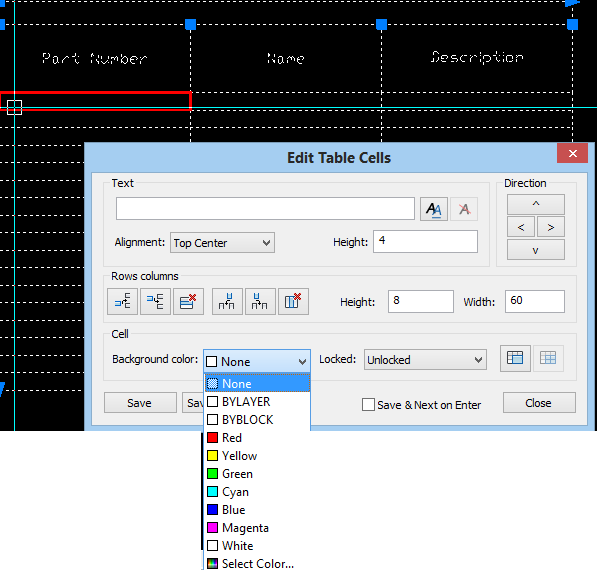
Simply specify the desired number or rows and columns, pick a size for these and set the cell styles. For now we will leave the Insert options as "Start from empty table". Then you can locate the new data table either by a single point, or cross-corner and allow the cell sizes to emerge as a calculated value. Once the table is inserted into your drawing, you can begin entering data, such as naming the headers or inserting values. This is done simply by double-clicking into one of the cells much like we would in Excel. This highlights the selected cell in red and opens up the cell's entry box:

Note that from here we can easily control many aspects of the individual data cell, like background colour, text height and much more. Text itself can be entered directly here, or formatted in the MTEXT window which can be called up by clicking the "Double AA" icon to the right of the text field.

progeCAD tables also support entity data extraction to a new table, something only supported in the full version of AutoCAD and not in AutoCAD LT. To do this we select the "from object in the drawing" insert option instead. Afterwards we are prompted to select the entities from which we want to extract the data and a template as well, if desired.

progeCAD 2014 also supports an insert from CSV file option as well.

progeCAD is a popular AutoCAD alternative in Australia because of it's low cost, local support and large community of users. For more information on progeCAD 2014 or for a free, no-obligation trial version to test for yourself, visit the progeCAD Australia webpage or contact us at our Parramatta training office.


30 October 2012

progeCAD 2013 Released - AutoCAD 2013 & Windows 8 Support

Sydney, Australia 30 October 2012 - The long awaited progeCAD 2013 has been released on the CADDIT.net website. Since 2006 progeCAD has offered high-quality CAD software with distinctive AutoCAD-like features - like native AutoCAD DWG read/write (no conversion) and similar commands and toolbars. Engineers, architects, surveyors, builders, landscape designers, manufacturers and other hobbyists and professionals alike prefer progeCAD as the affordable AutoCAD alternative. progeCAD 2013 is a major new release, and the first version to include IntelliCAD 7 source code into its product.

progeCAD pricing will continue at the low $400+ level (as opposed to AutoCAD's full $6000 license cost plus Autodesk maintenance subscription, etc). progeCAD 2013 continues to offer features used in previous versions, like DWG-to-PDF and PDF-to-CAD support, the free EasyArch add-on for architectural drawing, 3D solids and rendering, advanced hatching, text and dimensioning commands, thousands of free symbols and more. progeCAD 2013 also adds new features including:

  • PC3 plotter configuration file support
  • New Print Style Manager Interface
  • New Printing / Plotting Interface
  • AEC visualization (AutoCAD Architectural Desktop objects)
  • STL (mesh) and DAE file export
  • New Dimension Style Manager Interface
  • Advanced Spline Editing
  • New wireframe "HELIX" command
  • New ACIS Solid "LOFT" command
  • CAD Underlays of PDF, DWF and DGN files
  • Microstation DGN File Import (selected versions, as underlay)
  • New LMAN (Layer Manager)
  • Improved Purge command
  • Multigrip editing
  • New overall GUI style
  • Windows 8 Support
  • AutoCAD DWG 2013 file format support


  • AutoCAD and progeCAD users alike are invited to download progeCAD 2013 free at: http://www.caddit.net/progecad/progecad.php

    This is a free full version 30 day trial which will allow you to save, print, etc and experience the cost savings benefit of CADDIT progeCAD for yourself. progeCAD 2013 licenses will be available as progeCAD single, mobile USB, network NLM, academic and corporate solutions.

    Please contact CADDIT International for more information about progeCAD HERE: http://www.caddit.net/store/index.php?main_page=contact_us

    For technical questions and user experiences about progeCAD, visit our forum HERE:
    http://www.caddit.net/forum/viewforum.php?f=3

    28 September 2010

    progeCAD Free to Schools

    progeCAD is a powerful but low-cost architectural or mechanical design package, somewhat similar to AutoCAD from Autodesk. progeCAD features include Autodesk's DWG format read/write for all versions of AutoCAD from 2010 and as far back as R11. Most of the basic commands are the same, workflow and interface all follow a similar logic. For years CADDIT Australia has been offering progeCAD Professional annual licenses to schools free of charge. One school in the New South Wales TAFE system wrote of progeCAD:

    I personally consider that your company’s provision of this program for academic purposes, free of charge is the best thing that has happened to the CAD industry for a long time... I teach across a number of campuses in the Hunter and am trying to convince other sections to switch over from AutoCAD to ProgeCAD for teaching purposes. The benefits of allowing students to download the program and develop their skills at home at no cost cannot be underestimated, apart from the ethical aspect of positively discouraging the use of pirated AutoCAD software.

    CSTC in Queensland Australia writes:


    It is an exceptional program in the standards it allows students to apply to drawing - variety of linetypes, lineweights, hatchs patterns etc. We are enjoying using it, our trainees and apprentices appear to like the feel of it. Great program.

    A few of CADDIT's academic program subscribers are from outside Australia. One school from overseas writes:

    Since we only have a single, one-semester course that uses CAD, this offer CADDIT makes to license ProgeCAD to schools at no charge is a wonderful effort supporting education. Our students are able to gain experience with professional software and several have applied these skills in internships and subsequent educational experiences in vocational/technical programs and college. Without ProgeCAD's support, we would be forced to use some consumer-level software, as it would be extremely difficult to justify spending thousands of dollars to license professional CAD software for a lab that will be used with a single class of students.

    Another student used the opportunity to submit a new concept for a local highway intersection to local planning authorities..
    progeCAD can be downloaded free of cost HERE. For more information about how progeCAD can be used in your school, visit http://www.caddit.net/progecad/educational.php

    13 August 2010

    CAD Software Update for progeCAD 2010 Users

    CADDIT.net has released a new update of progeCAD 2010 10.0.10.8 for immediate download on their website. progeCAD is a low-cost compliment for AutoCAD from Autodesk, offering similar commands and editing AutoCAD DWG files but costing thousands less to buy. The progeCAD 10.0.10.8 update is free to all licensed progeCAD 2010 users and offers several key fixes that our users have requested, including these listed below:

    For End Users:
    Gradient hatch: improved visualization in printing
    Improved performance when layouts have hidden or shaded viewports
    ICAD.LSP continues loading even when reading ICAD.SDS fails
    Fixed active layout in status bar opening a drawing on paper space
    Last path used to open drawings is saved correctly
    Fixed save of Dynamic blocks of DWG 2010 version
    Fixed save of drawings containing Multileader and improved plot settings extraction
    Fixed change of active DIMSTYLE in dialog
    Changed reopen of property palette after print, to avoid conflict between print dialog and property palette
    Fixed isolated crashes caused by certain entity displays
    Fixed isolated crashes on Trim/Extend commands
    Fixed problem of command typing with Windows 7 (Chinese Version)

    For Developers:
    Fixed 'send of message' to VBI workspaces

    New Features:
    Added Beta version of LispDefender (Lisp protection)
    Added Proxy capability for both updater and registration


    AutoCAD LT users are especially invited to try this latest release of progeCAD 2010. progeCAD offers several important features that AutoCAD LT does not, including 3D modelling and rendering, full programmability (C++, VBA, AutoLISP), multiple profile support, Network Licensing, DWG 14 export, Express Tools, Image Tools, advanced PDF printing and more. A free no-obligation trial of progeCAD Professional can be downloaded HERE.

    29 March 2010

    progeCAD Upgrades: What are my choices?

    Until 11 May 2010, CADDIT.net is sharing in a global limited-time 15% discount for all upgrades to progeCAD 2010 Professional. This includes discounts to the following basic upgrade options:

    The procedure for upgrading progeCAD online is simple: select the matching progeCAD upgrade for your current license, fill out the bottom text box of the product page with your current serial code(s) and complete the order as usual.

    It is also possible online to migrate or convert different CAD licenses to progeCAD Professional, Network or USB versions.

    To upgrade from an older version of AutoCAD LT (2004 or newer), IntelliCAD 6, certain versions of TurboCAD Professional, Vectorworks, Microstation, BricsCAD and other software HERE. As with direct upgrades for progeCAD, upgrading simply requires entering a valid license code and a description of the old CAD software in the bottom text box provided. Always check this cross-over order form for a list of software currently qualifying for upgrade.

    To convert from either progeCAD Professional stand-alone license or another CAD package to progeCAD Professional USB version, use this order page and select which system you are upgrading from the drop-down menu "product-current" toward the bottom of the order page, as well as filling out the current serial number. The final price for the USB upgrade varies depending from which previous CAD program that one upgrades from.

    For example, why "upgrade" from AutoCAD LT 2006 to progeCAD Professional 2010? Here are some reasons: AutoCAD DWG 2010 file editing, Windows Vista & Windows 7 support, 3D modeling and rendering, AutoLISP and VBA programming, Google Earth export, Express Tools, Quick Dimensioning, PDF import, Raster to Vector tools, gradient hatching - all offered in progeCAD at modest cost - but not in AutoCAD LT 2006. In fact, while the gap between AutoCAD LT and AutoCAD widens, the gap between progeCAD and AutoCAD is narrowing.

    A full version of the new progeCAD 2010 Professional (with 10.0.4 patch) can be downloaded HERE. It will run without limitation for 30 days before you can decide if it meets your needs.

    16 July 2009

    Does Google Abuse Position to Promote Their "CAD" Software?

    I am not sure how many follow the PageRank™ system that Google uses for 'assigning a numerical weight (of importance) to a web page'. For some time now Google has been assigning Sketchup.com a higher PageRank(PR 8) than Autodesk.com(PR 7). Could Sketchup.com possibly be a more important resource on the web than Autodesk.com?

    According to most web traffic indexes, Sketchup.com doesn't receive a small fraction of the traffic which autodesk.com gets. Autodesk.com is also a much older site than sketchup.com. By Google's own index, Autodesk product names are searched several times more than "Sketchup" as a key word. Most of those searches are strictly related to Google free version of Sketchup. Sales of Professional version of Sketchup don't actually surpass Autodesk - not by a long shot. But Google does happen to own Sketchup.

    Here's the problem. I think Google doesn't actually know much (or care) about CAD software, much less the needs of engineers and architects who use it. Some people (like myself) wouldn't even consider the free version of Sketchup to actually be a true CAD program. Yet Google PageRank seems to assume the position that this brand is arbitrarily more important, somehow more significant, more useful than any other CAD resource on the web. This artificial manipulation of "significance" influences the results people see when they search for terms like "CAD".

    Is this what happens when a large company in control of a large infrastructure uses that position to cross-promote unrelated products from other sectors? Google could just as easily buy an accounting package tomorrow, brand it as Google something and suddenly their site has PR 8. Just like that.

    It's probably true that Sketchup is a significant product, as many use the free version for creating buildings and other features in Google Earth. Other CAD programs, including AutoCAD and progeCAD can do this as well BTW. But would anyone besides Google consider the site (and by natural connection, the product) more significant than ALL other CAD software sites?

    10 April 2009

    Free AutoCAD a Hoax

    Autodesk recently published an article reading, in part, "In order to get ahead in the workplace, you need to invest in yourself by increasing your knowledge and expanding your skills.. The program offers... Free Software License*"

    The timing for this announcement was probably no accident. Autodesk's paying yearly upgrade buyers (unsubscribed) got a big shock just two weeks earlier when Autodesk unveiled plans to triple their upgrade prices. So this quick fix to bury any bad karma was probably planned weeks in advance.

    But is the "Free Software License" really free? Actually the license only lasts for thirteen months. Applicants must be able to prove that they are an unemployed design professional, and give reference to their last place and time of employment. Appearantly it is also watermarked "Educational", so it can't legally be used for any kind of commercial work. In other words, this isn't what you were thinking it was. Autodesk is really just expanding their educational program to include recently unemployed users of their software.

    Far from "caring about the little guy", Autodesk continues to relentlessly charge high prices to their paying customers, accost people trying to sell AutoCAD on eBay, drag small businesses to court who try to enable high-end functionality in the lower price Autodesk products like AutoCAD LT and kill open interoperability of their file formats.

    Sorry, no free AutoCAD.

    23 March 2009

    Who is the Best BIMmer?

    For those not familiar with the expression, BIM stands for Building Information Modeling. BIM is common tech speak for using information-based building semantics in CAD design workflows. The exact definition is actually still evolving. BIM products include the likes of Autodesk Revit, Graphisoft and Bentley. Two things generally characterize BIM software: increased program complexity and higher software costs. Some liken BIM in the architectural industry to PLM for product manufacturing.

    We would argue one important difference: PLM was a customer driven concept to meet large scale manufacturing needs. However, "few have pursued full 3D (building design) modeling with great vigor, and even fewer have embraced BIM and information extraction, even though the AEC software industry has spent much time and capital creating and promoting BIM software," states Goldberg, H. Edward in CADalyst magazine. So a large portion of the need for BIM software may be originating from the software companies themselves.

    One thing almost everyone agrees on is that there is a right way to BIM and a wrong way to BIM. But that's about where agreement ends. How to BIM depends largely on which marketing team one chooses to listen to. Autodesk, Bentley, Nemetschek and others are all staking claims "to BIM the Best" in what appears to be the CAD industry's latest gold rush to establish a title standard.

    The question arises if this will actually be a standard that most businesses need. Full scale BIM deployments can be very expensive. They may requiring extensive retraining and, in some scenarios, a complete refit for design and business workflows. Interestingly, none of Autodesk's ROI charts seem to take this last aspect into account. And even if large companies succeed in (at least partially) implementing BIM, will the solution scale downward for small business and supplier integrations?

    Previously on our CAD Blog we introduced our low-cost BIM alternative CP-System, which can be dubbed our "Anti-BIM" proposal. CP-System offers AutoCAD, AutoCAD LT (using LTX), progeCAD, BricsCAD, ZwCAD, CADopia and other IntelliCAD brands quick but accurate HVAC, electrical, plumbing, architectural, mechanical, structural, hydraulic design with extensive parametric symbol libraries. More information about CP-System and a free 30-day trial is available HERE.

    10 March 2009

    AutoCAD LT versus progeCAD 2009 CAD Software

    AutoCAD LT (AutoCAD "lite" version) is still used by many companies who require compatible AutoCAD DWG design software, but have no desire to pay several thousand dollars for a single license of the worlds most expensive mainly-2D design platform. progeCAD is design software not sold by Autodesk but distributed through other companies like CADDIT. progeCAD offers native DWG editing and most commands found in the full version of AutoCAD, including their own AutoLISP interpreter, VBA and C++ (SDS/ADS) frameworks. How do these two products compare regarding features and cost?

    Feature comparison: progeCAD actually offers many features missing in AutoCAD LT. Most of these are features which Autodesk deliberately removed from AutoCAD LT to redirect users back to buying AutoCAD. These features include full ACIS 3D modelling and rendering, user profile support and the aforementioned LISP, VBA and C++ interfaces. However, AutoCAD C++ add-ons will need to be edited and re-compiled by the supplier before they will run in progeCAD. progeCAD also supports AutoLISP protected by AutoLISP encryption security. progeCAD also offers extra features like Google Earth KML, SVG and PDF file export.

    Performance comparison: AutoCAD LT can run a bit faster than progeCAD, although that differs form drawing to drawing, depending on elements, layout, size and complexity. progeCAD, however, can have a somewhat smaller resource footprint on RAM and disk space requirements. As of progeCAD 2009, both programs offer paper size visualization in layout mode, right-mouse button context menus, a spelling checker and quick dimensioning.

    Cost comparison: This depends on local markets, exchange rates and promotions, but generally speaking AutoCAD LT costs three to four times more than does the Professional edition of progeCAD.

    Both systems offer a download version for users to try for themselves. progeCAD can be downloaded HERE, from CADDIT directly, or from many other sites. AutoCAD LT is available from the Autodesk website.

    26 February 2009

    Can TransMagic Really Help Solve 3D CAD Translation Problems?

    Recent economics have spawned an increasing need for business to adapt in new markets. And new markets often require companies to read new 3D CAD file formats - but "total cost of ownership" for maintaining additional CAD environments can be costly and time consuming. TransMagic is central, easy-to-use 3D collaboration software for reliably sharing CAD files across multiple CAD programs. TransMagic saves companies time, effort and money by offering a better option than budgeting and maintaining several independent CAD environments.

    TransMagic software translates CAD information directly from one modeling technology to another, supporting direct ACIS, ParaSolid *.x_t, CATIA V4 & V5, Unigraphics JT and more, preventing data loss. TransMagic's functionality extends far beyond any basic 3D model translator, with robust tools like "Gap Check" and "MagicSurface". TransMagic repairs model gaps, heals unstitched surfaces and automates much of the rework that often comes with basic STEP and IGES file exchange.

    Superlift, one of the largest suspension companies in the off-road market, is one manufacturer using TransMagic to save time. "TransMagic has made it possible to open any neutral or native CAD file we receive, quickly isolate, repair and retrieve what we need," said Kevin Dill, Product Development Lead Engineer for Superlift. "Repairing damaged files and grouping what we need prior to importing has saved us lots of time. Our time is now better spent working with clean, manageable files that we can rely on as we design new products."

    ZEMAX Development Corporation, developers of ZEMAX optical system design software, had a similar problem. "Our customers struggle with the handover between mechanical and optical engineering – they are optical engineers and not experts in CAD. Mechanical CAD packages are three orders of magnitude coarser resolution than what is needed for optical design and errors in mechanical designs may not be apparent in the CAD package," says Mark Nicholson, Vice-President, ZEMAX Development Corporation. "TransMagic is able to simply explain what is wrong with a badly-formed CAD file and then easily repair the file with a high resolution before importing into ZEMAX. CAD files repaired by TransMagic are imported into ZEMAX with no problems."

    An independent review of TransMagic was recently written by Frank Sherosky of the Detroit Automotive Technology Examiner. In part he writes, "TransMagic appears good for suppliers, because it reads proprietary CAD files in their native formats. (While the operative word is "read," I'm also concerned with "write.") That alone makes for higher data-read integrity, not to mention same-day implementation. Furthermore, the company touts the system is scalable, meaning suppliers can buy value-priced suites and add more capabilities at a later time."
    The full review can be read HERE.

    For more information about if TransMagic can help your business, you can
    contact us on this page.

    18 December 2008

    Autodesk Mergers Continue; Buys Algor FEA

    When I posted several days ago that economic downturn was a good time to invest in new technology, I didn't exactly have serial corporate takeovers in mind. Despite its fallen share price, Autodesk continues its series of acquisitions with its takeover of Algor. In business since 1974, ALGOR, Inc. is a long-standing provider of finite element analysis software.

    It was announced on Tenlinks today that
    Autodesk is to buy Algor "for approximately $34 million". Similar announcements have been made on Yahoo Biz and Reuters.

    According to the announcement in Reuters, "Upon completion of the acquisition, Autodesk's current intent is to integrate ALGOR into its Manufacturing Solutions business unit and to continue developing and selling ALGOR's core product line. Autodesk plans to continue developing the ALGOR products with an open approach, allowing direct data exchange between ALGOR products and multiple computer aided design software offerings."

    Algor currently integrates their base static stress FEA "Designcheck" solution with several CAD CAM industry solutions, including Rhino, Cadkey, SolidWorks and Autodesk Mechanical Desktop. Several of Algor's strategic business partners were not anticipating the Autodesk takeover.

    15 July 2008

    Autodesk Escalates War on "Open DWG" File Technology

    progeCAD and similar products continue to win user confidence as low cost substitutes for overpriced CAD. And American corporation "Autodesk" is getting mad. Passive resistance to DWG clone technologies has developed into all out war, both in the court room and in the board room.

    The Open Design Alliance (ODA) is a nonprofit consortium of CAD companies cooperating in a rare way to clone one of the few major reasons people still pay Autodesk prices - the binary DWG AutoCAD file format. The ODA posts regular updates of their robust DWG and DGN libraries on a website for member use in their own software - software like progeCAD.

    When Autodesk itself was invited to join the ODA, the company declined. Gradually Autodesk began a long series of legal attacks on the ODA. On November 13 2006 they officially filed suit for their "Trusted DWG technology" which superficially warns users about opening DWG files that didn't come from their own AUD$6000 CAD system. They are also litigating for ownership of the letters DWG as a trademark belonging to Autodesk. The problem is that the USA trademark office doesn't recognise file extensions as "trademarkable". DWG is really just another file extension like ".doc" or ".txt".

    Meanwhile, Autodesk finally realeased their own "RealDWG" toolkit to compete with the ODA, the caveat being that any applicant must meet with Autodesk's approval as a developer that will not compete with any of the Autodesk high-priced product line. It was quite an effective move to begin cherry-picking "realDWG" converts from important ODA contributors, undermining it. ODA gets its funding from its members.

    Autodesk has quickly made their next move in this apperantly two-prong gambit to weaken the ODA. Following at the heals of the completed million-dollar Autodesk assimilation of Moldflow, Autodesk has announced a new "cooperation" with their next unlikely target, Bentley Systems(Microstation). At one time, Bentley was a serious AEC market competitor. Then, in February 2008, a key Bentley developer changed sides to Autodesk. Strangley, Bentley Systems has now been approved for use of the Autodesk "RealDWG" toolkit. A press release was posted celebrating this "Advance in AEC Software Interoperability". Now think, would you let your worst enemy watch your house while you were away? The truth is that Autodesk is as unconcerned in promoting real file interoperability as they have ever been. The endgame in this gambit really stood later in Bentley's own reaction, stating that their ODA was "now irrelevant". There is further speculation that Bentley Systems is next in line for Autodesk assimilation.

    progeCAD is a product that reads, writes, edits and converts Autodesk DWG format files in a CAD interface very similar to AutoCAD 2002. Some consider it a clone. Recently this product has become very stable and robust so that even large companies are saving thousands by replacing expensive AutoCAD installations with progeCAD.

    It is obvious that Autodesk is now at a de facto state of all out war against such products. Should they win, businesses will have no choice but to pay big AutoCAD prices. My gut tells me that Autodesk is scheming something parallel to their 2010 release to finish the ODA for good. Is the world's best hope is that the EU will take the same anti-trust motions against Autodesk as they have against Microsoft? Maybe the ODA needs to move to Europe?

    05 July 2008

    Will Autodesk Moldflow Merger Help Plastic Simulation Software Users?

    On June 25 2008 Autodesk, Inc.(Nasdaq: ADSK) completed its acquisition of Moldflow Corporation, partly made possible by means of "Autodesk's existing revolving credit facility with Citibank N.A." What the press release didn't mention was the removal of several directors from the Moldflow board. Not Autodesk's. Of course not. And now I am guessing that "merger" is the psychologically-correct way of saying "takeover"... a way that doesn't make end users want to run away quite so fast. Like the "merger" of Cimmatron and GibbsCAM, right?

    Autodesk mentions a "Safe Harbour" statement as part of their press release concerning "the impact of the acquisition on Autodesk's earnings per share, business performance and product offerings; Autodesk's commitments to Moldflow customers; and the impact of the combined product capabilities." One always wonders if and how the working class end user will benefit. On one positive side, it could result in some free version release similar to Maya. No doubt Inventor will enjoy enhanced integration, but will other platform users (i.e. SolidWorks) continue to enjoy the same benefit?
    Google.