Showing posts with label 2015. Show all posts

22 September 2015

New Geomagic Design Features & How to Move a License

Geomagic Design offers the best of both worlds with robust feature-based parametric modelling side-by-side with direct editing tools for manipulating imported geometry from STEP, Parasolid, Inventor and other 3D CAD software, at a comparatively affordable price. With the release of Geomagic Design 2015.1 (17.1.0) will come several new features available to software subscribers as part of their product update. Updated MCAD file format support will help ensure ongoing model read/write interoperability with newer versions of 3rd party CAD systems like Solidworks and Siemens Solid Edge.

Two new features provided in the 2015.1 update will be associative assembly mirroring and "live linking" with KeyShot rendering software. Both features will save time for designers.

Assembly Mirror Component feature allows designers to create mirror-reverse instances of existing parts and subassemblies across a selected plane. This mirror feature can maintain associativity and reflect changes made to the parent instance, including motion etc. Live linking with KeyShot likewise saves design time by allowing designers to update scenes with new geometry from the Geomagic Design model while keeping all existing scene settings, material bitmaps and light positions. Below is a video released by 3D Systems demonstrating an early version of this functionality:


For users of previous versions of Alibre or Geomagic Design, these new features add to the value of the excellent flat-rate upgrade-and-update amnesty offer on CADDIT.net. Questions about Geomagic Design CAD Software can be submitted to CADDIT here.

Speaking of questions, several users have been asking about how it is possible to "move" a license using the new Flexnet license management for Geomagic Design. Simply stated, the software is deactivated from the "License Key Status" on one PC and activated on another. Without a license activation, Geomagic Design will ask for one each time it is started. If the license code is already activated on another PC, this license can be made free again using these steps as shown below: 1) Make sure the current system is connected to the internet. From the Home Window of Geomagic Design click "Help" -> "About Geomagic Design". 2) Click the "License Key Status" button. 3) Select "Virtual Dongle":


4) Click "Deactivation" from the Virtual Dongle functions. Select your license and click the grey arrow (lower right of box) to proceed. Once the license is deactivated online, it can be activated on the new target PC/Laptop/etc:

Geomagic Design users wishing to move their license offline, without use of an internet connection, may consider purchase of a hardware USB dongle available from CADDIT here.

24 February 2015

progeCAD 2016 Released with New "Dynamic" Features

Sydney, Australia 24 February 2015 - CADDIT Announces the release of progeCAD 2016 Professional CAD software. Since 2007 progeCAD has delivered the leading low-cost AutoCAD-alternative product for Australia and many other regions. progeCAD offers an affordable way to read and write AutoCAD files, using similar commands and toolbars as used in previous releases of AutoCAD itself. Many choose progeCAD over AutoCAD LT because of it's low cost (currently a little over AUD $500) and features like 3D modelling and AutoLISP which are blocked in AutoCAD LT. progeCAD is commonly used in a wide variety of industry domains, including building design, electrical and plumbing, telecommunications and fibre-optic diagrams, civil land survey, engineering, fabrication, joinery and much more. With progeCAD Professional 2016, a CAD drafter can create very large complex drawings and save directly to AutoCAD or AutoCAD LT without data loss or conversion, as shown:

DWG 2015 Test TrueView
  Left, AutoCAD 2015 DWG, Right same file read in new progeCAD 2016

Existing users who upgrade to progeCAD 2016 version will enjoy a host of new features, including dynamic input at the screen cursor, dynamic UCS for selecting 2D drawing planes on-the-fly, solid grips for editing 3D solids dynamically and support for annotative objects.

progeCAD Dynamic Input
Dynamic input allows the user to enter options and values for drawing commands via context-sensitive "tooltip" boxes and menus which appear near the graphics cursor. progeCAD dynamic input works with geometry, text and dimensions. For some users, this graphical input system seems more "user-friendly" than the traditional command prompt and use of relative polar notation.

Dynamic UCS allow users to choose a 2D planar coordinate system (UCS) merely by starting a drawing command like LINE and "hovering" over supported entities which will temporarily appear 'dashed' indicating a temporary UCS is selected. Both Dynamic Input and Dynamic UCS can be switched off at any time via their buttons on the bottom status bar.

progeCAD Annotative Detailing and Notation
Annotative Objects were introduced in AutoCAD 2008. Using Annotative Objects in progeCAD allows the user to create dimensions, text and even hatches which scale automatically scale according to the viewport or plot scale they are presented with. With more flexible detailing, drafters will not need to create as many text and dimension styles. Those which are created can be more flexible. In progeCAD, to make any supported detailing style or hatch "annotative" simply by clicking the new "Annotative" option provided.

progeCAD 2016 also offers a new ARCTEXT command with a very similar interface to the one provided by AutoCAD Express Tools. You can define text justified to an arc (not a full circle) with options on spacing, height etc. as shown here.
text along arc in progeCAD

New commands also include support for saving drawings and configurations to and from supported Cloud Storage accounts including Dropbox, Google Drive and Microsoft OneDrive. Since we now live in a time where cloud storage is more common, this new feature may prove very convenient for some users. Other new features include a new BREAKLINE command, updated icons and a larger selection of interface skins to choose from.

progeCAD 2016 Professional is available for immediate download form CADDIT. The new version will run for 30 days with all features enabled, thereafter a license must be purchased. Existing users can purchase an upgrade to progeCAD 2016 Professional from their current version. Any other questions about the new progeCAD 2016 release can be submitted on the CADDIT Contact Page.

19 February 2015

Geomagic Design 2015 (v17) Released, 32 Bit Support by Special Request

Sydney, Australia 19 February 2015 - CADDIT Announces the immediate availability of Geomagic Design 2015 V17 Release. This is somewhat a stability / bugfix release but with several new and important features requested by users in Australia and around the world. 3D Systems demonstrates its commitment to making Geomagic Design an improved tool for 3D mechanical design and drafting with this release. The most significant (and perhaps most understated) enhancement is the long-awaited Global Parameters feature. What are "global parameters"? Basically, a global parameter is a design value or equation which is shared across multiple parts and/or assemblies. The concept is very similar to SolidWorks global variables. Global variable data is stored independently in a newly released format called an ".AD_GLP" file. Any part or assembly can be associated to the values stored in an AD_GLP file.

A new set of Global Parameters can be created in Geomagic Design from the file menu -> "New" -> "Global Parameters" as shown in the Home window screenshot below:

Selecting this file type opens the new Editor interface for Global Parameters as shown. Create new parameters and save the final data as a new AD_GLP:


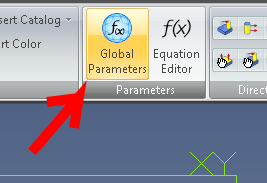
Your new Global Parameter file can thereafter be selected from any part or assembly and be used in that design by clicking the new "Global Parameters" supplied in both the Part and Assembly menu ribbons. Click "Select File" and choose your newly created AD_GLP file from the folder where it was saved to.


Other new features include: The Isolate command has been added to design instances in the Drawing Explorer. It is used to isolate a design instance in a drawing view, especially ones that are affected by an assembly feature. Standard fundamental deviations and International Tolerance (IT) grades can be selected to create Fit Tolerances on a hole and shaft, which will determine the type of fit. The dialog boxes for creating Reference Geometry have been updated to more intuitively show how reference geometry is created and to visually assist users on the various creation methods that can be used in different reference geometry creation situations. A new "Summary BOM" can now be created from an assembly. It can be used to override the Treat as part in BOM when used as a subassembly option. This is useful for quickly creating a BOM that shows all parts in subassemblies if multiple subassemblies have been set to be treated as a part.

A 32-bit version of Geomagic Design 2015 is still available but only by special request. Users should contact CADDIT for link and availability. Legacy users of Alibre Design Pro and Expert are strongly urged to renew their software maintenance subscription if they wish to take advantage or these new features and the remaining 32-bit -platform support. Subscriptions can be renewed online using this webpage: https://www.caddit.net/store/index.php?main_page=product_info&products_id=74&language=en

24 December 2014

Free Upgrade for progeCAD 2016 For Purchases After 15 December

CADDIT announces the worldwide offer of free upgrades to progeCAD 2016 of equivalent type for all progeCAD 2014 licenses and upgrades paid for on or after 15 December 2014. This means that a purchase of progeCAD 2014 USB will also get a free upgrade to 2016 USB at no extra cost, an upgrade from progeCAD 2011 to 2014 will also get 2016 upgrade at no extra cost, and so forth. Upgrades will be distributed during the first few weeks after the global release announcement of progeCAD 2016 on the CAD Software Blog and on CADDIT.net. This free upgrade offer applies to ENGLISH language license purchase only, and will continue until the release of progeCAD 2016 on CADDIT.net.

progeCAD 2016 will offer a more dynamic interface while continuing to improve performance, add new features and fixes. Expected features will include Dynamic Input (Dynamic Input provides real-time input fields at the actual cursor location for certain commands, etc), dynamic UCS and 2D planes as well as supporting Z axis 3D ortho mode and "grips" for dynamic editing ACIS solids in real-time. progeCAD will also support Annotative Objects and Styles, which automatically adjust the size and scale at which annotation objects are displayed in model space or a layout similar to newer versions of AutoCAD. Many other improvements will be provided as well, and a more comprehensive list will follow. progeCAD 2016 will also be the new supported version then going forward after release.


To benefit from this free upgrade offer, simply place any progeCAD 2014 English order on the CADDIT.net website. After the 2016 release, free upgrades will be sent to all progeCAD customers with orders paid on or after 15 December 2014. The progeCAD 2014 serial key will be replaced with a progeCAD 2016 serial key and a new download link will be sent for the software, similar to how has been done in past years. The free upgrade will apply to all new progeCAD Professional, progeCAD USB and Floating Network licenses purchased on or after 15 December. New dongles will not be required for the progeCAD USB upgrade. Free upgrades will also be sent to any users now purchasing a progeCAD 2014 upgrade for an existing seat of progeCAD 2008, 2009, etc. This promotion will last until the day that progeCAD 2016 release is announced on this website.

For more information about this free 2016 promotion please contact CADDIT here.
Google.