Showing posts with label CADDIT. Show all posts

29 May 2024

progeCAD 2025 With Parametric Block Editor and New AEC BIM Tools Released on CADDIT.net

 Sydney, Australia 28 May - CADDIT announces the release of progeCAD 2025. Multiple useful features have been added, including a completely new Parametric "Advanced Block" editing mode, a new set of AEC BIM design tools, improved REVIT and IFC compatibility, Rubber Sheeting and many other brand new functions and commands, as well as further performance and reliability optimizations. CADDIT has been supporting Australia and New Zealand design software and training needs for over fifteen years, with localized support for architects, builders, electricians, industrial designers and safety engineers. progeCAD is a robust general-purpose 2D / 3D technical drawing and CAD program with excellent AutoCAD compatibility and flexibility to suit drafting needs ranging from civil engineering and mining to product manufacturing and fabrication.

progeCAD's new parametric block authoring offers very similar commands to that found in AutoCAD. Designers have a selection of parametric constraints which can be applied to multiple selected entities withing the block editor, including point-position, linear, polar association, XY coordinate location, circular rotation, flipping, alignment and more. Different actions can be combined with these constraint definitions for capturing powerful design and intent logic within the block. Dynamic blocks created with AutoCAD® can be used directly, and remain so until imported to the progeCAD block editor. where it will be automatically converted into a progeCAD "Advanced Block". Advanced blocks created with progeCAD can be seen by other CAD programs, such as AutoCAD®, but again only as simple blocks (without proprietary progeCAD parametrics).

Parametric blocks now in progeCAD 2025


The new 3D AEC Architectural module is compatible with AutoCAD®AEC Objects. The new AEC package allows you to draw 3D architectural elements with a two-dimensional view in plan and takes advantage of a whole series of new Architecture style commands. The drawn entities are now specific AEC elements editable and configurable via the Styles management. By default it replaces our previous EasyArch architectural plugin which still remains available and can be activated with the variable AECMODE. New AEC features include:
• Draw walls, doors, curtain walls, windows, stairs and railings
• Draw slabs, roofs, or roof slabs
• Walls and Slabs can be created by direct conversion of 2D entities
• Multi-level manager to assign levels to AEC entities. Levels contain default settings
for bottom and top elevations, wall height, on/off status, lock/unlock status,
freeze/thaw status, offset, and other settings for walls and plane symbols
• Attach Roof and Ceiling plane symbols to walls and reference them while
interactively creating roof and ceiling planes using the plane solve command• AEC Styles manager: manage & customize AEC Styles for Walls, Doors, Windows,
Curtain Walls and Curtain Wall Units, stairs and railings, and slabs
• AEC Family – imports AEC objects style from external FAM or DWG files.

progeCAD AEC and BIM design Import and Export


 Additional new features include a new REVIT import (up to version 2024), a new DATAEXTRACTION supporting traditional and Advanced blocks and XREFs directly to Excel, IFC file export for sharing designs back to BIM-centric design programs like REVIT, a new AI drawing text translator for supporting multiple languages in a drawing, Rubber Sheeting for faster alignment of multiple datasets and dozens of other new commands and improvements.

progeCAD 2025 is now available for free trial download to test the new features. Please contact CADDIT for more details about this exciting release.


19 April 2024

progeCAD 2025 First Look and Free Upgrades

  Sydney, Australia 18 April - CADDIT announces their testing of the upcoming progeCAD 2025 Professional software product. We also announce that any order placed on or after 15 April 2025 will be entitled to have that order upgraded to a 2025 version after the release announcement on CADDIT.net. progeCAD is an advanced general-purpose 2D and 3D CAD package with similar commands to AutoCAD but with perpetual license and lower price. CADDIT has been supporting progeCAD users in the Australia/New Zealand region for almost twenty years.

Additional to existing features of both powerful 2D and 3D design, CAD file conversion and rendering, progeCAD 2025 will add new domain-specific functionality requested by many users.


A brand new AEC module replaces progeCAD EasyArch, supporting AutoCAD®AEC Compatible 3D architectural elements with a two-dimensional view in plan and takes advantage of a whole series of new Architecture style commands. progeCAD 2025 still offers an installation option for EasyArch if needed.

progeCAD 2025 AutoCAD 2025 AEC compatible

progeCAD 2025 will offer a new parametric block authoring tool called Advanced Blocks. This will offer similar functionality offered by AutoCAD's "Dyanmic Blocks" and will have the ability to import Dynamic Blocks for editing. More details to this tool will come in a future post. There will be many other new features, like drawing translation and "Rubber Sheeting" added, as well as significant performance fixes and improvements.


A free equivalent upgrade to progeCAD 2025 is now offered to all new and upgrade orders. For example, if a user upgrades five progeCAD NLM network licenses from 2022 to 2024 now, all five progeCAD 2024 Network Licenses will also be upgraded to progeCAD 2025 Network entitlement without additional charge after the official progeCAD 2025 release announcement is posted on CADDIT.net. Similar upgrades will be issued for progeCAD USB and stand-alone licenses. This free upgrade offer applies to all progeCAD 2024 new and upgrade orders placed with CADDIT after 15 April 2024.

We believe that the new and improved abilities in progeCAD 2025 will represent an incredible value leap for progeCAD user investment. Additionally, a new series of live training events are being planned in key locations across Australia in 2024 and 2025. If your business is interested in CAD training for multiple users please contact us.

We are pleased about what we are seeing in our progeCAD 2025 early release testing and will be following up with additional details soon. Please contact our Parramatta office for press kit information or general questions about this new progeCAD Upgrade offer. 


27 September 2022

progeCAD 22.0.14 Free Update Released

 Sydney, Australia 26 September - CADDIT announces the immediate availability of the 2022.0.14 patch update for all progeCAD 2022 license types. This update is free for all up-to-date users of progeCAD Professional 2022 Single License (stand-alone), Portable Travel-USB and Network License types. It may be downloaded either through the progeCAD software update, or directly as a complete installation package from the CADDIT website. progeCAD is a general purpose AutoCAD-compatible 2D and 3D technical drawing software used by thousands of Australian businesses and government agencies.

This progeCAD update offers minor improvements in multiple functional areas, including Superhatch and Hatch island detection, Tables and Table Styles, ease of use and appearance issues. These include:

•    Fixed crash selecting specific hatch
•    Fixed zoom on entity in FIND command without "zoom after replace" option
•    Margins set in Table Style are now loaded correctly in table creation menu
•    Fixed EATTEDIT prompt messages
•    Fixed open of drawing with bad constraints
•    Fixed behavior of prompt boxes. Added new variable PROMPTBOXES to enable/disable prompt boxes. Right click menu is now regulated only by the variable SHORTCUTMENU
•    Now creating a new table style copies the base one successfully
•    Fixed Table Styles preview
•    Added "Match Cell" and "Field" buttons to Table Cell context ribbon
•    Fixed prompt menu when command is not active
•    Added "Alignement" button to the Table toolbar for the Classic workspaces
•    Fixed crash using table with block in cell
•    Fixed freeze searching closed boundary in a drawing
•    Fixed SUPERHATCH with circle island in area
•    Fixed SUPERHATCH with rectangular "hole" in area
•    Added double click to edit block in table cell
•    Fixed crash on edit table cell with block. Using "Format Locking" option
•    Added "Block" button to "Insert" panel of "Table Cell" contextual ribbon
•    Added TBB and TINSERT aliases of TABLEINSERTBLK command
•    Fixed ARC command from Lisp
•    Fixed contextual menu on mouse button down
•    Removed display of options list when DYNMODE < 0
•    Changed ZOOM level on FIND command, Implemented FINDZOOMSCALE variable to set scale zoom level (default 5.0)
•    Improved drawing templates dropdown menu in Start Page. Now it will display a vertical scrollbar if the list of the templates is too long

Question about this update for progeCAD 2022 can be submitted through the CADDIT website.

28 October 2020

progeCAD 2021 Release with Improved GPU Graphics

 Sydney, Australia 20 October - CADDIT Announces the release of progeCAD 2021 on CADDIT.net for Australia and New Zealand. Based in Sydney, CADDIT has been supporting progeCAD users in Australia, New Zealand and surrounds for more than twelve years. progeCAD is a powerful general-purpose 2D and 3D CAD package which offers very similar work environment as AutoCAD, with additional tools and  lower price. progeCAD 2021 offers multiple improvements in areas of graphics performance, interface handling and file format support. After several months of per-release field testing, CADDIT is pleased to follow our global partners with the release of this version.

progeCAD, like most CAD systems, offers both simple software CPU-driven graphics and much faster hardware GPU-driven graphics. The hardware graphics offered in progeCAD uses the common OPENGL graphics language, supported at least in part by most modern graphics cards. OPENGL compatible graphics are offered by a variety of NVIDIA and Intel GPU like NVIDIA QUADRO, NVIDIA GTX and even on-board "business graphics" offered by Intel. There are different versions of OpenGL and most modern requirements call for at least OpenGL version 4 supported by Intel HD (since Haswell, excluding older Intel "Ivy Bridge" drivers which only supported OpenGL 3). "Software" graphics on the other hand, do not use any GPU, but emulate 3D graphics instructions to the main CPU. This is an even slower than Intel HD "on board" graphics, but also a bit cheaper (although most modern PCs/laptops at least offer Intel Graphics). Which graphics are most suitable depends on job size and user situation.

Details of the updated "Graphics Performance Panel"
Details of the updated "Graphics Performance Panel" with (1) Option to use hardware or software graphics (2) Optimization options new in progeCAD 2021  (3) Installed GPU list


Two new GPU optimization options are shown in 2021 Performance Options panel:

Hide small entity in block: This saves GPU bandwidth by masking the most insignificant features of block instances, hiding them as invisible. NOTE this does not affect printing, block printing is still in full detail. The job of this option is strictly to increase display efficiency.

Use Frame buffer object display system: Also new in progeCAD 2021 - this introduces dedicated memory for GPU temporary display storage as another method of optimization, commonly known as a frame buffer. As most NVIDIA cards include their own graphics memory, this option is mainly for lower-cost Intel on-board graphics which actually use system RAM for frame buffering. This will be especially useful option to enable on lower-cost laptops, Microsoft Surface Pro, etc without NVIDIA graphics but having something like the Intel UHD 5000 GPU.

progeCAD 2021 also has included a number of other new graphics optimizations for cropped and large size XREFS handling, improved realtime CONCEPTUAL and REALISTIC rendering performance, better ISOLINE display as well as optimizations for drawings with active shading. Note that a number of third party hardware options have been specifically discussed in this article to assist users with the general principles to make the best decision for their own choice of CAD hardware. A final note especially about Intel on-board "business" graphics: we have found significant performance improvement simply by updating to the latest driver version for the GPU.

progeCAD 2021 is now available for free download on CADDIT.net. CADDIT re-affirms their commitment to perpetual non-rental licensing for all progeCAD license types including simple single stand-alone PC licenses, portable USB licenses and floating network NLM licenses. We encourage users to consider the new options discussed in this article to help them in their choice to use progeCAD. Contact CADDIT Australia for more information about progeCAD or new features offered in progeCAD 2021.


21 November 2019

progeCAD 2020 Update Released on CADDIT.net

Sydney, Australia 09 November 2019 - progeCAD 2020 Professional 20.0.6 has been released on CADDIT.net, with free upgrade entitlement for all existing progeCAD 2020 users. progeCAD Professional is an affordable general-purpose CAD computer program having similar commands and workflow to AutoCAD, native DWG file read/write and extensive publishing/translation features. Advanced progeCAD features include full 3D modelling and rendering, extensive symbols library and Express Tools similar to those offered in AutoCAD. Using progeCAD, designers can seamlessly communicate with an AutoCAD environment. progeCAD 2020 was first released on CADDIT offering a heap of new features like 4K display support, drag-and-drop icon palettes, BIM IFC and RECAP .rcp/.rcs support, table formulas, 3D silhouette printing as well as new interfaces for PUBLISH and EXPORTPDF and new EXPRESS Tools.

BIM IFC files can now be fully imported as editable geometry. progeCAD now supports either import or export of at least 40 different major design formats (not including format versions), including 3D models, 2D drawings, mesh and point cloud models, vector and raster graphic images as well as embedding formats like PDF, offering a true swiss-army-knife like set of CAD functionality essential and affordable for any CAD designer.


3D BIM IFC Rendering progeCAD 2020
Direct BIM IFC import into progeCAD 2020 Professional with immediate 3D rendering in free Artisan rendering studio (Artisan for progeCAD included with purchase)


 The new progeCAD Professional 20.0.6 is a bugfix release offering users over 100 improvements over the previous 2020.0.4 version:
  • Improved support for functions like hatches placed in layout, nested BEDIT sessions, REFEDIT fade, embedded image PAN and ZOOM (when MTMODE = 3), Unicode support and 3D solid regen improvements.
  • Targeted fixes for existing commands like HATCH, BOX, HELIX, FILLET, SWEEP and dozens more..
  • Performance improvement for STEP import, 3D PDF, APPLOAD, COPYCLIP
  • API tweaks and small fixes to DCL, LISP and .NET
  • General improvements in interface and workflow

Users of previous progeCAD versions are strongly encouraged to consider upgrade to progeCAD Professional 2020, for better compatibility with AutoCAD as well as the ongoing updates for Microsoft Windows. A full price list for all upgrade options, including multiple stand-alone, USB and floating network licenses, can be found on the CADDIT website here (link). A fully enabled 30-day trial can also be downloaded. Additional questions about progeCAD features or upgrade options can be sent directly to CADDIT Australia via the Contact Us page.

22 May 2017

progeCAD 2018 Released on CADDIT.net with New Artisan Render

Sydney, Australia  22 May 2017 - CADDIT announces the release of progeCAD 2018 Professional on the website for immediate download. progeCAD is a flexible general-purpose CAD drawing program that is used in many industries, including architectural design, fabrication shops, landscaping, strata and property management, mechanical design and many more. progeCAD is the long-standing low cost alternative for AutoCAD® and AutoCAD LT® software in Australia. progeCAD 2018 continues to offer perpetual license options (no rental or annual subscription required) and is tested for compatibility on Windows 7 through to Windows 10, both 64-bit and 32-bit versions. All progeCAD 2018 licenses now include Artisan for progeCAD - a new 3D rendering tool for creating business presentation-quality 3D graphics from progeCAD models and drawings.

New presentation-quality 3D rendering with free rendering add-on


progeCAD 2018 refines the native 64-bit performance first introduced last year with improved general performance and reliability. Major improvement in progeCAD Microstation V8 file interoperability now offers users complete ability to open, save, create, and edit .dgn files in native Microstation V8 DGN format. progeCAD further now supports the Microstation .dgnlib,.rdl,.cel formats. Users now also may use geometry from PDF and DGN underlays as an ESNAP reference. This example demonstrates the close read/write compatibility that progeCAD also offers for users with files from Bentley Microstation now:


    Microstation imported to progeCAD and saved again
          
progeCAD .DGN read back into Microstation V8i           
       
Development has also completed on a number of other new features. The progeCAD PDF printer now supports PDF printing with layers. Point cloud import now supports LIDAR scan data .las and .laz (compressed) formats. Land planning and civil engeering teams will also greatly benefit from the new support of ESRI Shape import. The shapefile format is a popular geospatial vector data format for geographic information system (GIS) software. It is developed and regulated by ESRI as a (mostly) open specification for data interoperability among ESRI and other GIS software products.

progeCAD 2018 offers a completely new in-place MTEXT editor. Extensive implementation of Fade controls for XREFerences and locked layers ships as well. progeCAD 2018 also delivers additional support for AutoCAD VPMIN and VPMAX for maximizing and minimizing viewports, as well as implementing the Superhatch command accessible through the Express Tools menu has been introduced to create amazing hatches out of images, blocks, external references and wipeout objects. progeCAD 2018 further delivers:
Contextual Ribbons
Toolbars locking
Clickable Command Prompt Options (string options on command line can be selected with mouse)
New Advanced Rename interface
New Array Interface
Support for variable DIMLAYER
Support for variable HPLAYER and HPTRASPARENCY (Default layer for Hatch and level of Hatch transparency)
3D Sub Entity selection (selection of Faces and Edges on 3D objects)
TEXTFRONT Command (bring all texts to front)
CACHEFILES variable (control the external cache layout data to enhance layout switching performance and memory usage)
PathWatcher (control of a folder for automatic DWG opening)


Current iCARE subscribers and those participating in our recent free upgrade promotion will begin to receive their progeCAD 2018 upgrade notices in the next several days. Users of previous versions of progeCAD can order the appropriate upgrade for them from the CADDIT progeCAD upgrade price list. There is much more to be said about the new progeCAD 2018 release, including dozens of other new commands, variables and improved functions (such as the 3D rendering) which can be explored by downloading the software for a free 30 day trial from CADDIT. We are very excited about this release and hope that many users will benefit form the hard work invested in this version of progeCAD. Any questions about general features of progeCAD can be directed to CADDIT via the CONTACT US page HERE.


03 November 2016

Understanding progeCAD Upgrade Options

Many advances have been made in progeCAD development in recent years. Apart from native 64-bit CAD editing and better OpenGL hardware support for premium graphics cards, progeCAD continues to maintain its highest level of compatibility with recent Windows and AutoCAD updates. For some users, choosing the right progeCAD upgrade can be a bit confusing. This is understandable. Aside from the basic types of upgrades such as floating Network licenses, portable USB or Stand-Alone, there are also several different options for each type.


The first tip is that the latest version of progeCAD supports the same DWG file format as did previous versions. This means that progeCAD will open drawings even if they are created in a version several years earlier. Of course, as with all versions, the DWG format itself should be correct and error-free. As mentioned on the CADDIT forum, regular use of progeCAD tools like "audit", "purge" as well as regular backups can keep drawings safe and free of any format errors.

The second tip is that - unlike other CAD systems - it is still possible to upgrade from any commercial version of progeCAD without paying the full cost of a new license. For example, even if a user has a 2008 license there is still a discount for "trading in" the old license towards a new 2017 version. Here is how.

To upgrade any version of progeCAD we start on the CADDIT webstore:
https://www.caddit.net/store/index.php?main_page=index&cPath=12

If a user prefers to use the webstore categories, all progeCAD upgrades can be found under the "progeCAD Upgrades" category.

It is possible to upgrade from any type of paid progeCAD license to any other type of paid progeCAD license. Under the "progeCAD Upgrades" category, we see several different types of license that can be selected for the upgrade. progeCAD licenses are upgraded on a one for one exchange basis. That is, for one "older" valid license code (which has not been, for example, already upgraded before), a user is entitled to one upgrade price in the license type of their choice. If a company has multiple licenses, there is no requirement to upgrade all of them, but it would be advisable to do so. Of course, the user does not need to change the license type just to upgrade - they are welcome to keep on the same type as the older one they are upgrading from (e.g. Single). The point is, either way works. Any of the upgrade products will activate the latest version of software (currently progeCAD 2017):


For example: we could decide that a floating network license would be more suitable for our company, rather than the single seat license which we had now since, say, 2013-2014. In that case we could begin to order our upgrade by clicking on the "progeCAD 2017 Network License Upgrade" product, even though what we have now is a 2014 Stand-Alone license from three years ago. Clicking on the product title opens the product page - in this example the product page for "progeCAD 2017 Network License Upgrade". A similar process works if a user wishes to change to a USB, or simply to keep their Single license updated. Simply click the product title for the license type you wish to upgrade TO (or, to keep).

The forth tip is to select the correct options for the upgrade. Once on the product page for the type of upgrade we want, we still need to tell the system what we are upgrading from -> which support option that we want, etc. The upgrade options are currently located toward the bottom of each product page. Some options will affect the total price of the upgrade. For our example, we are upgrading a 2014 stand-alone to a 2017 Network license. Looking at the drop down options for "Which CAD System do you currently use?" we see a few different choices. Choosing the right option here will prevent delays when our order is checked. Since progeCAD 2014 Stand-Alone is not specifically listed, the correct option is "Other (Specify ..).." as shown below:


Once the correct options are clicked, we only need to Add to Cart and Check Out per usual. We notice that by upgrading our existing old stand-alone license, we save more than $100 from the cost that buying a new Network License outright. Similar cost savings are available for other types of progeCAD licenses - even very old ones. This upgrade option allows progeCAD users to claim a measure of value back, even after using a license for many years. This upgrade option also helps ensure that users enjoy more productive software while contributing to the development of this powerful AutoCAD alternative. Of course, it would be impossible to cover every upgrade topic in a single article. So, as usual, we would close this post by saying that any questions about progeCAD upgrade offers can be sent to CADDIT through the contact details on the website.

24 February 2016

progeCAD 2017 Free Upgrade and Preview

progeCAD has long stood as the default "professional" low-cost AutoCAD alternative software option. progeCAD offers and affordable perpetual-license alternative for "renting" high-cost AutoCAD access, with the ability to create, read, write and edit native AutoCAD DWG and DXF files fluently using and interface very similar to what AutoCAD users are accustomed.

CADDIT now announces the worldwide offer of free upgrades to progeCAD 2017 of equivalent type for all progeCAD 2016 licenses and upgrades paid for on or after 24 February 2016. This means that a purchase of progeCAD 2016 USB will also get a free upgrade to 2017 USB at no extra cost, an upgrade from progeCAD 2014 to 2016 will also get 2017 upgrade at no extra cost, and so forth. Upgrades will be distributed during the first few weeks after the global release announcement of progeCAD 2017 on the CAD Software Blog and on CADDIT.net. This free upgrade offer applies to ENGLISH language license purchase only, and will continue until the release of progeCAD 2017, on CADDIT.net.

progeCAD 2017 represents the most exciting release of progeCAD to date, offering one fell swoop of general improvements, including:
NATIVE 64-bit version with theoretical memory limit of 16-terabytes for x64 PC architecture, Windows tuning model (8 terabytes "User" and 8 terabytes "Kernel"). This means ability to edit vastly larger DWG drawing files than under the previous 32-bit architecture. progeCAD no longer supports 32-bit as of 2017 release. New RIBBON-BASED INTERFACE option. Users now have the choice between ribbon, toolbar, both or neither. Updated status bar, with icons and new features. Improved memory management and hardware graphics acceleration (OpenGL), again increasing stability and drawing speed. Multi-core support for opening and regenerating files, which provides 1.5 to 3 times performance improvement on multi-core computers (er.. well, we hope that is most of us by now..) Other platform improvements include: Support for "workspaces", .NET API with user drawing interaction support (AutoCAD compatible), vastly improved Microstation DGN format read support, AutoCAD .CUI menu support and many other general platform improvements.


Here is our FIRST SNEAK PEAK of this new platform (in beta testing):

New progeCAD 2017 64-bit multicore with ribbon UI from CADDIT.

progeCAD 2017 will also deliver DOZENS of new commands and variables to be used. At this point these new functions are to include: BCOUNT, XOPEN, XPLODE, POLYSOLID, POINTCLOUDATTACH, SETBYLAYER, PRINTTRANSPARENCY, TABLESTYLE, Layer-walking and many more. Significant changes and improvements have also been made on QSELECT, PURGE, LOFT, CUSTOMIZE, AUTOCOMPLETE and many others.

To benefit from this free upgrade offer, simply buy progeCAD 2016 (English) on the CADDIT.net website. After the 2017 release, free upgrades will be sent to all progeCAD customers with orders paid on or after 24 February 2016. At a time agreeable to the user, the progeCAD 2016 serial key will be replaced with a progeCAD 2017 serial key and a new download link will be sent for the software, similar to how has been done in past years. The free upgrade will apply to all new progeCAD Professional, progeCAD USB and company Network licenses purchased on or after 24 February. New dongles will not be required for the progeCAD USB upgrade. Free upgrades will also be sent to any users now purchasing a progeCAD 2016 upgrade for an existing seat of progeCAD 2010, 2011, etc. Promotion does not apply to OEM repackaging. This promotion will last until the day that progeCAD 2017 release is announced on this website.

To try progeCAD free for a month, progeCAD 2016 can be downloaded HERE. For questions about this free 2017 promotion please contact CADDIT here.

24 August 2015

Upgrade Alibre or Geomagic Design Any Version to V17, Special Offer

CADDIT announces a limited, one-time maintenance fee which will allow CAD users to upgrade to the most current version of Geomagic Design from any previous version of either Alibre- or Geomagic Design. Any customer in Australia who bought Alibre Personal, Alibre Professional, Alibre Design Expert and Geomagic Design Elements, and who are not on current maintenance can subscribe now for one flat fee on the CADDIT.net website until December 31, 2015. Maintenance subscribers receive all updates and support from 3D Systems for a one-year period after booking, so for outdated / lapsed users this represents an excellent return on the original investment and an opportunity to migrate over to the new license system. Note that the exact AUD price is subject to change. Offer applies only to each seat of purchased software. Multiple installed seats on one license will be charged separately. Dongle and network fees may apply seperately.  This offer does not apply to the AlibreCAM, Mfiles/Vault or Dynamics add-ons.

For one flat fee, any user of previous versions of Alibre or Geomagic Design can now update - includes hobby users.
As previously announced, newer versions of Geomagic Design now use a new serial-key based floating license which requires occasional connection to the internet for verification purposes. Users with problematic internet, or having no internet, may wish to take advantage of the new Geomagic Design USB license dongle instead. The USB dongle can be ordered on the same page as CADDIT Geomagic Subscription Renewals.

These offers are only valid for online purchases placed using the following web link:
https://www.caddit.net/store/index.php?main_page=product_info&products_id=74&language=en

At a highly affordable price point, Geomagic Design delivers top-end tools at lower cost, including comprehensive assembly, parametric and direct editing tools, 2D documentation, sheet metal design, motion analysis and integrated CAD data sharing tools. For more information about 3D Systems Australia, Geomagic Design or this promotion, contact CADDIT HERE.

24 December 2014

Free Upgrade for progeCAD 2016 For Purchases After 15 December

CADDIT announces the worldwide offer of free upgrades to progeCAD 2016 of equivalent type for all progeCAD 2014 licenses and upgrades paid for on or after 15 December 2014. This means that a purchase of progeCAD 2014 USB will also get a free upgrade to 2016 USB at no extra cost, an upgrade from progeCAD 2011 to 2014 will also get 2016 upgrade at no extra cost, and so forth. Upgrades will be distributed during the first few weeks after the global release announcement of progeCAD 2016 on the CAD Software Blog and on CADDIT.net. This free upgrade offer applies to ENGLISH language license purchase only, and will continue until the release of progeCAD 2016 on CADDIT.net.

progeCAD 2016 will offer a more dynamic interface while continuing to improve performance, add new features and fixes. Expected features will include Dynamic Input (Dynamic Input provides real-time input fields at the actual cursor location for certain commands, etc), dynamic UCS and 2D planes as well as supporting Z axis 3D ortho mode and "grips" for dynamic editing ACIS solids in real-time. progeCAD will also support Annotative Objects and Styles, which automatically adjust the size and scale at which annotation objects are displayed in model space or a layout similar to newer versions of AutoCAD. Many other improvements will be provided as well, and a more comprehensive list will follow. progeCAD 2016 will also be the new supported version then going forward after release.


To benefit from this free upgrade offer, simply place any progeCAD 2014 English order on the CADDIT.net website. After the 2016 release, free upgrades will be sent to all progeCAD customers with orders paid on or after 15 December 2014. The progeCAD 2014 serial key will be replaced with a progeCAD 2016 serial key and a new download link will be sent for the software, similar to how has been done in past years. The free upgrade will apply to all new progeCAD Professional, progeCAD USB and Floating Network licenses purchased on or after 15 December. New dongles will not be required for the progeCAD USB upgrade. Free upgrades will also be sent to any users now purchasing a progeCAD 2014 upgrade for an existing seat of progeCAD 2008, 2009, etc. This promotion will last until the day that progeCAD 2016 release is announced on this website.

For more information about this free 2016 promotion please contact CADDIT here.

15 December 2014

Mesh to Solid in Geomagic Design, New Update

CADDIT announces the availability of a new update for Geomagic Design with enhanced mesh to solid functionality and other enhancements. Geomagic Design is a complete but affordable 2D/3D CAD system for mechanical design similar to SolidWorks and Inventor, and  available through the CADDIT.net website in Australia since 2009. Version 16 recently added milestone mesh import and conversion functionality to the already large set of design tools including parametric and direct solid modelling, assembly and sheet metal design, BOM and 2D drafting along with a large collection of third party applications for motion simulation, rendering and CNC machining.

When Geomagic Design 16.0 was first announced, milestone features allowing users to convert mesh triangle models (such as from 3D scanners and printers) into useable CAD models was introduced. This means that we can read a file of discrete triangles such as in STL, OBJ or 3DS and convert these into true NURBS based solids for export as IGES, STEP or SolidWorks CAD models using a proprietary "auto-surfacing" technology. Geomagic Design 16.0.2, recently released, adds Boolean to Mesh, trim solid to 3D mesh, and the ability to "snap" to mesh edges in Sketch mode. This provides the mechanical CAD designer with a true hybrid modelling environment unique to Geomagic Design. The following table summarizes these powerful new capabilities.

Scan to CAD - scan directly into Geomagci Design using Sense Scanner
Scan to CAD - users can now attach a low-cost Sense scanner directly into Geomagic Design and begin importing 3D scan data without any need for conversion. Simply click "Launch Sense Scanner" from the main menu. The resulting 3D scanner information will be added to the parametric model history tree as "Mesh" type entities.

Convert to Solid - Mesh entities do not need to remain mesh entities anymore. Reverse engineering time is now greatly reduced with the ability to change a mesh into a solid model with just a few mouse clicks. This functionality was originally discussed in the v16 announcement here: http://cadcam3d.blogspot.com.au/2014/06/geomagic-design-3d-cad.html

This works for both mechanical or organic type mesh models. The results of this conversion process for a sample freeform surface model are shown here to the right.

Boolean to Mesh - Solid model Boolean operations are among the oldest in the direct modelling toolbox of CAD software. Shapes are changed by "adding" or "subtracting" the volume or one solid to another. Geomagic Design extends this functionality by allowing users to specify a mesh as the Boolean tool. Solids may also now be trimmed or cut against an imported or scanned mesh entity as shown below.


Version 16.0.2 also introduced the ability to "snap" to a point on a mesh while in the part sketch mode. The To-Next termination condition type for the Extrude Boss and Extrude Cut operations also now supports the selection of a surface or a mesh. Imported meshes can also now be precisely re-located and oriented against the existing model space using the new Locate Mesh function.

Geomagic Design 16.0.2 reveals the forward vision of Geomagic Design as a true parametric hybrid, capable of using both NURBS solids and triangle mesh models together in the mechanical design process. For a free trial of the new version of Geomagic Design visit the CADDIT website at this link:
http://www.caddit.net/3d-cad-software/download-alibre.php

27 November 2014

progeCAD Center 2014: The Toolbox You Didn't know You Had

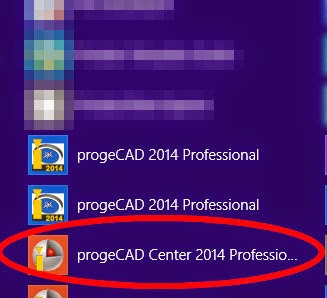
https://www.caddit.net/progecad/progecad.phpprogeCAD is a low-cost CAD alternative for creating, editing and plotting native AutoCAD DWG files without buying AutoCAD or AutoCAD LT. Since the release of progeCAD 2013, every installation is accompanied with a toolbox called progeCAD Center. progeCAD center is also available for use during the free trial period of the software. progeCAD Center can be started from the START menu icon within the progeCAD Start Folder, or from the icon on the Desktop menu in Windows 8.1 (shown right).


Once started, there are several categories which appear in the toolbox. For progeCAD 2014 these are: Launch progeCAD, Register progeCAD, Online Support, Help / Video, Settings, Utility, Support Tools. We will review each of these as used in progeCAD 2014 professional.


  • Launch progeCAD: This CLOSES progeCAD Center and starts the progeCAD Software program.
  • Register progeCAD: When you buy a progeCAD license or install a new progeCAD Network client, use this option to activate the license code.
  • Online Support: A webpage to the contact us page for support questions is opened. progeCAD Center remains active.
  • Help / Video: Launches the progeCAD Searchable Help files, either for users or programmers. Video Tutorials open a webpage with a list of online video lessons for CAD beginners.
  • Settings: Turn graphics acceleration on or off (recommend ON), Repair (use this first if progeCAD stops running as a result of the user environment somehow becoming corrupt), Toggle Automatic Updates On or OFF (recommend ON), User support folder - direct access to progeCAD support files for templates, hatches etc.
  • Support Tools: Rescue, Troubleshooter and Dumper are all functions used when in contact with the progeCAD development team for remote access and analysis of problems that a user may be having specific to their installation of progeCAD. progeCAD Extras opens a webpage with a few extra downloads, including the VBA toolkit for progeCAD 2013 and 2014, as well as updated USB dongle drivers for mobile USB licenses.
These tools can become very useful in different situations. For example, a long running progeCAD installation may on occasion suddenly begin to crash on startup. This has to do with some way progeCAD was adjusted or reconfigured during a previous session and now the environment is corrupt. Simply using the Repair function under Settings often resolves the issue immediately. For example, here is how to access the USB Analyzer from the Support Menu:


For more information about progeCAD as a low-cost AutoCAD solution, contact CADDIT or visit the website HERE.

18 November 2014

AutoCAD Tables in progeCAD 2014 - Create and Edit

A new feature in progeCAD 2014 is comprehensive support for the AutoCAD data "table" entity set which was first introduced in AutoCAD 2005 version but improved in 2008. The data table is supported in both the full version of AutoCAD and AutoCAD LT, although the LT version does not support entity data extraction feature. It was also discussed for earlier versions of progeCAD, but had to wait for the milestone 2013 DRX-based release before it could be implemented. In a further step in AutoCAD compatibility, progeCAD 2014 can now both create new data tables and edit existing data tables from AutoCAD DWG files.

To create a new, empty data table in progeCAD, simply click either the Table icon in the Draw toolbar
, OR select "Draw" -> "Table" form the progeCAD menu. The following familiar dialogue box will appear:

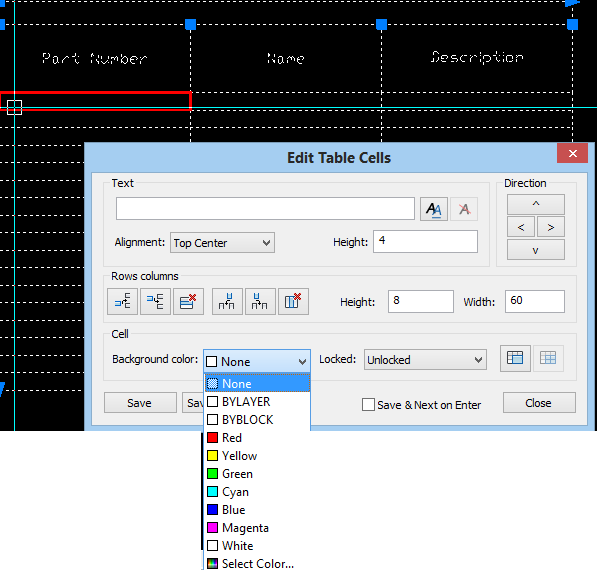
Simply specify the desired number or rows and columns, pick a size for these and set the cell styles. For now we will leave the Insert options as "Start from empty table". Then you can locate the new data table either by a single point, or cross-corner and allow the cell sizes to emerge as a calculated value. Once the table is inserted into your drawing, you can begin entering data, such as naming the headers or inserting values. This is done simply by double-clicking into one of the cells much like we would in Excel. This highlights the selected cell in red and opens up the cell's entry box:

Note that from here we can easily control many aspects of the individual data cell, like background colour, text height and much more. Text itself can be entered directly here, or formatted in the MTEXT window which can be called up by clicking the "Double AA" icon to the right of the text field.

progeCAD tables also support entity data extraction to a new table, something only supported in the full version of AutoCAD and not in AutoCAD LT. To do this we select the "from object in the drawing" insert option instead. Afterwards we are prompted to select the entities from which we want to extract the data and a template as well, if desired.

progeCAD 2014 also supports an insert from CSV file option as well.

progeCAD is a popular AutoCAD alternative in Australia because of it's low cost, local support and large community of users. For more information on progeCAD 2014 or for a free, no-obligation trial version to test for yourself, visit the progeCAD Australia webpage or contact us at our Parramatta training office.


20 October 2014

progeCAD German Version 2014 - "progeCAD 2014 - deutsche Version"

CADDIT announces the updated German translation release of progeCAD 2014 Professional CAD design software. Designers, engineers and architects accustomed to AutoCAD, Auto CAD LT or IntelliCAD can compare the cost-for-feature value free for 30 days. Unlike most AutoCAD compatible CAD software, progeCAD 2014 far exceeds simple DWG file compatibility with special features like Google Earth export, PDF conversion, Quick-Dimensioning (“QDIM”) and even an updated spell checker. Now German users enjoy the convenience of using progeCAD design commands in native German language. The progeCAD German version can be downloaded HERE.progeCAD in German is available from CADDIT ( http://www.caddit.net/progecad/progecad-deutsch.php ).

progeCAD 2014 CAD Software - deutsche Version


##########
CADDIT gibt hiermit die Freigabe der deutschen Übersetzung von progeCAD 2014 Professional bekannt. Designer, Konstrukteure und Architekten, die mit AutoCAD, AutoCAD LT oder IntelliCAD vertraut sind, haben die Möglichkeit den Nutzwert der Software für 30 Tage kostenlos zu testen. Im Gegensatz zur meisten AutoCAD ähnlichen CAD-Software übertrifft progeCAD 2014 einfache DWG-Dateiformat Kompatibilität mit speziellen Funktionen wie Google Earth Export, PDF Konvertierung, Quick-Dimensioning(„QDIM“) und eine verbesserte Rechtschreibprüfung bei weitem. Deutsche Benutzer haben jetzt auch den Komfort progeCAD Designbefehle in Ihrer deutschen Muttersprache zu verwenden. Benutzter können jetzt die deutsche Version direkt herunterladen - HIER.
progeCAD Deutsch ist weltweit erhältlich CADDIT ( http://www.caddit.net/progecad/progecad-deutsch.php ).

26 November 2013

progeCAD 2014 Free Upgrade Offer Starts 26 November

Sydney, Australia 25 November 2013 - CADDIT announces a global free upgrade offer for all new and upgrade purchases of progeCAD Professional 2013 from CADDIT.net. Buy a new license of progeCAD 2013 now and receive an equivalent progeCAD 2014 product upgrade free, after the general release. progeCAD 2014 is currently scheduled for release in the next few months. progeCAD 2014 will follow up the successful 2013 DRX/IRX based code re-write with features requested by our users:


AutoCAD Tables - creation and editing of text & entity tables introduced
Dynamic Blocks - basic support introduced
3D Architecture tools
3D Sweep solid modelling command enabled
Create New Multiline Styles enabled
Many more features, small and large not mentioned here ...


progeCAD has long been a favourite low-cost CAD alternative for creating and editing .DWG CAD files from Autodesk. Features have long included PDF import and printing, 3D modelling and rendering, USB and network license support and more.

The progeCAD 2014 free upgrade promotion begins 26 November 2013 AEST (Australia Sydney Time) for all new full and upgrade orders placed for progeCAD Professional 2013 version (current) ENGLISH LANGUAGE ONLY - including progeCAD Pro, progeCAD USB, progeCAD Network NLM and OFFICE licenses. It does not apply to orders placed before this date.

For more information please contact CADDIT directly using this link:http://www.caddit.net/store/index.php?main_page=contact_us

18 March 2013

Alibre Design 2013 Preview - The Best Alibre Ever

The folks over at Alibre USA have been hard at work at what looks to be the best release ever of their flagship CAD software. Alibre is the defacto CAD software for low-cost parametric 3D mechanical part and assembly design in Australia. Priced modestly from A$220 for the base hobby user package to A$2200 for the top-end version including motion simulation, direct editing, variant design and direct reading of CATIA and Unigraphics files, Alibre is a more viable option than SolidWorks or Inventor for smaller budgets. Alibre 2013 will introduce literally hundreds of improvements in all areas of 3D modelling, assembly design, 2D drafting and section views, sheet metal design, bill of material and more. The overview document Alibre has provided to CADDIT Australia listing these enhancements is 59 pages long. Here are some highlights:

USER INTERACTION CONSISTENCY: In previous versions of Alibre, CRTL and SHIFT multiselect treated were differently in the various modes of Alibre. Alibre 2013 now uniformly implements multi-selection in the Design Explorer and Work Area, using Ctrl and Shift. More commands can also be applied to multiple objects in a single operation such as anchor, hide, suppress, align and scale view etc. Right-click behaviour has also been improved to ALWAYS show the options that are available to all selected items. (Previously there were cases where a right-click actually deselected all selected items.) "Apply" buttons have been added to numerous dialogue boxes so that changes can be seen before leaving many commands. Conflict visibility has been improved, dragging the "Dog Bone" has been fixed, real-time measurement data now appears in the status bar, some menu items have been consolidated, even the licensing dialogues have enjoyed some housekeeping. There is now a much more consistent user experience with the overall interface of Alibre. This is good new to those using Alibre for their everyday mechanical design work :)

UNDER THE HOOD: Alibre 2013 will be powered by Dassault's new ACIS V23 kernel, released six months ago (see announcement here). This means better modelling and problem-solving on the geometry level of Alibre. STEP file export includes multi-part assembly and drawing "packaging" (somewhat similar to progeCAD "eTransmit"), STL publishing for 3D printing enjoys better support for binary STL, and control of the STL data.

SKETCHING AND PART MODELLING: Sketching performance is significantly improved and more responsive, especially when zoomed in. Dimensions can now be placed between concentric arcs and circles to define the difference in their radii. All disjoint ends of a sketch (caused by DXF or DWG import, etc) are automatically healed when the active Sketch is exited. User is no longer prompted that sketch problems exist when only Disjoint Ends exist, as they are automatically healed. Pressing Escape while in 2D Sketch Mode now make the Select tool active. User can now import Points from a CSV file into a 2D Sketch as well as for 3D sketches. User can also designate any 2D dimension to be Driven during dimension placement or after dimension placement by modifying the dimension. Driven dimensions update in real-time as figures are moved or further define objects in the sketch. Driven dimensions can also designated to show up in the Equation Editor as a parameter. This effectively enables use dimensions from one part in another part. For part modelling itself, the THREAD tool has been improved with drop-down menus of thread definitions.

OTHER IMPROVEMENTS: In this blitz review of the upcoming release of Alibre 2013 we haven't even started to discuss what's new in Assembly design, drafting, sheet metal, BOM, third-party bonuses etc and this article would be WAY to long to include them all. There is one improvement we picked from sheet metal we wanted to mention here. There will be a brand new tool which allows designers to create sheetmetal bend lines directly from a sketch, complete with rips. These bend lines are used to fold a tab or flange. This is particularly useful if you are trying to recreate a sheet metal part from an imported 2D drawing of a flat pattern:

It is important to note that Alibre Design 2013 will not support Windows XP, except for general how-to questions unrelated to anything in the operating system. Users really need to be using Alibre 2013 on a computer running at least Windows Vista or newer. Users choosing to remain back with Alibre 2012 on Windows XP and on active subscription will continue to be supported. For further information about this upcoming release of Alibre 2013 in Australia contact CADDIT.net (link). A further announcement will be posted here when the software is availble for download and trial.

30 October 2012

progeCAD 2013 Released - AutoCAD 2013 & Windows 8 Support

Sydney, Australia 30 October 2012 - The long awaited progeCAD 2013 has been released on the CADDIT.net website. Since 2006 progeCAD has offered high-quality CAD software with distinctive AutoCAD-like features - like native AutoCAD DWG read/write (no conversion) and similar commands and toolbars. Engineers, architects, surveyors, builders, landscape designers, manufacturers and other hobbyists and professionals alike prefer progeCAD as the affordable AutoCAD alternative. progeCAD 2013 is a major new release, and the first version to include IntelliCAD 7 source code into its product.

progeCAD pricing will continue at the low $400+ level (as opposed to AutoCAD's full $6000 license cost plus Autodesk maintenance subscription, etc). progeCAD 2013 continues to offer features used in previous versions, like DWG-to-PDF and PDF-to-CAD support, the free EasyArch add-on for architectural drawing, 3D solids and rendering, advanced hatching, text and dimensioning commands, thousands of free symbols and more. progeCAD 2013 also adds new features including:

  • PC3 plotter configuration file support
  • New Print Style Manager Interface
  • New Printing / Plotting Interface
  • AEC visualization (AutoCAD Architectural Desktop objects)
  • STL (mesh) and DAE file export
  • New Dimension Style Manager Interface
  • Advanced Spline Editing
  • New wireframe "HELIX" command
  • New ACIS Solid "LOFT" command
  • CAD Underlays of PDF, DWF and DGN files
  • Microstation DGN File Import (selected versions, as underlay)
  • New LMAN (Layer Manager)
  • Improved Purge command
  • Multigrip editing
  • New overall GUI style
  • Windows 8 Support
  • AutoCAD DWG 2013 file format support


  • AutoCAD and progeCAD users alike are invited to download progeCAD 2013 free at: http://www.caddit.net/progecad/progecad.php

    This is a free full version 30 day trial which will allow you to save, print, etc and experience the cost savings benefit of CADDIT progeCAD for yourself. progeCAD 2013 licenses will be available as progeCAD single, mobile USB, network NLM, academic and corporate solutions.

    Please contact CADDIT International for more information about progeCAD HERE: http://www.caddit.net/store/index.php?main_page=contact_us

    For technical questions and user experiences about progeCAD, visit our forum HERE:
    http://www.caddit.net/forum/viewforum.php?f=3

    13 August 2012

    progeCAD 2013 Free Upgrade Offer - Begins 15 August 2012

    Sydney, Australia 13 August 2012 - CADDIT announces a global free upgrade offer for all new and upgrade purchases of progeCAD Professional 2011 from CADDIT.net. The free upgrade will be for the upcoming progeCAD Professional 2013 version, after its release. progeCAD 2013 is currently scheduled for release in the next few months. progeCAD 2013 is the first release to have IntelliCAD 7 technology included in the end-user version. Along with this new technology, several new progeCAD features are planned:
    • PC3 plotter configuration file support
    • New Print Style Manager Interface
    • New Printing / Plotting Interface
    • AEC visualization (AutoCAD Architectural Desktop objects)
    • STL (mesh) and DAE file export
    • New Dimension Style Manager Interface
    • Advanced Spline Editing
    • New wireframe "HELIX" command
    • New ACIS Solid "LOFT" command
    • CAD Underlays of PDF, DWF and DGN files
    • Microstation DGN File Import (selected versions, as underlay)
    • New LMAN (Layer Manager)
    • Improved Purge command
    • Multigrip editing
    • New overall GUI style
    • Windows 8 Support
    • AutoCAD DWG 2013 file format support
    Here it is - the very first sneak peek of progeCAD 2013 :)
    

    Lower level enhancements of progeCAD 2013 include the use of several new developer languages (APIs) in progeCAD: true DRX and IRX application support with VBA and VSTA object models for prototype applications, while still supporting legacy SDS and AutoLISP languages making the new progeCAD 2013 an excellent foudation for specialized CAD application development.

    The progeCAD 2013 free upgrade promotion begins 15 August 2012 AEST (Australia Sydney Time) for all new full and upgrade orders placed for progeCAD Professional 2011 version (current) ENGLISH LANGUAGE ONLY - including progeCAD Pro, progeCAD USB, progeCAD Network NLM and OFFICE licenses. This promotion does not include progeCAD Standard licenses.

    For more information visit our website or contact CADDIT.net HERE.
    Google.