Showing posts with label CAD. Show all posts

03 January 2022

progeCAD 2022 Milestone AutoCAD Alternative Released on CADDIT.net

 Sydney, Australia 3 January - CADDIT Announces the release of progeCAD 2022 on CADDIT.net for Australia and New Zealand. progeCAD is an advanced general-purpose 2D and 3D CAD package with similar commands to AutoCAD but with perpetual license and lower price. CADDIT has been supporting progeCAD users in the Australia/New Zealand region for almost fifteen years.  Now, after months of thorough testing, the CADDIT team is happy to announce their official release of this milestone product version.
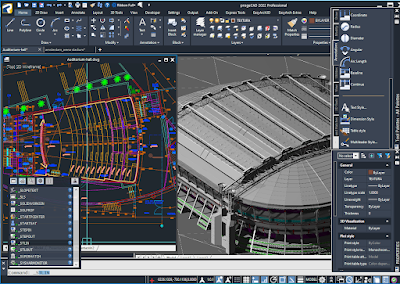
progeCAD 2022 from CADDIT Australia

progeCAD 2022 from CADDIT Australia offers a dramatic feature update over previous versions. 2D Drafting now includes a fully-implemented and hugely improved interface for drawing text and data TABLES, including improved cell support and a full list of FIELD types. Data cell selection now seamlessly brings up a full text editor. DIESEL fields are now properly implemented and real-time spell checking has been added for text. MTEXT likewise has new support for clear and strike-through formatting, as well as better symbol- sub- and super-script support. progeCAD 2022 now offers the much-anticipated SHEET SET MANAGER displays, publishes and manages sheet sets, a named collection of drawing sheets. Each sheet in a Sheet Set is a layout in a drawing (DWG) file.

A new geometry solver improves reliability for almost all drawing commands like Trim, Chamfer, Fillet, Hatch etc. General performance improvements have also been made to FILE open speeds, REGEN, SAVE, AUTOSAVE as well as the end user's experience in OSNAP, LAYOUT and many other commands. General interface improvements have been made to the program's START page, VIEW MANAGER, SETTINGS window, CUI customization dialog and the ARRAY command. Feature GROUP handling is now offered in progeCAD via the new GROUPEDIT command, complete with visualization grips. Several new tools will save estimators time in progeCAD, such as the new TOTALAREA command which gives the sum total of multiple selected closed entities, the new ATTSYNC command which updates attributes for all block instances (useful for updating material lists) or IMPOINT which automates the creation of new points, polylines or splines from coordinates in a text file. TPNAVIGATE has also been added for palette navigation, which can be helpful for users who create or use multiple tool palettes.
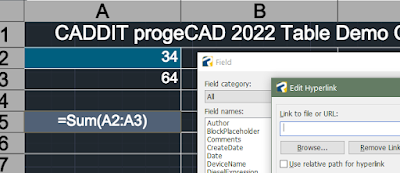
progeCAD 2022 new TABLE and FIELD support
New TABLE and FIELD interface for progeCAD 2022

progeCAD 2022 now supports all new Spacemouse and CADmouse models from 3DConnexion. This can be an absolute boon for end users doing a lot of 3D design in progeCAD. 3D Solids now fully support the use of GRIPS for direct editing. a new 3D STEEL library for quick 3D weldment design in progeCAD has also been added.

A free no-obligation thirty-day trial of progeCAD 2022 can be downloaded directly from CADDIT Australia here, even if you have downloaded progeCAD before. Due to the significant improvements made to this software for this version, we need to repeat our usual call for existing users to strongly consider a low cost upgrade to progeCAD 2022 stand-alone, USB or Network licenses. We plan to publish several more in-depth reviews of the important new features in progeCAD 2022. Please contact CADDIT at their Sydney office with any questions.

08 September 2021

progeCAD 2022 Coming Soon: Free Upgrade Offer Begins


Sydney, Australia 7 September - CADDIT announces the free upgrade to 2022 version for all progeCAD purchases on or after 01 September 2021. progeCAD is a powerful general-purpose 2D and 3D CAD solution very similar to AutoCAD, with additional tools and a lower cost. With progeCAD, designers have a professional yet affordable perpetual-license alternative to high-cost AutoCAD rental fees, with the ability to create, read, write and edit native AutoCAD DWG and DXF files fluently using and interface very similar to what AutoCAD already know. Based in Sydney, CADDIT has been supporting progeCAD users in Australia, New Zealand and surrounds for more than twelve years.


Much of what will come in 2022 is still confidential but we have several detail which we can pass on now. Significant effort has been invested in making progeCAD 2022 a truly cutting-edge release that is stable and reliable from initial release. Many improvements are still confidential during an internal testing period. What we can expect are new features for the AEC industry with further improvements to BIM and REVIT compatibility, as well.  Many features are expected to be completely re-worked or refactored, such as the MTEXT and TABLE elements. Pursuant to last year's improvements in hardware acceleration, this year progeCAD 2022 release is expected to offer many new improvements in 3D view handling, modelling and new 3D content specifically targeted to architects and structural engineers working in steel. GUI customization will also be improved with several new commands.


A detailed list of these new features will be released soon, but we are delighted to share what we know now and begin offering the free upgrade to all customers. progeCAD 2021 can be downloaded now as a free 30-day trial. As in previous years, all new licenses as well as upgrades for existing licenses, including single stand-alone, floating NLM network, USB and total office licenses, purchased on or after 1 September 2021 will be entitled to the same for progeCAD 2022 upon our announcement. Multiple purchases will qualify for multiple upgrades. progeCAD Upgrades will also qualify, again as in the past. As in past, eligible users with a USB upgrade will usually not be required to replace their hardware dongle for the next version. We are really excited about the upcoming new release and making those upgrade entitlements available well in advance. So watch this space over the next weeks as more details and images become available. Contact CADDIT Australia for more information about progeCAD or this upgrade offer.

21 November 2019

progeCAD 2020 Update Released on CADDIT.net

Sydney, Australia 09 November 2019 - progeCAD 2020 Professional 20.0.6 has been released on CADDIT.net, with free upgrade entitlement for all existing progeCAD 2020 users. progeCAD Professional is an affordable general-purpose CAD computer program having similar commands and workflow to AutoCAD, native DWG file read/write and extensive publishing/translation features. Advanced progeCAD features include full 3D modelling and rendering, extensive symbols library and Express Tools similar to those offered in AutoCAD. Using progeCAD, designers can seamlessly communicate with an AutoCAD environment. progeCAD 2020 was first released on CADDIT offering a heap of new features like 4K display support, drag-and-drop icon palettes, BIM IFC and RECAP .rcp/.rcs support, table formulas, 3D silhouette printing as well as new interfaces for PUBLISH and EXPORTPDF and new EXPRESS Tools.

BIM IFC files can now be fully imported as editable geometry. progeCAD now supports either import or export of at least 40 different major design formats (not including format versions), including 3D models, 2D drawings, mesh and point cloud models, vector and raster graphic images as well as embedding formats like PDF, offering a true swiss-army-knife like set of CAD functionality essential and affordable for any CAD designer.


3D BIM IFC Rendering progeCAD 2020
Direct BIM IFC import into progeCAD 2020 Professional with immediate 3D rendering in free Artisan rendering studio (Artisan for progeCAD included with purchase)


 The new progeCAD Professional 20.0.6 is a bugfix release offering users over 100 improvements over the previous 2020.0.4 version:
  • Improved support for functions like hatches placed in layout, nested BEDIT sessions, REFEDIT fade, embedded image PAN and ZOOM (when MTMODE = 3), Unicode support and 3D solid regen improvements.
  • Targeted fixes for existing commands like HATCH, BOX, HELIX, FILLET, SWEEP and dozens more..
  • Performance improvement for STEP import, 3D PDF, APPLOAD, COPYCLIP
  • API tweaks and small fixes to DCL, LISP and .NET
  • General improvements in interface and workflow

Users of previous progeCAD versions are strongly encouraged to consider upgrade to progeCAD Professional 2020, for better compatibility with AutoCAD as well as the ongoing updates for Microsoft Windows. A full price list for all upgrade options, including multiple stand-alone, USB and floating network licenses, can be found on the CADDIT website here (link). A fully enabled 30-day trial can also be downloaded. Additional questions about progeCAD features or upgrade options can be sent directly to CADDIT Australia via the Contact Us page.

10 May 2018

Civil Survey DTM Features Introduced in progeCAD 2019

Sydney, Australia  09 May 2017 - CADDIT Software announces the second major class of new features to ship with their upcoming progeCAD 2019 release. progeCAD is an affordable, robust general purpose CAD system used by designers, architects, builders, engineers, civil survey and government planning offices for over ten yeas in Australia and New Zealand. progeCAD requires little or no learning curve for AutoCAD users because of its compatible interface and command structure.

Along with thousands of general-purpose CAD drafting features such as AutoCAD-similar drawing commands, full native DWG format read-write, PDF import and export, direct 3D modelling and realtime and advanced rendering, extensive block libraries, 3D architecture, tables and data extraction, new 3D model translation from STEP IGES and STL-mesh models as well as countless other tools, progeCAD 2019 will introduce a new suite of civil survey functions.


This new suite of DTM functions offer civil engineers, landscapers, environmentalists, builders and other land-development professionals an easy-to-use set of basic land survey tools for generating terrain profiles and slope lines. Some of the new civil survey commands include:

AUTOSECTION - generate full section detail views with full annotation from drawing contours
SECTIONLINE - create a profile path to be used by AUTOSECTION
CONVERTLCURVES - convert SPLINEs into 3DPOLY usable by AUTOSECTION
SLOPEBLOCK - generate normal or "slope" lines along a single polyline
SLOPEAREA - generate normal or "slope" lines between two polylines

To gererate a new civil section view simply create a new SECTIONLINE through your drawing like so and then select it using AUTOSECTION:
progeCAD 2019 can create DTM section views directly from LINE, 3DPOLY and 3DFACE. SPLINE need to be converted into 3D polylines first, using the "convert level curves" tool (CONVERTLCURVES)
 AUTOSECTION begins with a comprehensive dialog which allows you to customize your new DTM section view or click OK to accept prior defaults. After clicking OK your terrain section view will be generated like so:


 CADDIT is pleased to announce that starting 15 April 2018 all new and upgrade progeCAD 2018 orders from that day will be entitled to a free upgrade to 2019 upon its release on CADDIT.net. For a free 30-day trial of the current 2018 release of progeCAD or for more information about affordable CAD software, visit our website at www.caddit.net.

08 May 2018

CAD File Translation Improvements in progeCAD 2019 Preview

Sydney, Australia  01 May 2017 - The CADDIT Team is happy to share an exciting announcement and first look at the upcoming major release of our progeCAD 2019 CAD Software. progeCAD is an affordable, robust general purpose CAD system used by designers, architects, builders, engineers, civil survey and government planning offices for over ten yeas in Australia and New Zealand. progeCAD requires little or no learning curve for AutoCAD users because of its compatible interface and command structure.

Now beginning with progeCAD 2019, users will have access to industry 3D CAD file support for STEP, IGES, and many other popular CAD file formats. Additional new tools include bi-direction (read and write) support for popular 3D modelling formats from Maya (.RTG), 3D Studio(.3DS), Alias(.OBJ), LightWave, STL and other formats. Along with existing native file support for over a dozen others like AutoCAD .DWG and .DXF, Adobe PDF, ACIS SAT, Microsation .DGN, LIDAR (.LAS and .XYZ), ESRI .SHP and more, progeCAD becomes a powerful CAD "swiss-army-knife" useful for almost any graphics professional. To put this another way, simply compare the import file format support from progeCAD 2019 with that of the previous release as shown below here:


Extended (DOUBLE) CAD formats supported in 2019.

Basic CAD file import offered in progeCAD 2018


progeCAD's new CAD import features now mean that architects can now directly insert mechanical parts into their design from programs like SolidWorks, Inventor and CATIA which have been saved in either a STEP or IGES neutral exchange format. This also means that graphic designers can insert mesh models from their favourite animation package like MAYA or 3D Studio. With progeCAD's powerful new 3D rendering feature, beautiful 3D graphics can then be generated combining files from all of these different formats, or converted into new formats for use by other 3D software..

In this "round-robin" CAD translation stress-test, a twenty-year old IGES file was imported into progeCAD 2019 as ACIS 3D surfaces and exported again as a neutral 3D STEP model which was read by another CAD system without any noticeable data loss.  


Another exciting CAD data feature coming in progeCAD 2019 is the new BIM IFC underlay support. This means progeCAD can now incorporate industry-standard IFC data as a visual underlay to your active drawing, as shown in the the image below..
 

IFC Underlay support in progeCAD 2019 from BIM

 
progeCAD 2019 will also add enhancements and new functionality in other areas, adding new value for CAD designers of all disciplines which we will discuss further. CADDIT is also happy to announce that starting 15 April 2018 all new and upgrade progeCAD 2018 orders from that day will be entitled to a free upgrade to 2019 upon its release on CADDIT.net. For a free 30-day trial of the current 2018 release of progeCAD or for more information about affordable CAD software, visit our website at www.caddit.net.


08 August 2017

Alibre Returns with New Licensing and Free Upgrade Promotion

Sydney, Australia  07 August 2017 - CADDIT and Alibre LLC together announce a new future for Alibre users. Alibre, LLC based in Houston Texas USA recently acquired all rights to any materials from 3D SYSTEMS related to Geomagic Design. Since then a new product and licensing has been in development, which we can now announce release for on the CADDIT.net website. Alibre Design will continue its focus on affordable 3D parametric mechanical design for the Windows platform. Alibre Design is an intuitive, easy-to-use mechanical design system offering advanced features like Keyshot 3D rendering and optional FEA analysis.


New licensing. Alibre will move away from Flexera to now use a similar online activation system from Nalpeiron, along with several updated license options. Alibre will not offer a USB dongle option. Geomagic Design users with a USB license from 3D Systems will be offered a Nalpeiron "offline" license instead (this license type uses an email activation, see http://docs.nalpeiron.com/display/NND/NSL+V10+-+Offline+Activation ) There will continue to be a floating network license option. At this time, Nalpeiron licensing is stored in local user profile, within C:\Users\\AppData\Local\Alibre Design. To reset the activation of Alibre Design, simply delete all file inside this directory. Otherwise, moving Alibre licenses will operate in a similar way as they did with Geomagic Design.

Free upgrade. Because Alibre's Nalpeiron-based licensing is not compatible with 3D System's Flexera system, everyone with a valid Geomagic Design license from October 2015 and later will be moved to Alibre 2017 without charge, see https://www.alibre.com/alibre-llc-faq/. Essentially this consitutes a free upgrade for everyone having a valid Geomagic Design license from October 2015 or later. Previous Geomagic Design users who were still on the original Alibre CRM licensing system (e.g. Alibre 2013) will not be upgraded for free. In such case a valid Alibre Design subscription will be required for the user to move to the new licensing system. More information will be following soon.

CADDIT is happy to continue offering Alibre Design as a cost-effective 3D mechanical design option and we look forward to the upcoming releases under new management of the software. We ask users to be patient during the transition period. Further questions can be directed to CADDIT via our CONTACT US page: https://www.caddit.net/store/index.php?main_page=contact_us

03 April 2017

CADDIT Launches Powerful Low-Cost 3D CAD Software ZW3D with Time Limited Discount Offer

Sydney, Australia 03 April 2017 - CADDIT announces an exciting new 3D CAD product line agreement with ZWSOFT to sell and support all ZW3D products Australia-wide. ZW3D offers mechanical designers, engineers, machinists and manufacturers a powerful suite of integrated CAD and CAM software for parametric 3D part and assembly design, hybrid freeform and direct editing, sheet metal nesting and weldment construction, 3D publishing and printing, prismatic and multi-axis machining, lathe turning and more. ZW3D also delivers powerful 3D CAD translation tools for importing SolidWorks, Solid Edge, Siemens NX, JT, PTC Creo, Autodesk Inventor, STEP, ACIS .sat and .sab, IGES and many more formats from even very recent versions of the software. ZW3D supplies thousands of businesses globally, including Yamaha Motor Co, Bridgestone, Johnson Controls, Baosteel and many others.

ZW3D uses specially written state-of-the-art modeling technology, originally developed by VX Corporation of Melbourne FL USA, with software R&D still located in Florida to this day. The user interface includes a modern ribbon-based UI with visual help cues and prompts. Traditional bottom-up assembly design is offered in every version of the software without limitation. Standard and higher versions also offer advanced assembly options, top-down down and animation. There are also two CAM-specialist versions for CNC machinists at reduced cost in CAD features. CADDIT also announces a special price release of ZW3D 2017 for the Australian small business user called "Workshop". ZW3D Workshop by CADDIT edition will include all features of ZW3D Premium minus the costly electrode and mould tooling libraries, to be made available at a much lower cost.


To help introduce this high-value 3D CAD and CAM software option to small business users in Australia, CADDIT has arranged for significantly reduced pricing on both software, support and one-year upgrade options. Level one support for ZW3D will be local. A series of free comprehensive one-day training events are planned around Australia, based on number of requests. The first event is planned in Parramatta NSW near our offices. Frequent news and updates will be posted over the next few weeks on  our websites. For immediate contact or general ZW3D inquiries, CADDIT.net will be the nation-wide software partner which can be contacted HERE.


19 September 2016

Alibre and progeCAD 2013 End of Support

Sydney, Australia 19 September 2016 - CADDIT Announces end of all legacy support for the following outdated products:

"Alibre Design" - All Versions (not including Geomagic Design). Users wishing to maintain a support relationship with CADDIT Australia should now be using Geomagic Design (full version) instead.

progeCAD - 2013 and earlier versions only. Up-to-date subscription and new license users are not affected. Other users can upgrade here (link).

Why is installation support removed from very outdated product versions? First, we want to express our appreciation for all of the engineers, architects, builders, designers and manufacturers who have selected our products from among many in the past. Our products have advanced significantly. Frankly, we have little choice in this matter of very old version support. With Operating System support removed from Windows XP and Vista by Microsoft, supporting older software not only becomes unviable, but also unsafe as these systems are no longer provided with critical Functionality and Security patches. Windows 7 EOL (End Of Life) was announced by Microsoft (see table here http://windows.microsoft.com/en-us/windows/lifecycle ).

As with previous EOL announcement, end of support means any help from our local office in re-installing, moving, lost keys or passwords, registering, unregistering or otherwise assisting a user of a deprecated product. progeCAD users from any version will, however, still have the option to buy a license lookup (link) should they misplace their installers or serial codes. Users of progeCAD versions newer than 2013 continue to be entitled to one free lookup for each active license.


I have progeCAD 2010 and I lost my license. What can I do?
You will need to buy a license lookup service for each license in question, here:
https://www.caddit.net/store/index.php?main_page=product_info&products_id=91


I have progeCAD 2014 and I lost my license for the first time. What can I do?
Contact us here for your free one-time lookup:
https://www.caddit.net/store/index.php?main_page=contact_us


I have Alibre Design 2012 Standard / PE and I need help to activate on Windows 10.
Not supported. There are several issues with this, which prevent our staff from assisting in any way. First, Alibre 2012 is categorically not supported on Windows 10 in any fashion. Second, Alibre Design Standard / PE is completely discontinued. Alibre users were invited several times to upgrade free of charge to supported versions, as long as they only paid the subscription fee. Users who have repeatedly declined our offers have now indicated that they will keep their existing installations. Third, all 2012 releases of our products are completely outdated.

Alibre users still have login access to their online account HERE and are welcome to continue supporting themselves as best as possible. There is an Alibre password reset function HERE. Alibre users are also welcome to try to contact Geomagic Support at 3D Systems directly, however we cannot guarantee a response for unsupported legacy users. General questions about CADDIT support policies can be submitted to us via our website at any time HERE. Once again, we repeat, updated and new license users are not affected by this announcement.

18 May 2016

progeCAD 2017 Released on CADDIT.net

Sydney, Australia  18 May 2016 - CADDIT announces the release of progeCAD 2017 Professional on the website for immediate download. progeCAD is a flexible general-purpose CAD drawing program that is used in a wide range of industries, including architecture and building, fabrication, landscaping, strata management, mechanical design and many more. progeCAD is the long-standing low cost alternative for AutoCAD® and AutoCAD LT® software in Australia. progeCAD 2017 still offers perpetual licenses (no rental, no annual subscription is required) and is tested for compatibility on all major Windows platforms from 7 through Windows 10, both 64-bit and 32-bit versions. 2016 marks the tenth year of progeCAD availability in Australia and New Zealand and the ninth year of their partnership with CADDIT in the region. It is fitting that for such an occasion we offer the most significant release of the program.

progeCAD has long offered low-cost CAD software with the purpose of being as highly compatible with AutoCAD as possible. progeCAD has long offered advanced AutoCAD-like functionality in the areas of 2D and 3D CAD drawing using similar commands, icons and user interface. progeCAD supports all AutoCAD-native file format DWG versions from the newest 2017 version to very old. This year progeCAD will offer a native x64 (64-bit) environment while continuing to support x86 (32-bit) processors as well. Significantly, progeCAD 2017 offers a 1.5x - 3x performance improvement through use of multicore CPU processing as well. CADDIT now offers trial users the choice between 64-bit or 32-bit CAD download versions. All progeCAD 2017 licenses from CADDIT, including single stand-alone, mobile USB and company network licenses, will now conveniently work with either the 32-bit or 64-bit versions.

progeCAD 2017 x64 still offers 32-bit version on CADDIT
progeCAD 2017 offers users other new choices as well. Users can select, on first-time start up of the software, to use either the new ribbon-UI based interface or the legacy toolbar environment. Additionally, progeCAD 2017 now supports the newer AutoCAD® CUI user interface customization format. progeCAD 2017 offers better support for Microstation users with improved .DGN file import and underlay support through use of updated libraries. progeCAD also works with more AutoCAD® applications by introducing support for Civil3D, ADT and MDT extension formats. 3D scanner point cloud data is also now directly supported in progeCAD for either the Autodesk .PCG format or the Ambercore .ISD format. Other scan formats such as LIDAR and XYZ can possibly be converted to .PCG by downloading the Autodesk ReCap 360 tool. Updated programming interfaces for developers now includes a supported .NET API.

As Mr. Damiano Croci, COO at ProgeSOFT SA, commented: “We are taking progeCAD to the next level making it native 64-bit and giving it a fresh Ribbon-look, not forgetting improved performance with multi core computers support. The main ProgeSOFT’s focus is to provide good value for money and progeCAD 2017 Professional is a shining example of that. ProgeSOFT will continue to improve the CAD application based on the demand the company receives globally”.

Current iCARE subscribers and those participating in our recent free upgrade promotion will begin to receive their progeCAD 2017 serial codes in the next several days. Users of previous versions of progeCAD can order the appropriate upgrade for them from the CADDIT progeCAD upgrade price list. There is much more to be said about the new progeCAD 2017 release, including dozens of other new commands, variables and improved functions (such as the 3D rendering) which can be explored by downloading the software for a free 30 day trial from CADDIT. We are very excited about this release and hope that many users will benefit form the hard work invested in this version of progeCAD. Any questions about general features of progeCAD can be directed to CADDIT via the CONTACT US page HERE.

19 January 2016

Alibre Upgrade No Longer Available after 30 April 2016

On 19 July, 2011 3D Systems first announced its acquisition of Alibre Inc. and its flagship 3D mechanical design software. The product was subsequently rebranded under the "Geomagic" portfolio as "Geomagic Design". This year will mark the fifth anniversary since this acquisition and new features which have subsequently been introduced. 3D Systems has thus far supported all versions of Alibre, including Alibre Design Standard, Professional and Expert with either ongoing maintenance subscriptions or upgrade opportunities. For several months a well-published opportunity for flat fee "update and upgrade" was made available in Australia through CADDIT.net. Many users took good advantage of this window of advantage to update Geomagic Design and Alibre versions that were three, four or even six years old and we wish to extend thanks to all who are participating. The flat fee promotion has now ended, as was announced, on 31 December 2015.

3D Systems business channel has made it known to CADDIT of the intention to drop all upgrade support for Alibre Design PE, Alibre Design Standard, Alibre Design Professional and all similar levels of Geomagic Design Standard and Professional. Going forward, there will only be one product level available to all Geomagic Design users, as demonstrated on the CADDIT webstore. Users of lower-version products will need to buy a completely new license if they wish to update their software. The date for this change is 30 April 2016, and only affects users of the old PE, Standard and Professional product levels -  Expert and Geomagic Design (full) are not affected, can continue to update their subscriptions per usual at this link. Also, any users under current active Geomagic Design maintenance are likely not affected as they will mostly likely already be migrated to the full product version.

Users in Australia at any level can still order maintenance at any product level and receive a free level upgrade to the full version of Geomagic Design at this link. All indications are that this is the final opportunity lower-level users in Australia will ever have to have their package updated. Without current support, CADDIT is unable to answer user requests for licensing help, account lookups etc. After 30 April all such requests will be referred directly to 3D Systems without assurance of a response due to the outdated support.

I renewed my Geomagic Design Subscription just last year. Am I affected?
No. You should continue your maintenance subscription per usual.

I have Alibre Design PE 2012 version. What happens if I don't upgrade?
You will have no support, and likely will not even be able to run the software on newer versions of Windows. You are encouraged to maintain your investment by renewing the maintenance subscription  HERE.

I have two licenses. One is Alibre Design Pro 2011 and the other is Alibre Design Expert 2010. Should I upgrade both and what does it cost?
A subscription will need to be purchased for each license that you wish to keep updated, using this link which shows the current AUD pricing including applicable lapse fees. It is strongly recommended not to mix versions of Alibre / Geomagic Design as this will lead to serious file compatibility problems between them. 

I have other questions.
CADDIT Australia can be contacted the usually way via these details:
https://www.caddit.net/store/index.php?main_page=contact_us

22 September 2015

New Geomagic Design Features & How to Move a License

Geomagic Design offers the best of both worlds with robust feature-based parametric modelling side-by-side with direct editing tools for manipulating imported geometry from STEP, Parasolid, Inventor and other 3D CAD software, at a comparatively affordable price. With the release of Geomagic Design 2015.1 (17.1.0) will come several new features available to software subscribers as part of their product update. Updated MCAD file format support will help ensure ongoing model read/write interoperability with newer versions of 3rd party CAD systems like Solidworks and Siemens Solid Edge.

Two new features provided in the 2015.1 update will be associative assembly mirroring and "live linking" with KeyShot rendering software. Both features will save time for designers.

Assembly Mirror Component feature allows designers to create mirror-reverse instances of existing parts and subassemblies across a selected plane. This mirror feature can maintain associativity and reflect changes made to the parent instance, including motion etc. Live linking with KeyShot likewise saves design time by allowing designers to update scenes with new geometry from the Geomagic Design model while keeping all existing scene settings, material bitmaps and light positions. Below is a video released by 3D Systems demonstrating an early version of this functionality:


For users of previous versions of Alibre or Geomagic Design, these new features add to the value of the excellent flat-rate upgrade-and-update amnesty offer on CADDIT.net. Questions about Geomagic Design CAD Software can be submitted to CADDIT here.

Speaking of questions, several users have been asking about how it is possible to "move" a license using the new Flexnet license management for Geomagic Design. Simply stated, the software is deactivated from the "License Key Status" on one PC and activated on another. Without a license activation, Geomagic Design will ask for one each time it is started. If the license code is already activated on another PC, this license can be made free again using these steps as shown below: 1) Make sure the current system is connected to the internet. From the Home Window of Geomagic Design click "Help" -> "About Geomagic Design". 2) Click the "License Key Status" button. 3) Select "Virtual Dongle":


4) Click "Deactivation" from the Virtual Dongle functions. Select your license and click the grey arrow (lower right of box) to proceed. Once the license is deactivated online, it can be activated on the new target PC/Laptop/etc:

Geomagic Design users wishing to move their license offline, without use of an internet connection, may consider purchase of a hardware USB dongle available from CADDIT here.

09 September 2015

Affordable AutoCAD Upgarde Alternative for Windows 10

Sydney, Australia  08 September 2015 - CADDIT announces the release of progeCAD 16.0.8.17 for Windows 7, 8 and now Windows 10. progeCAD has long been regarded as the leading fully-compatible alternative to Autodesk AutoCAD software in Australia. This latest upgrade is available free of charge to all existing progeCAD 2016 registered users and may be downloaded as a full trial version from CADDIT.net. A significant new feature of the new progeCAD 2016 update is full support for Microsoft Windows 10 operating system as demonstrated on this Surface Pro 3:

progeCAD 2016 running on Windows 10 / Surface Pro 3

Users of previous versions of progeCAD, AutoCAD, AutoCAD LT and similar software products are encouraged to download the free progeCAD trial version, which will run full-feature and obligation free for 30 days from CADDIT Australia. progeCAD includes critical features like AutoCAD-like drawing commands for DWG file reading and writing, PDF printing and conversion back to CAD, iCADlib block library, dynamic block and cursor and fast OpenGL graphics engine. Collectively packaged at a price still under AUD$600 with USB and floating network license options, progeCAD 2016 delivers unprecedented value. These features have all been now tested and upgraded to work with Windows 10.

Previous versions of various CAD programs may not be compatible with Windows 10. Users are encouraged to take this opportunity to take advantage of the affordable pricing when considering their upgrade options. For further information about how progeCAD, contact CADDIT in Parramatta.

24 April 2015

Important Free Update for All progeCAD 2016 Users

Sydney, Australia 24 April 2015 - An important update has been released free for all English version progeCAD 2016 Professional Single, USB and Network installations. progeCAD 2016 is a general-purpose 2D/3D DWG/DXF-native CAD, the optimum cost-effective alternative to AutoCAD® and AutoCAD LT®. progeCAD 2016 Professional reads and writes AutoCAD® DWG versions 2.5 - 2016. progeCAD 16.0.6 has been released as both an automatic update and as a fully downloadable package on the CADDIT website. The following is a non-exhaustive list of important improvements have been delivered in progeCAD 2016.0.6.6:
  • Fixed COPYCLIP between progeCAD and other software products
  • Fixed EXTRUDE of not closed polylines but with equal end and start points
  • Dynamic Input: Fixed SPACEBAR to change grip function
  • Layer Manager: Fixed creation of layer group filters
  • Removed wrong ortho glyph used with ETRACK on NWUCS
  • Dynamic Input: Fixed not allowed chars
  • Annotative Dimension: Added regeneration of annotative dimensions to avoid disappearance
  • Fixed BOX command starting from not 0 Z
  • Fixed update of angle with rotation in Z axis in VIEWCTL dialog
  • Fixed ROTATE3D X/Y/Z options in NWUCS
  • Fixed CONE/CYILINDER specify radius with Z point
  • Fixed creation of BOX by length in NWUCS
  • Fixed command WEDGE length option
  • Dynamic UCS: Fixed exception in some cases
  • Disabled OSMODE for command LOFT
  • Annotative blocks: Fixed assign of annotative scale after SAVE and re-OPEN
  • Annotative blocks: Added BLOCKSCACHE variable to disable cache of blocks
  • Annotative blocks: Fixed BLOCKSCACHE change removing automatic reload of current drawing to avoid hang
  • Annotative blocks: Added check to annotative blocks changing active annotative scale, if found pcad asks the user to disable blocks cache and reload drawing
  • Added check to avoid useless and slow set of pdf printer margin
  • Fixed JPEG printer
  • Fixed LOFT command. Now it accepts parameters from LISP
  • Fixed crash/exception saving (also autosave) drawing with thumbnail
  • Fixed save of last used path to allow to set it by external IRX
  • Fixed lisp PRINT and PRIN1 with "\\"
  • Fixed FILLET command of a closed polyline
  • Fixed FLATSHOT and implemented dragging of created blocks
  • Fixed error when autosaving a 2013 drawing
  • Dynamic Input: Fixed CONE, SPHERE, CYLINDER commands typing diameter instead of radius
  • Added new contextual menu items for viewports. "Viewport Clip", "Display Viewport Objects" and "Display Locked".
  • Command VPORTS : Fixed ON/OFF for option Lock
  • Fixed ESNAP on ACIS with NWUCS
  • Dynamic UCS: Added dynamic UCS to CONE command and direction of extrusion
  • Dynamic UCS: Added Dynamic Ucs to WEDGE command
  • Dynamic Input: Fixed NNx and NNxp annotation in ZOOM command
  • Fixed extrude command with mouse direction and esnap
  • Fixed a wrong option in the ucs menu
  • TBSIZE variable set to readonly
  • QLEADER position error (with modified ucs)
  • Fixed specify of height of CILYNDER depending from mouse direction, ESNAP or ORTHO 3d
  • Fixed specify of height of BOX depending from mouse direction, ESNAP or ORTHO 3d
  • Dynamic UCS: Fixed Cylinder command with dynamic UCS
  • Changed the saving version parameter for command line
  • Fixed freeze with files with OLE objects
  • Removed colon at the end of EasyArch object's attributes in the edit object mask
  • Cloud: Fixed save to cloud without fonts
  • Fixed INSERT command setting angle with keyboard and POLAR
  • Fixed Missing Arc Aligned Text label in QSelect
  • Fixed ROTATE command setting angle with keyboard and POLAR
  • Added some check to avoid exception in NCOPY
  • Fixed DWGPREFIX and DWGNAME variable for files in 2013 format
  • Dynamic Input: Fixed dimension pointed lines scale in imperial/metrics drawing
  • Dynamic Input: Fixed height of text in dynamic dimension in drawing if current text style has fixed height
  • Dynamic Input: Fixed FLATTEN prompt for options
  • Dynamic Input: Moved dynamic controls away from cursor position
  • Dynamic Input: Fixed prompt text of command TEXTMASK and MOCORO and various messages in express
  • Dynamic Input: Fixed display of unselected text in dynamic control
  • Dynamic Input: Fixed draw of caret in active edit control
  • Fixed Hatch of dynamic blocks
  • Fixed BREAKLINE command in NWUCS
  • Dynamic Input: Fixed PAN and ZOOM during selection in localized version
  • Dynamic Input: Fixed cursor on mandatory option list after select (PEDIT, IMAGECLIP,...)
  • Removed grips from solid face perpendicular to view direction
  • Fixed position of tooltip of ESNAP/ETRACK/POLAR
  • Dynamic Input: Fixed RAY and XLINE input
  • Dynamic Input: Fixed reset of value in GetString mode
  • Dynamic UCS: Fixed dynamic UCS during RTPAN/RTZOOM
  • Fixed the "File" menu when closed all documents
  • Dynamic Input: Fixed display of dynamic input controls after RTPAN in REVCLOUD command
  • Dynamic Input: Fixed display of selection set coordinate controls after RTPAN
  • Dynamic Input: Fixed options in RASTER commands
  • Dynamic Input: Fixed update of controls and dimensions using only keyboard
     

24 February 2015

progeCAD 2016 Released with New "Dynamic" Features

Sydney, Australia 24 February 2015 - CADDIT Announces the release of progeCAD 2016 Professional CAD software. Since 2007 progeCAD has delivered the leading low-cost AutoCAD-alternative product for Australia and many other regions. progeCAD offers an affordable way to read and write AutoCAD files, using similar commands and toolbars as used in previous releases of AutoCAD itself. Many choose progeCAD over AutoCAD LT because of it's low cost (currently a little over AUD $500) and features like 3D modelling and AutoLISP which are blocked in AutoCAD LT. progeCAD is commonly used in a wide variety of industry domains, including building design, electrical and plumbing, telecommunications and fibre-optic diagrams, civil land survey, engineering, fabrication, joinery and much more. With progeCAD Professional 2016, a CAD drafter can create very large complex drawings and save directly to AutoCAD or AutoCAD LT without data loss or conversion, as shown:

DWG 2015 Test TrueView
  Left, AutoCAD 2015 DWG, Right same file read in new progeCAD 2016

Existing users who upgrade to progeCAD 2016 version will enjoy a host of new features, including dynamic input at the screen cursor, dynamic UCS for selecting 2D drawing planes on-the-fly, solid grips for editing 3D solids dynamically and support for annotative objects.

progeCAD Dynamic Input
Dynamic input allows the user to enter options and values for drawing commands via context-sensitive "tooltip" boxes and menus which appear near the graphics cursor. progeCAD dynamic input works with geometry, text and dimensions. For some users, this graphical input system seems more "user-friendly" than the traditional command prompt and use of relative polar notation.

Dynamic UCS allow users to choose a 2D planar coordinate system (UCS) merely by starting a drawing command like LINE and "hovering" over supported entities which will temporarily appear 'dashed' indicating a temporary UCS is selected. Both Dynamic Input and Dynamic UCS can be switched off at any time via their buttons on the bottom status bar.

progeCAD Annotative Detailing and Notation
Annotative Objects were introduced in AutoCAD 2008. Using Annotative Objects in progeCAD allows the user to create dimensions, text and even hatches which scale automatically scale according to the viewport or plot scale they are presented with. With more flexible detailing, drafters will not need to create as many text and dimension styles. Those which are created can be more flexible. In progeCAD, to make any supported detailing style or hatch "annotative" simply by clicking the new "Annotative" option provided.

progeCAD 2016 also offers a new ARCTEXT command with a very similar interface to the one provided by AutoCAD Express Tools. You can define text justified to an arc (not a full circle) with options on spacing, height etc. as shown here.
text along arc in progeCAD

New commands also include support for saving drawings and configurations to and from supported Cloud Storage accounts including Dropbox, Google Drive and Microsoft OneDrive. Since we now live in a time where cloud storage is more common, this new feature may prove very convenient for some users. Other new features include a new BREAKLINE command, updated icons and a larger selection of interface skins to choose from.

progeCAD 2016 Professional is available for immediate download form CADDIT. The new version will run for 30 days with all features enabled, thereafter a license must be purchased. Existing users can purchase an upgrade to progeCAD 2016 Professional from their current version. Any other questions about the new progeCAD 2016 release can be submitted on the CADDIT Contact Page.

30 January 2015

End Of Support Announcement for Old Versions of CAD Software

Sydney, Australia 30 January 2015 - With the opening of year 2015, CADDIT announces the scheduled end, on 1 April 2015, for basic licensing and installation support for the following products:
progeCAD 2011 and older, including USB and Network Versions
Alibre Design 2011, Alibre Design 2011 and all older versions.

Users of these products are strongly encouraged to upgrade. For convenience, upgrade orders can be placed online at the CADDIT website. Here are the links.

For upgrading to progeCAD 2014 (includes 2015 upgrade free) choose the appropriate stand alone, USB or Network upgrade from here:
http://www.caddit.net/store/index.php?main_page=index&cPath=12

For upgrading Alibre Pro or Expert to Geomagic Design or Geomagic Design ELEMENTS, you will need to resume your maintenance subscription from here:
http://www.caddit.net/store/index.php?main_page=product_info&products_id=74


Old Alibre users with lapsed maintenance are not CURRENT, and will need to buy the "Add.. to existing license" subscription product listed on that page. Note also, Alibre Design Standard no longer exists and that the upgrade offer from 3D Systems for this product has now expired. Old STANDARD users will be required to purchase a new license of Geomagic Design to resume upgrades and installation support.


What is basic licensing and installation support? This means any help from our local office in re-installing, moving, lost keys or passwords, registering, unregistering or otherwise assisting a user of a deprecated product.


Why is installation support removed from outdated products? First, we want to express our appreciation for all of the engineers, architects, builders, designers and manufacturers who have selected our products from among many in the past. Frankly, we have little choice in this matter of very old version support. With Operating System support removed from Windows XP and Vista by Microsoft, supporting older software not only becomes unviable, but also unsafe as these systems are no longer provided with critical Functionality and Security patches. Windows 7 EOL (End Of Life) was announced by Microsoft (see table here http://windows.microsoft.com/en-us/windows/lifecycle ). Also, 3D Systems has moved to an improved, more flexible licensing system to which we want to strongly encourage users to migrate (see announcement last year: http://cadcam3d.blogspot.com.au/2014/06/geomagic-design-3d-cad.html )

To keep costs low, progeSOFT only provides mainstream support for the current version of their product. For the progeCAD USB version, also we will be unable to replace broken keys for the older versions due to diminished hardware stock of the older USB device. Supporting very old versions of an already low-cost solution simply makes no sense, isn't practical, isn't fair to our current users going forward and in some cases unsafe for the user's system.


Our decision to end basic installation and licensing help for very old versions of these and other products is therefore inline with the included End User License Agreement of each respective product and with the computer software and hardware industry in general. For now, we will maintain limited installation support for Windows 7 for versions newer than those listed above. To clarify, although the licenses for these products are permanent, our obligation to invest our time with users who insist on staying with very outdated versions is not.

For upgrade assistance or other questions please feel free to contact our Parramatta Office.

15 December 2014

Mesh to Solid in Geomagic Design, New Update

CADDIT announces the availability of a new update for Geomagic Design with enhanced mesh to solid functionality and other enhancements. Geomagic Design is a complete but affordable 2D/3D CAD system for mechanical design similar to SolidWorks and Inventor, and  available through the CADDIT.net website in Australia since 2009. Version 16 recently added milestone mesh import and conversion functionality to the already large set of design tools including parametric and direct solid modelling, assembly and sheet metal design, BOM and 2D drafting along with a large collection of third party applications for motion simulation, rendering and CNC machining.

When Geomagic Design 16.0 was first announced, milestone features allowing users to convert mesh triangle models (such as from 3D scanners and printers) into useable CAD models was introduced. This means that we can read a file of discrete triangles such as in STL, OBJ or 3DS and convert these into true NURBS based solids for export as IGES, STEP or SolidWorks CAD models using a proprietary "auto-surfacing" technology. Geomagic Design 16.0.2, recently released, adds Boolean to Mesh, trim solid to 3D mesh, and the ability to "snap" to mesh edges in Sketch mode. This provides the mechanical CAD designer with a true hybrid modelling environment unique to Geomagic Design. The following table summarizes these powerful new capabilities.

Scan to CAD - scan directly into Geomagci Design using Sense Scanner
Scan to CAD - users can now attach a low-cost Sense scanner directly into Geomagic Design and begin importing 3D scan data without any need for conversion. Simply click "Launch Sense Scanner" from the main menu. The resulting 3D scanner information will be added to the parametric model history tree as "Mesh" type entities.

Convert to Solid - Mesh entities do not need to remain mesh entities anymore. Reverse engineering time is now greatly reduced with the ability to change a mesh into a solid model with just a few mouse clicks. This functionality was originally discussed in the v16 announcement here: http://cadcam3d.blogspot.com.au/2014/06/geomagic-design-3d-cad.html

This works for both mechanical or organic type mesh models. The results of this conversion process for a sample freeform surface model are shown here to the right.

Boolean to Mesh - Solid model Boolean operations are among the oldest in the direct modelling toolbox of CAD software. Shapes are changed by "adding" or "subtracting" the volume or one solid to another. Geomagic Design extends this functionality by allowing users to specify a mesh as the Boolean tool. Solids may also now be trimmed or cut against an imported or scanned mesh entity as shown below.


Version 16.0.2 also introduced the ability to "snap" to a point on a mesh while in the part sketch mode. The To-Next termination condition type for the Extrude Boss and Extrude Cut operations also now supports the selection of a surface or a mesh. Imported meshes can also now be precisely re-located and oriented against the existing model space using the new Locate Mesh function.

Geomagic Design 16.0.2 reveals the forward vision of Geomagic Design as a true parametric hybrid, capable of using both NURBS solids and triangle mesh models together in the mechanical design process. For a free trial of the new version of Geomagic Design visit the CADDIT website at this link:
http://www.caddit.net/3d-cad-software/download-alibre.php
Google.