![]() |
| CAD software users can now qualify for their free progeCAD 2021 Upgrade, with any new or upgrade progeCAD license purchase after 01 August 2020. |
Compare CAD software reviews tips tutorials and updates. CADDIT and partners based in Sydney, Australia. www.caddit.net shares CAD and design software support services online for CAD CAM and CAE software including MSC Nastran, Geomagic Design, Geomagic Freeform, progeCAD, Mathcad and more.
03 August 2020
Free Upgrade begins for progeCAD 2021
08 August 2017
Alibre Returns with New Licensing and Free Upgrade Promotion
New licensing. Alibre will move away from Flexera to now use a similar online activation system from Nalpeiron, along with several updated license options. Alibre will not offer a USB dongle option. Geomagic Design users with a USB license from 3D Systems will be offered a Nalpeiron "offline" license instead (this license type uses an email activation, see http://docs.nalpeiron.com/display/NND/NSL+V10+-+Offline+Activation ) There will continue to be a floating network license option. At this time, Nalpeiron licensing is stored in local user profile, within C:\Users\
Free upgrade. Because Alibre's Nalpeiron-based licensing is not compatible with 3D System's Flexera system, everyone with a valid Geomagic Design license from October 2015 and later will be moved to Alibre 2017 without charge, see https://www.alibre.com/alibre-llc-faq/. Essentially this consitutes a free upgrade for everyone having a valid Geomagic Design license from October 2015 or later. Previous Geomagic Design users who were still on the original Alibre CRM licensing system (e.g. Alibre 2013) will not be upgraded for free. In such case a valid Alibre Design subscription will be required for the user to move to the new licensing system. More information will be following soon.
CADDIT is happy to continue offering Alibre Design as a cost-effective 3D mechanical design option and we look forward to the upcoming releases under new management of the software. We ask users to be patient during the transition period. Further questions can be directed to CADDIT via our CONTACT US page: https://www.caddit.net/store/index.php?main_page=contact_us
03 April 2017
CADDIT Launches Powerful Low-Cost 3D CAD Software ZW3D with Time Limited Discount Offer
ZW3D uses specially written state-of-the-art modeling technology, originally developed by VX Corporation of Melbourne FL USA, with software R&D still located in Florida to this day. The user interface includes a modern ribbon-based UI with visual help cues and prompts. Traditional bottom-up assembly design is offered in every version of the software without limitation. Standard and higher versions also offer advanced assembly options, top-down down and animation. There are also two CAM-specialist versions for CNC machinists at reduced cost in CAD features. CADDIT also announces a special price release of ZW3D 2017 for the Australian small business user called "Workshop". ZW3D Workshop by CADDIT edition will include all features of ZW3D Premium minus the costly electrode and mould tooling libraries, to be made available at a much lower cost.
To help introduce this high-value 3D CAD and CAM software option to small business users in Australia, CADDIT has arranged for significantly reduced pricing on both software, support and one-year upgrade options. Level one support for ZW3D will be local. A series of free comprehensive one-day training events are planned around Australia, based on number of requests. The first event is planned in Parramatta NSW near our offices. Frequent news and updates will be posted over the next few weeks on our websites. For immediate contact or general ZW3D inquiries, CADDIT.net will be the nation-wide software partner which can be contacted HERE.
15 December 2014
Mesh to Solid in Geomagic Design, New Update
When Geomagic Design 16.0 was first announced, milestone features allowing users to convert mesh triangle models (such as from 3D scanners and printers) into useable CAD models was introduced. This means that we can read a file of discrete triangles such as in STL, OBJ or 3DS and convert these into true NURBS based solids for export as IGES, STEP or SolidWorks CAD models using a proprietary "auto-surfacing" technology. Geomagic Design 16.0.2, recently released, adds Boolean to Mesh, trim solid to 3D mesh, and the ability to "snap" to mesh edges in Sketch mode. This provides the mechanical CAD designer with a true hybrid modelling environment unique to Geomagic Design. The following table summarizes these powerful new capabilities.
Scan to CAD - users can now attach a low-cost Sense scanner directly into Geomagic Design and begin importing 3D scan data without any need for conversion. Simply click "Launch Sense Scanner" from the main menu. The resulting 3D scanner information will be added to the parametric model history tree as "Mesh" type entities.
Convert to Solid - Mesh entities do not need to remain mesh entities anymore. Reverse engineering time is now greatly reduced with the ability to change a mesh into a solid model with just a few mouse clicks. This functionality was originally discussed in the v16 announcement here: http://cadcam3d.blogspot.com.au/2014/06/geomagic-design-3d-cad.html

This works for both mechanical or organic type mesh models. The results of this conversion process for a sample freeform surface model are shown here to the right.
Boolean to Mesh - Solid model Boolean operations are among the oldest in the direct modelling toolbox of CAD software. Shapes are changed by "adding" or "subtracting" the volume or one solid to another. Geomagic Design extends this functionality by allowing users to specify a mesh as the Boolean tool. Solids may also now be trimmed or cut against an imported or scanned mesh entity as shown below.
Version 16.0.2 also introduced the ability to "snap" to a point on a mesh while in the part sketch mode. The To-Next termination condition type for the Extrude Boss and Extrude Cut operations also now supports the selection of a surface or a mesh. Imported meshes can also now be precisely re-located and oriented against the existing model space using the new Locate Mesh function.
Geomagic Design 16.0.2 reveals the forward vision of Geomagic Design as a true parametric hybrid, capable of using both NURBS solids and triangle mesh models together in the mechanical design process. For a free trial of the new version of Geomagic Design visit the CADDIT website at this link:
http://www.caddit.net/3d-cad-software/download-alibre.php
03 June 2014
Review of New Features and Licensing for Geomagic Design V16 (2015)
Operating Systems - Geomagic Design continues to support 32 and 64-bit operating systems:
- Windows Vista
- Windows 7
- Windows 8
- Requires Graphics Card with DirectX 9.0c or above and 32 bit true color
- Windows XP is now unsupported by Microsoft and officially unsupported by 3D Systems. CADDIT can therefore provide general information on software usage as long as the question is not XP-specific.
- Geomagic Design, Geomagic Freeform and Geomagic Studio include proprietary "autosurfacing" libraries which can convert mesh models to solids. This revolutionary, one-of a kind technology has been simplified for inclusion into the low-cost Geomagic Design software.
- There are two options in the Geomagic Design wizard-driven version: import as "organic shape" or import as "mechanical shape". These options use different algorithms to compute NURBS curves to represent the imported mesh, one with stricter planar/arc based "feature" recognition and one suited for non-parametric freeform topologies. Import as "organic shape" will also allow the user to merge the imported shape with an opened CAD part file.
- Designers may now sign in directly to 3D Systems cloud storage from within Geomagic Design and share models and designs electronically.
- A new Geomagic CAD viewer has been implemented. The CAD viewer allows users to open and view native Geomagic Design and Elements files as well as DWG and DXF files. In addition, users will be able to take measurements, obtain physical properties of a design and use the Redline tools for markups. Files can then be saved or uploaded/downloaded from TeamPlatform.
- Perhaps most importantly, Geomagic Design has incorporated a new licensing tool which will allow users to directly manage the activation and deactivation of software licenses. Geomagic Design no longer connects to Alibre CRM for license updates and can be moved ad-hoc by the user themselves. There are several licensing options now available including live floating network, virtual USB and physical USB dongles. These licenses options can be reviewed by opening the Geomagic "GSLicenseUtil.exe" directly or calling it from the main menu -> Help -> About Geomagic Design -> "License Key Status" button:
04 June 2013
3D CAD Sheetmetal using Excel in Geomagic Design
To begin with, download Geomagic Design HERE (link). No special settings are required at this point during the installation. Note that Geomagic Design does not support integration with Open Office. By way of overview, our example team will generate example spreadsheets which we will use to update a 3D design, which will be saved and used to update a DXF file for CNC.
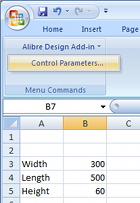
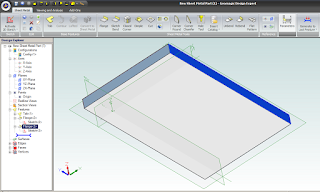
Every Geomagic Design installation includes an installation template which must be added to the Excel add-on list while running Excel once with administrator rights. Instructions as to how to do this with any supported version of Microsoft Office are available in the F1-help of Geomagic Design. Once properly installed, "Alibre Design Add-in" should be available from the Tools menu or Add-ins ribbon tab. Any numerical value cell may be selected to correspond to a Geomagic Design parameter, units specified and applied to a selected Geomagic Design file. For example we whip up something simple in Excel (shown right). Such a file can be created in Excel by anyone anywhere anytime (or it can be an imported CSV file etc)...To update model parameters with the values listed in our spreadsheet, we need to start Geomagic Design and load the file in question. In our example we load the following basic Sheet Metal part, with overall parameters for "SM_length", "SM_width" and "SM_height":

To generate a DXF file of the final sheet metal design, a Geomagic drawing is used. Create a new Standard View. In the open Standard View Creation window, click the button "More Options". Check the option "Project as Flat Pattern" which will use the flattened version of the Sheet metal design for the projection view. Check that the projection scale is 1:1 and create the view. Once the flattened view is created, export the version of DXF which you require for CNC.
Geomagic Design is Australia's de facto low-cost 3D CAD alternative to SolidWorks and Autodesk Inventor. For more information about Geomagic Design or a free download, visit our website at http://www.caddit.net/cad-cam-software/geomagic.php
18 May 2013
Geomagic Design 2013 Released on CADDIT Australia
The base price of Geomagic Design remains at a modest $220. Geomagic Design is Australia's de facto choice for low-cost 3D parametric, mechanical design software which offers features similar to AutoCAD Inventor, SolidWorks and Solid Edge at a fraction of the cost. All versions of Geomagic Design includes advanced STL file export for 3D printing and rapid prototyping.
Geomagic Design Professional continues to offer photo-realistic rendering, STEP import/export and full 2D detail drawing. Geomagic Design Expert adds comprehensive sheet metal, direct (non-parametric) modeling, variant design and motion simulation capabilities. Geomagic Design Expert also offers reading of SolidWorks sldprt and sldasm files, Solid Edge and AutoCAD Inventor files. GeoMagic Exchange is a lower cost option available specific for CAD translation.
A full 30-day free trial of Geomagic Design can be downloaded from CADDIT Australia at this link:
http://www.caddit.net/cad-cam-software/geomagic.php
18 March 2013
Alibre Design 2013 Preview - The Best Alibre Ever
USER INTERACTION CONSISTENCY: In previous versions of Alibre, CRTL and SHIFT multiselect treated were differently in the various modes of Alibre. Alibre 2013 now uniformly implements multi-selection in the Design Explorer and Work Area, using Ctrl and Shift. More commands can also be applied to multiple objects in a single operation such as anchor, hide, suppress, align and scale view etc. Right-click behaviour has also been improved to ALWAYS show the options that are available to all selected items. (Previously there were cases where a right-click actually deselected all selected items.) "Apply" buttons have been added to numerous dialogue boxes so that changes can be seen before leaving many commands. Conflict visibility has been improved, dragging the "Dog Bone" has been fixed, real-time measurement data now appears in the status bar, some menu items have been consolidated, even the licensing dialogues have enjoyed some housekeeping. There is now a much more consistent user experience with the overall interface of Alibre. This is good new to those using Alibre for their everyday mechanical design work :)
UNDER THE HOOD: Alibre 2013 will be powered by Dassault's new ACIS V23 kernel, released six months ago (see announcement here). This means better modelling and problem-solving on the geometry level of Alibre. STEP file export includes multi-part assembly and drawing "packaging" (somewhat similar to progeCAD "eTransmit"), STL publishing for 3D printing enjoys better support for binary STL, and control of the STL data.
SKETCHING AND PART MODELLING: Sketching performance is significantly improved and more responsive, especially when zoomed in. Dimensions can now be placed between concentric arcs and circles to define the difference in their radii. All disjoint ends of a sketch (caused by DXF or DWG import, etc) are automatically healed when the active Sketch is exited. User is no longer prompted that sketch problems exist when only Disjoint Ends exist, as they are automatically healed. Pressing Escape while in 2D Sketch Mode now make the Select tool active. User can now import Points from a CSV file into a 2D Sketch as well as for 3D sketches. User can also designate any 2D dimension to be Driven during dimension placement or after dimension placement by modifying the dimension. Driven dimensions update in real-time as figures are moved or further define objects in the sketch. Driven dimensions can also designated to show up in the Equation Editor as a parameter. This effectively enables use dimensions from one part in another part. For part modelling itself, the THREAD tool has been improved with drop-down menus of thread definitions.
OTHER IMPROVEMENTS: In this blitz review of the upcoming release of Alibre 2013 we haven't even started to discuss what's new in Assembly design, drafting, sheet metal, BOM, third-party bonuses etc and this article would be WAY to long to include them all. There is one improvement we picked from sheet metal we wanted to mention here. There will be a brand new tool which allows designers to create sheetmetal bend lines directly from a sketch, complete with rips. These bend lines are used to fold a tab or flange. This is particularly useful if you are trying to recreate a sheet metal part from an imported 2D drawing of a flat pattern:
It is important to note that Alibre Design 2013 will not support Windows XP, except for general how-to questions unrelated to anything in the operating system. Users really need to be using Alibre 2013 on a computer running at least Windows Vista or newer. Users choosing to remain back with Alibre 2012 on Windows XP and on active subscription will continue to be supported. For further information about this upcoming release of Alibre 2013 in Australia contact CADDIT.net (link). A further announcement will be posted here when the software is availble for download and trial.
01 November 2011
Alibre 2012 Now Released - Overview
Alibre 2012 offers a completely reworked graphical user interface, with a style similar to other Windows 7 productivity applications. New tools have been added for surfacing, sketching, relations and more. .

Alibre Design introduced in-place editing last release, as an enhancement in 2D drafting. This year, in-place editing toolbars have been introduced for part modelling, notably for sketch creation. In-place editing greatly improves speed-of-interface by reducing mouse travel for each command, and need to manually change toolbars. Alibre Design 2012 also lets you project sketches to other sketches, letting you reuse the work you've already done in new features.
Two major enhancements have been included for surface modelling. Surfaces may now be pasted directly from either MoI (free with Alibre Design Expert) or Rhino CAD. A complete new toolset for surface manipulation includes commands for Split Surface, Trim Surface, Stitch, Convert Solid to Surface, Create Surface from Face, and Delete Face.
2D mechanical drafting enhancements include support for multiple leaders from a single annotation, more flexible hatching, improved drafting geometry constraints and border selection for notations. .
Other general improvements include the placement of InterDesign relations in Alibre Design's feature tree and secondary cuts for sheet metal parts. For a free 30 day trial of the new Alibre 2012 - either as Windows XP 32-bit or Windows 7 64-bit native application - download Alibre 2012 HERE.
CADDIT has been supporting Alibre Design products in Australia since 2008. For more information about Alibre Design in Australia, contact CADDIT.net HERE.
24 March 2011
SolidWorks Alternative in Australia

SolidWorks users should have little trouble understanding Alibre's straight-forward solid modelling and assembly design interfaces. feature sketch, extrusion, subtraction, shelling, draft, lofting are all functions also supported in Alibre Design. Alibre Design Expert adds non-parametric (direct) editing techniques commonly found in systems costing several times more than Alibre Design Expert (less than AUD $1500 in Australia - see prices here). Expert also includes Keyshot photo-rendering and Moi 3D surfacing software at no additional cost.
Alibre also offers fully integrated CNC software for 2.5-axis, 3 4 and 5-axis milling machines. Alibre CAM basic comes free with Alibre Design Expert, offering as the name indicates basic 2.5-axis milling from within the Alibre interface. A full comparison of Alibre CAM options are shown HERE. Solidworks users can also import their SolidWorks model into Alibre CAM for manufacturing.
Alibre Design is an easy, inexpensive and intuitive option for SolidWorks users. Although Alibre 2D detailing and drafting environment is quite comprehensive, Alibre also integrates well with advanced 2D CAD drafting solutions like Autodesk AutoCAD or progeCAD, a low-cost AutoCAD clone. A free 30-day trial of Alibre Design can be requested directly from CADDIT Australia by following the links and downloading HERE.
01 May 2010
3D Document Publishing from TransMagic
Enter TransMagic's 3D web page publishing feature. This video briefly demonstrates using TransMagic to publish a STEP file to HTML and open with Windows Internet Explorer.
Saving a CAD model or assembly as an HTML page from TransMagic will create (at least) two linked files using the file name given - one HTML file which can be loaded from Windows Internet Explorer & an associated HOOPS ".hsf" file containing the actual 3D parts which use the HTML as a "container". Simply, zip or unzip both files together, upload send in email or save to the same hard disk (or server) location and open the HTML from Internet Explorer with the .HSF file present in the same directory. You can view this video's actual HTML page for yourself HERE.
Of course, HTML code can be edited to change colors, add a company logo or product information and web links as desired - so it is far more effective in making product presentations than a binary viewer - and transmits far more successfully in email. It also adds the possibility (perhaps also using TransMagic's batch-convert option) to publish 3D part catalogs on a website that visitors can navigate and "inspect" in real time 3D.
For Australia and New Zealand, TransMagic can be downloaded locally from CADDIT. From other lands, please refer to http://www.transmagic.com/.
28 December 2009
TransMagic R8 sp3 Released in Australia through CADDIT
TransMagic R8 sp3 enhancements include:
- TransMagic is now fully supported on both Intel 64-bit and Windows 7 systems.
- Drastically improved rendering performance for re-rendering geometry changes. The rendering engine now intelligently determines only what has changed and re-renders only that vs. re-rendering the entire scene after small changes.
- New "Show Un-Repaired Geometry" dialog that gets launched when appropriately during the Auto-Repair Wizard
- TransMagic now offers two different methods for stock size calculation "bounding box" - precise and fast.
- CATIA V5 Environment now created on a per user account basis - allows any account type to establish the TM V5 Environment automatically without any user rights issue.
- Siemens Unigraphics JT Facet Resolution can now be one of five settings for "normal deviation" and correspond to the following settings: Lowest accuracy (fastest) = 45 degrees, Low = 30 degrees, Normal = 15 degrees, High = 10 degrees, Highest accuracy (slowest) = 5 degrees
- Added JT assembly output types: Single File Assembly Entire assembly in one file. Typical Assembly Assembly JT files + part JT files. Typical Assembly w/Directory Typical assembly JT file + directory. All Assembly Files Each assembly is a JT file including parts.
- Upgraded to JT Open 5.3.
- More enhancements to stability, speed, command-line interface and batch mode CAD file translations.
TransMagic native 64-Bit permanently changes the landscape for large CAD file translation by solving this common manufacturing problem. TransMagic reports that the new platform offers 10-20% better performance and a tremendous increase in CAD software file size capability. Translating multi-gigabyte files on a single computer is now a reality, with TransMagic 64-Bit.
TransMagic users with active maintenance can upgrade to SP3 free of charge. TransMagic 8 sp3 can be downloaded directly from CADDIT in Australia HERE. CADDIT can be contacted about options for TransMagic 64-bit, batch mode and command-line translation enterprise solutions HERE.
12 August 2009
$99 Alibre Announced, Special Promotion in Australia
PRESS RELEASE (Modified for Australia)Richardson, TX (August 11, 2009) - Alibre, Inc. (http://www.alibre.com/) today announced the boldest marketing initiative in the history of 3D CAD - making professional grade 3D CAD software, including parts, assemblies, and 2D drafting, available to anyone for under $100. In Australia the promotional price will be AUD $149.00, sold through CADDIT.net.
For a limited time, anyone can get Alibre Design for $99 (regularly $999). Alibre Design is the core CAD component of Alibre's product offering, providing a complete parametric toolset for unlimited 3D part and assembly design and 2D drafting. Capable of creating complex mechanical designs with thousands of components, full assembly motion, automatic 2D drawing updates, and many other benefits, Alibre Design is similar to products such as SolidWorks, Inventor, and Pro/E. Tens of thousands of Alibre Design users in 50 countries and 15 languages use the software to design, verify, and virtually test their products.
29 April 2009
Free Upgrade to T-FLEX Version 12 Offer
CADDIT announced new buyers of T-FLEX CAD (version 11 starting with May 2009) will get their USB license dongles upgraded to use version 12 free of charge upon release. T-FLEX 12 is scheduled to be released later this year, with many new features. At that time users will be offered the option to upgrade free or keep their version 11 installed as-is.T-FLEX is winning attention of mechanical CAD designers as flexible MCAD with features that rival much more expensive systems. It will import SolidWorks, Solid Edge, Parasolid and many other formats directly, so chances are users can work in T-FLEX with many currently existing designs. Unlike many solid-only CAD systems, T-FLEX commands work equally with sheet surface or solid entities. Integrated BOM, sheet metal, welding, FEA and motion simulation offer designers all the tools needed for complex mechanical assembly.
T-FLEX's intuitive context-sensitive right mouse-click menu and adaptive feature based construction cuts design time while database and spreadsheet connectivity allow 3D models to be driven from business data. Custom part windows allow designers to quickly reuse existing 3D model templates with unlimited variation. Designers have the choice of either parametric or direct editing methodology. T-FLEX is enabling many SMBs with powerful 3D mechanical CAD at 25% or less of equivalent platforms.
Users can download a full version T-FLEX trial HERE. For those with download difficulty, free evaluation DVDs are available from CADDIT to the USA, Canada, Australia, New Zealand and other locations. These can be requested HERE. Once installed, users will need to send CADDIT their User Code for a trial password to begin their 30 day experience using T-FLEX. T-FLEX pricing and ordering direct from CADDIT is available online HERE.
06 April 2009
Review Alibre Translate 3D for CATIA Pro/E SolidWorks..
AlibreTranslate imports the following 3D CAD formats directly:
- Dassault SolidWorks .sldprd 3D model files and .sldprt assembly files
- Dassault CATIA V5 .CATPart model files and .CATProduct assemblies
- EDS/UGS/Siemens Solid Edge 3D .par parts and .asm assemblies
- Autodesk Inventor .ipt parts and .iam 3D assemblies
- PTC Pro Engineer & Wildfire .prt models and .asm assemblies, also .xpr & .xas
- Parasolid: v18 (*.x_t, *.x_b, *.xmt_txt, *.xmt_bin)

AlibreTranslate also offers a range of automated model check, stitching and healing functions with the software. This assures closed manifold 3D objects which can be edited directly in Alibre as solid models. Units conversion between English Imperial and Metric are also included. Alibre 3D CAD already supports Rhino 3DM, AP 214 STEP, ISO IGES, Spatial (Dassault) ACIS SAT for translation to progeCAD, AutoCAD, TurboCAD as well as native AutoCAD DWG file support. Enabled with the optional AlibreTranslate license, a CAD designer can import almost any mainstream CAD model and edit it.
AlibreTranslate also exports to write directly to:
- SolidWorks 3D model file .sldprt format
- Parasolid: v18 (*.x_t, *.x_b, *.xmt_txt, *.xmt_bin)

20 February 2009
Alibre Design 11.2: New Features Come in March!
Alibre Design is a global standard for affordable 3D CAD design, and more recently CAD CAM CNC manufacturing. March will see the newest release of this powerful design tool made available in Australia and around the world. Other new features being added in Alibre 11.2 will include:Product (Alibre Design Interface):
- New global option in GUI (under Home window->Tools/Options) to keep all workspaces maximized
- New global option in GUI (under Home window->Tools/Options) to enable/disable prompt for naming new workspace
- Persist workspace browser position and size on file save to restore them on file open
- Make default size of new workspace browsers to be 80% of display size
- Persist explorer visibility and width and restore on open
- Increase the default size of the Design Explorer
- Ability to edit all vault metadata from inside the File->Properties dialog (General tab)
Addon (Framework):
- Framework to let addon insert custom file filter in our File->Export dialog and accompanying API to allow such addon to export workspace to desired file format
- New AlibreTranslate addon built around Datakit's translation library to import/export CAD formats such as SW, ProE, Parasolid, Catia etc. Merged SolidWorksReader add-on with AlibreTranslate
- Enable showing 'Import Options' dialog while importing files via AlibreTranslate
- Enable AlibreTranslate to accept SW file names containing Unicode (Japanese, Chinese etc) characters
AlibreTranslate is new software that will be made available as part of the Alibre product family very soon, as well. Alibre was introduced as new mid-range CAD CAM software by CADDIT Australia two weeks ago. Alibre can be downloaded HERE. More details are to follow in this CAD CAM Blog...
09 February 2009
CAD CAM Australia 2009 Comes At Three Levels
CADDIT has officially released the Alibre CAD/CAM software line for Australia on their online CAD software store. Alibre takes an important place with CADDIT's "Three-Tier-Portfolio" of software now being offered to Australian design and industry service customers. Many already know Alibre CAD to be a cost effective mid-range CAD offering parametric solid modelling, sheet metal design, basic motion kinematics, associative 2D layout detailing and other features. Designers also have the option to "drive" models from a spreadsheet, linking CAD designs to Microsoft Excel tables.- progeCAD/progeCAM basic low cost design & 2.5 axis machining for lathe mill & wire EDM
- T-FLEX high-end hybrid surface/solid freeform-parametric PLM software.
Users can begin immediately downloading the new Alibre V11 from the CADDIT website. This software will run in full Expert mode for thirty days before reverting to it's free Xpress mode of asking for a commercial license which can be bought HERE.
18 December 2008
Autodesk Mergers Continue; Buys Algor FEA
It was announced on Tenlinks today that Autodesk is to buy Algor "for approximately $34 million". Similar announcements have been made on Yahoo Biz and Reuters.
According to the announcement in Reuters, "Upon completion of the acquisition, Autodesk's current intent is to integrate ALGOR into its Manufacturing Solutions business unit and to continue developing and selling ALGOR's core product line. Autodesk plans to continue developing the ALGOR products with an open approach, allowing direct data exchange between ALGOR products and multiple computer aided design software offerings."
Algor currently integrates their base static stress FEA "Designcheck" solution with several CAD CAM industry solutions, including Rhino, Cadkey, SolidWorks and Autodesk Mechanical Desktop. Several of Algor's strategic business partners were not anticipating the Autodesk takeover.
24 June 2008
TransMagic R7 SP2 3D CAD Conversion Software Released
New CAD Version Support
• JT Read/Write Add-on (Visualization and B-Rep)
Updated CAD Version Support
• CATIA V5 R18
• ACIS R18
• SolidWorks 2008
• Inventor 2009
New Usability Features
• Multi-Thread Technology
• PMI Official Release
• Inventor 2009 Certification
• High Resolution Image Capabilities
• Extended CATIA V5 Write Options
• Extended SolidWorks Read Options
• Optional Long File Name Trimming
• Split Window Views
• Batch Translator Enhancements
More information about TransMagic for Converting CAD files is available on the CADDIT website.