Showing posts with label design-software. Show all posts

27 November 2014

progeCAD Center 2014: The Toolbox You Didn't know You Had

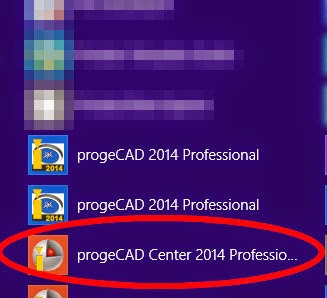
https://www.caddit.net/progecad/progecad.phpprogeCAD is a low-cost CAD alternative for creating, editing and plotting native AutoCAD DWG files without buying AutoCAD or AutoCAD LT. Since the release of progeCAD 2013, every installation is accompanied with a toolbox called progeCAD Center. progeCAD center is also available for use during the free trial period of the software. progeCAD Center can be started from the START menu icon within the progeCAD Start Folder, or from the icon on the Desktop menu in Windows 8.1 (shown right).


Once started, there are several categories which appear in the toolbox. For progeCAD 2014 these are: Launch progeCAD, Register progeCAD, Online Support, Help / Video, Settings, Utility, Support Tools. We will review each of these as used in progeCAD 2014 professional.


  • Launch progeCAD: This CLOSES progeCAD Center and starts the progeCAD Software program.
  • Register progeCAD: When you buy a progeCAD license or install a new progeCAD Network client, use this option to activate the license code.
  • Online Support: A webpage to the contact us page for support questions is opened. progeCAD Center remains active.
  • Help / Video: Launches the progeCAD Searchable Help files, either for users or programmers. Video Tutorials open a webpage with a list of online video lessons for CAD beginners.
  • Settings: Turn graphics acceleration on or off (recommend ON), Repair (use this first if progeCAD stops running as a result of the user environment somehow becoming corrupt), Toggle Automatic Updates On or OFF (recommend ON), User support folder - direct access to progeCAD support files for templates, hatches etc.
  • Support Tools: Rescue, Troubleshooter and Dumper are all functions used when in contact with the progeCAD development team for remote access and analysis of problems that a user may be having specific to their installation of progeCAD. progeCAD Extras opens a webpage with a few extra downloads, including the VBA toolkit for progeCAD 2013 and 2014, as well as updated USB dongle drivers for mobile USB licenses.
These tools can become very useful in different situations. For example, a long running progeCAD installation may on occasion suddenly begin to crash on startup. This has to do with some way progeCAD was adjusted or reconfigured during a previous session and now the environment is corrupt. Simply using the Repair function under Settings often resolves the issue immediately. For example, here is how to access the USB Analyzer from the Support Menu:


For more information about progeCAD as a low-cost AutoCAD solution, contact CADDIT or visit the website HERE.

20 October 2014

progeCAD German Version 2014 - "progeCAD 2014 - deutsche Version"

CADDIT announces the updated German translation release of progeCAD 2014 Professional CAD design software. Designers, engineers and architects accustomed to AutoCAD, Auto CAD LT or IntelliCAD can compare the cost-for-feature value free for 30 days. Unlike most AutoCAD compatible CAD software, progeCAD 2014 far exceeds simple DWG file compatibility with special features like Google Earth export, PDF conversion, Quick-Dimensioning (“QDIM”) and even an updated spell checker. Now German users enjoy the convenience of using progeCAD design commands in native German language. The progeCAD German version can be downloaded HERE.progeCAD in German is available from CADDIT ( http://www.caddit.net/progecad/progecad-deutsch.php ).

progeCAD 2014 CAD Software - deutsche Version


##########
CADDIT gibt hiermit die Freigabe der deutschen Übersetzung von progeCAD 2014 Professional bekannt. Designer, Konstrukteure und Architekten, die mit AutoCAD, AutoCAD LT oder IntelliCAD vertraut sind, haben die Möglichkeit den Nutzwert der Software für 30 Tage kostenlos zu testen. Im Gegensatz zur meisten AutoCAD ähnlichen CAD-Software übertrifft progeCAD 2014 einfache DWG-Dateiformat Kompatibilität mit speziellen Funktionen wie Google Earth Export, PDF Konvertierung, Quick-Dimensioning(„QDIM“) und eine verbesserte Rechtschreibprüfung bei weitem. Deutsche Benutzer haben jetzt auch den Komfort progeCAD Designbefehle in Ihrer deutschen Muttersprache zu verwenden. Benutzter können jetzt die deutsche Version direkt herunterladen - HIER.
progeCAD Deutsch ist weltweit erhältlich CADDIT ( http://www.caddit.net/progecad/progecad-deutsch.php ).

13 January 2010

A Preview of Alibre CAM 2.0 CNC Software

The upcoming release of Alibre Design 12.1 (SP1) will include major enhancement to the basic CAM software included free with Alibre Design Expert, as well as the four- and five-axis options available for Alibre CAM Professional and Alibre CAM Expert. Improvement to the Alibre CAM Interface will make CNC programming inside Alibre Design much easier and enjoyable to do. Here is one comparison between the crowded old (left) tab interface and the new (right) cascading style:

But more than the lookand feel of Alibre CAM will change. A new entry method has been added to 2.5 axis profile milling operations allowing you to have more control over the entry angle.You can now create tabs/bridges for 2.5 axis profiling operations. You can specify the bridge height and length. You can also specify whether you want to use a particular number of bridges which will be equally distributed around the profiles or you can set an exact distance between bridges. Below is an example of the same cut-outs using 5 bridges and 10 bridges per profile.

The Tool Libraries will allow "drag and drop" of pre-defined tools into the active tool set. There will also be an option to immediately preview a tool upon creation.

Alibre CAM 2.0 will now support avoidance regions to specify where the tool should not cut, for example to avoid clamps holding the stock material down on your CNC machine. Flat faces can be directly selected as machining / avoidance regions instead of having to use sketches. You can also select the starting point for the engagement of the tool for Machining Operations defined by sketches.

Alibre CAM Standard will offer along-path-3D-entry for 3 axis horizontal finishing offers more control over surface finish for steep areas of parts. Specifying the engage angle and path height allows you to control the smoothness of the engage motion, helping to eliminate unwanted marks on the cut part that would otherwise need to be buffed out later. Alibre CAM Professional will also enjoy improvements to 4 axis milling.

Alibre CAM Expert will add a new 3D Offset profiling method, 3D Offset pocketing for making constant offset tool paths on the part surfaces, 3 axis pencil tracing now offers multiple passes & 3 axis valley re-machining allows split cuts, step over and cut control. Tool Holder Collision determines the minimum tool length required to avoid collision.

Alibre Design is sold in Australia by CADDIT. Download Alibre Design / Alibre CAM in Australia for a free 30 day "Professional" trial before software reverts back to free "Xpress" mode.

Google.