Showing posts with label 3d-printing. Show all posts

16 May 2016

CADDIT Announces the Release of Geomagic Freeform 2016 in Australia

Sydney, Australia  16 May 2016 - CADDIT Australia announces the release of Geomagic Freeform and Freeform Plus 2016 version. Geomagic Freeform offers a cornerstone solution in the 3D "digital thread" of rapid manufacturing and reverse engineering suite from 3D SYSTEMS. Specifically, Geomagic Freeform is a comprehensive organic 3D engineering solution for digital sculpting, haptic-controlled VR modelling, surface design, 3D Scan processing, CAD interoperability and mould making. Geomagic Freeform offers the sensation of "virtual clay modelling" with physical model feedback to the designer - however Freeform models remain fully editable (as opposed to physical sculpting - try "undo" in real stone). Moreover, Geomagic Freeform works seamlessly with related 3D SYSTEMS technologies of 3D scanning and 3D printing.

Freeform 2016 introduces a number of new features and options, including:
Enhanced Sketching and Curve Tools
• Improved sketching tools to capture design intent
• Easily extract curve networks from a part in the object list
• Improved touchscreen support for curve drawing
StructureFX
• New tools for complex lightweight lattice structures
• Select existing patterns or create customs forms
• Quickly create clever and complex designs with CellFx,
LayeredFx, CageFx, and ShapeFX
Direct Geomagic Capture Scanning
• Directly capture physical objects in 3D with Geomagic® Capture™ scanner
• New Dynabar tools to support the scanning, alignment, and merging of scans
Wrap for Freeform Plus
• Freeform Plus includes cooperative application
• Use the high quality Geomagic surfacing tools to CAD surfaces
Clay File Viewer
• Stand-alone viewer for clay (.cly) files
• Visualize models with zoom, pan and rotate capabilities
• Analyze designs using measure and cutaway tools


CADDIT also announces the availability of Geomagic® Sculpt™ - a simple, fast yet sophisticated precision voxel 3D sculpting and modelling software solution. Create organic designs and edit and transform existing 3D data with sculpting, shaping and detailing tools not found in traditional CAD software. Get the sensation of clay modelling with the benefits of digital design. Available with Geomagic Sculpt is 3D SYSTEMS' new lower-cost 3D Touch haptic stylus device.


For more information, trial download (without haptic device) or even to arrange for a hands-on demonstration of digital sculpting using Geomagic Freeform in Australia, contact CADDIT in Parramatta.

19 February 2015

Geomagic Design 2015 (v17) Released, 32 Bit Support by Special Request

Sydney, Australia 19 February 2015 - CADDIT Announces the immediate availability of Geomagic Design 2015 V17 Release. This is somewhat a stability / bugfix release but with several new and important features requested by users in Australia and around the world. 3D Systems demonstrates its commitment to making Geomagic Design an improved tool for 3D mechanical design and drafting with this release. The most significant (and perhaps most understated) enhancement is the long-awaited Global Parameters feature. What are "global parameters"? Basically, a global parameter is a design value or equation which is shared across multiple parts and/or assemblies. The concept is very similar to SolidWorks global variables. Global variable data is stored independently in a newly released format called an ".AD_GLP" file. Any part or assembly can be associated to the values stored in an AD_GLP file.

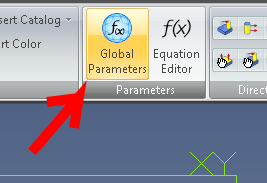
A new set of Global Parameters can be created in Geomagic Design from the file menu -> "New" -> "Global Parameters" as shown in the Home window screenshot below:

Selecting this file type opens the new Editor interface for Global Parameters as shown. Create new parameters and save the final data as a new AD_GLP:


Your new Global Parameter file can thereafter be selected from any part or assembly and be used in that design by clicking the new "Global Parameters" supplied in both the Part and Assembly menu ribbons. Click "Select File" and choose your newly created AD_GLP file from the folder where it was saved to.


Other new features include: The Isolate command has been added to design instances in the Drawing Explorer. It is used to isolate a design instance in a drawing view, especially ones that are affected by an assembly feature. Standard fundamental deviations and International Tolerance (IT) grades can be selected to create Fit Tolerances on a hole and shaft, which will determine the type of fit. The dialog boxes for creating Reference Geometry have been updated to more intuitively show how reference geometry is created and to visually assist users on the various creation methods that can be used in different reference geometry creation situations. A new "Summary BOM" can now be created from an assembly. It can be used to override the Treat as part in BOM when used as a subassembly option. This is useful for quickly creating a BOM that shows all parts in subassemblies if multiple subassemblies have been set to be treated as a part.

A 32-bit version of Geomagic Design 2015 is still available but only by special request. Users should contact CADDIT for link and availability. Legacy users of Alibre Design Pro and Expert are strongly urged to renew their software maintenance subscription if they wish to take advantage or these new features and the remaining 32-bit -platform support. Subscriptions can be renewed online using this webpage: https://www.caddit.net/store/index.php?main_page=product_info&products_id=74&language=en

16 July 2013

Bright Future for Geomagic Design Users at First APAC 3D Systems Geomagic Meeting

9 July 2013 - The first 3D Systems Geomagic annual APAC meeting was held in Bangkok, Thailand. A broad range of training and information seminars were also conducted with a peak total attendance of more than eighty from the entire Asia-Pacific region including China, Korea, India, Malaysia and Australia. Ben Decker from CADDIT Australia attended this meeting for all three days, and met and shared experience with industry professionals in scanning, reverse engineering and 3D printing. An important take away from day one is the key role that Geomagic Design (formerly Alibre) will continue to have in software development at 3D Systems. This was confirmed in the same week when 3D Systems released a new simulation/FEA add-on option for Geomagic Design Expert, with other enhancements coming soon.

All in attendance discuss future vision of Geomagic

A future vision was shared of a full 3D rapid development process, including 3D scanning, reverse engineering, design, documentation, prototyping, verification, manufacturing and testing - of which Geomagic Design will play a central role. Also discussed was integration between individual solutions of the Geomagic product family and a new Geomagic Designer bundle which includes Geomagic Freeform and Geomagic Design. Australia users who have interest in Geomagic Designer should contact CADDIT Australia or 3D Systems directly.

A rainy but comfortable Bangkok for the meeting.
Google.